I want to adjust either the left or right track after recording. How may I do this.
1 Like
If it’s just a volume adjustment, can use the track pan slider, then “mix and render”.
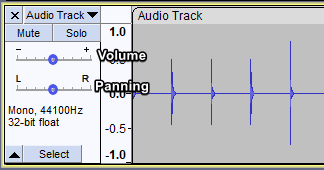
Or “split stereo track” then apply effects individually to each track, then “mix and render”.
That usually depends on the software or recorder you’re using, but in most audio editors you can adjust the left and right channels after recording pretty easily.
Common ways to do it:
-
Split the stereo track into separate mono tracks
-
Adjust volume/pan for the left or right channel
-
Mute one side completely
-
Rebalance the stereo image
For example, in many editors you would:
-
Right-click the audio track
-
Choose something like Split Stereo Track or Channels
-
Edit the left/right channel independently
If you only want one side louder:
-
Use the Pan or Balance control
-
Or apply gain to a single channel
Programs like Audacity, Adobe Audition, and GarageBand all support this.
If you tell me which software or recorder you’re using, I can give the exact steps.
This topic was automatically closed after 30 days. New replies are no longer allowed.