Here’s the thing: I have an old school tape / CD / radio hifi with an external turntable plugged into the aux position. Setting up Audacity on my MacBook to record directly from my hifi works for some of my formats but not from the turntable. For example, tape picks up beautifully on Audacity, so does a CD signal and also from radio. But when I select the aux channel (where the turntable signal comes in) nothing is picked up. I have another aux for Apple Music which doesn’t record either, making me suspect the aux setting. Everything works as normal on the hifi before switch the input to the MacBook, so what am I doing wrong with my connections? How would a turntable channel usually be routed for Audacity recording success? I can’t figure it out - but the truth is it doesn’t take much tech to bamboozle me! Can you help?
The “aux” from the stereo needs to be aux out, tape-out, or preamp-out. A headphone output can also be used with line-in or aux-in (with the right adapter cable).
As long as the turntable is working on the stereo it should record-digitize exactly like the CD or radio. Are you able to record-digitize those other sources?
Everything works as normal on the hifi before switch the input to the MacBook, so what am I doing wrong with my connections?
I’m a Windows guy but I’m a bit confused by that.
The computer doesn’t need to be connected to an input on the stereo. It needs to be connected to an output where then sound comes out of the stereo and in to the computer.
Does your MacBook have a line or aux-in? Or is the mic-input configurable as line-in? If not, you’ll need a USB audio interface with line-in, or a USB turntable, or something… Most laptops only have mic-in and headphone-out. The mic input can “work” but a line/aux signal is about 100 times stronger than a microphone signal and the mic-input is often mono so you don’t usually get good quality. And if the Mac has a combination mic/headphone jack you need a special plug to make then “extra” microphone connection (which you don’t want to use anyway).
This may be the source of your problem. A turntable usually needs a “phono pre-amplifier”, it normally does not supply a line-level output. There are some turntables which have a switchable pre-amp built in - but most do not.
If your stereo system hase a “phono” connector, you should connect to this, to use the phono pre-amp built into your stereo system. If not, you need to get an external pre-amp to get a line-level signal.
Additional question: how do you connect your stereo system to your computer?
Recent MacBooks do not have a line-in - they have a connector which can be used with a headset (mono-microphone and stereo-headphones), that’s it. Some (many) years ago, this was a combined connector for headsets / line-in / line-out (switchable in the system settings). The last MacBook Pro with this option was the non-Retina version of mid-2012. Since then, no MacBook came with a useable sound-in possibility. Since then, you need to have an “external sound card” connected to the Mac’s USB port to get analog sound signals converted to something Audacity (and the Mac) can use.
Some turntables have USB built-in but if yours doesn’t, replacing it is not the most economical solution and you may already have a better analog turntable, etc.
The Behringer UCA202 is popular and inexpensive. But it doesn’t have a recording level control which an be a problem if you overload it with a “hot” line level signal. (That doesn’t seem to be a common problem.)
Or there are lot’s of higher-end audio interfaces with switchable mic/line inputs. I have an ART USB phono plus ($100 USD) which has switchable line/line inputs (for optional direct connection to a phono cartridge) and a recording volume control. (I wouldn’t say call it “high end” but it’s good enough for analog vinyl.)
https://drive.google.com/file/d/13-zoG61N1fdGByA7-88oZoD6SWhzRZy4/view?usp=sharing << I added a link to a diagram of my set up.
I made a diagram of my set up as there are a few components. The arrangement has a pre amp and an audio capture lead. The significant clue I think is that the set up allows me to record successfully CD, tape, and radio via the hifi to MacBook, but not from the turntable or the bluetooth via the same set up. https://drive.google.com/file/d/13-zoG61N1fdGByA7-88oZoD6SWhzRZy4/view?usp=sharing
I made a diagram of my set up as there are a few components >>> https://drive.google.com/file/d/13-zoG61N1fdGByA7-88oZoD6SWhzRZy4/view?usp=sharing
I am told: access denied. If you do not allow access, I am out.
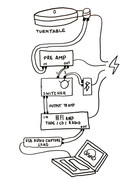
I just added a diagram to my first post to make visualising the set up easier
Are speakers hooked-up to the amplifier? Are you getting sound out of the amplifier?
What happens if you connect then phono preamp-out directly to the USB capture device?
This topic was automatically closed after 30 days. New replies are no longer allowed.