they were acting like a 16-bit interface was just too noisy for podcasting work
That’s misleading.
24-bit recording tends to be only available on higher quality microphones. Had they forced a 24-bit microphone to record in 16-bit, it would be fine. We have demonstrated several times that you can do perfectly OK at 16-bit, 44100, Mono.
Attached is an ACX-compliant, 44100, 16-bit, Mono clip I recorded with a rock band microphone, simple sound mixer and a MacBook Pro. I used minor level shifting and processing in Audacity to get there from the raw clip.
However, personal recording is not without its problems. The love affair with USB microphones is losing it’s glow because of several shortcomings. The worst one is “frying mosquitoes” noise in the background. This noise is burned into the USB system and it’s rough to remove in post production.
http://kozco.com/tech/audacity/clips/FryingMosquitoes3.wav
It can prevent you from achieving ACX conformance.
This is a technical problem, but there are certainly physical ones as well. We can’t take out the dog barking in the background. Sorry. Forget Noise Removal. It doesn’t remove noise. All it does is suppress certain background sounds that weren’t all that much of a problem in the first place.
We have posters going into production with the idea that Noise Removal is going to get them “Out of Jail.” It won’t. And these producers are pretty much doomed.
it looks like the quality needs to be a bit better for narrating audio books, so here I am.
If you can achieve graceful ACX compliance, you pretty much got many of the other applications nailed. ACX is simple but not at all easy. There’s no such thing as starting with a terrible recording and “cleaning it up” in Audacity. ACX final test is a human listening to the clip and if it sounds like you’re recording it from Mars through the vacuum of space, you’re dead, even if it does meet technical compliance.
This is where I give you the equipment list, right?
I can tell you how I and a couple of others did it. ACX is recommending a microphone digitizer and preamplifier I’ve never used before. The Blue Icicle. Jury’s out. I just don’t know. I have a cousin of that, the Shure X2U. I don’t use it much because it has low volume and there’s no good way to fix it.
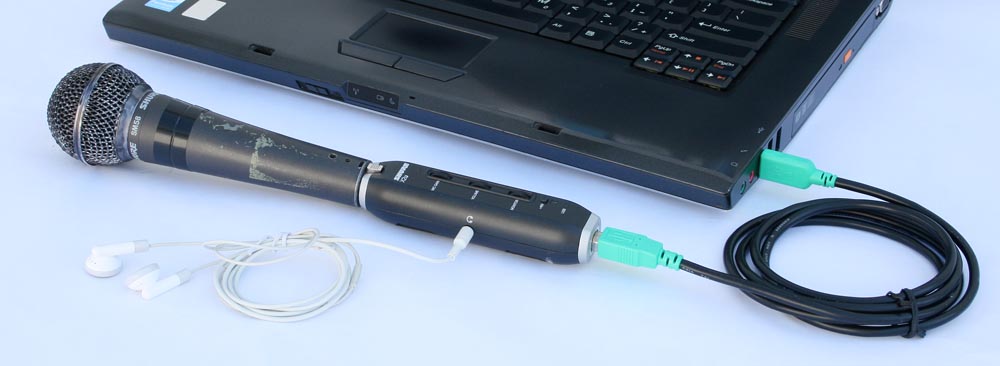
That’s it connected to my beat-up Shure SM-58.
I really need to touch up that picture so it looks less like I dragged it behind my car.
That’s on my list of things to try so I can list my observations.
Do all of your work in exported WAV and save your archive in WAV. Once you export an MP3, you’re stuck with the MP3 quality and it can only go downhill. ACX requires 192 quality up from Audacity default 128 so they can resample it to lower and lower qualities. Your original works need to be perfect, not less damaged.
You can produce in 24 bit or higher if you want, but unless you’re producing “Abbey Road,” I don’t think it gains you anything and it takes up drivespace for no reason.
If you’ve been “reading the mail,” you know that several people have been successful in using stand-alone sound recorders and leaving the computer turned off. Not an awful idea. I’m doing a sound project right now and I’m using a Zoom H4 (older unit) for the whole show. NPR used to do most of their field work on Tascam recorders. Those aren’t dreadful, either.
I know this smacks of ad copy, but I really do have my “recording studio” wrapped in a bandanna in my backpack. Pantone 293c Blue. The bandanna, not the recorder.
Nobody wants to hear this, but I recommend you start using Something and then figure out what the shortcomings are so you can buy The Real Thing later. The universal urge is to buy The Perfect Microphone right at the top and go straight to Fame and Fortune by Recording Audiobooks.
I’ll stand over here and watch.
Koz