Hi, I’m simple but capable new user, doing cassette capture with Audacity on newer model iMac (M4). I’ve done a lot of captures so far of hour+ long cassette content, no problem. Out of nowhere just a day ago, when I save the project right after I end the recording, the filename is not being accepted! As soon as I type a space in the filename, it all gets wiped out and cursor goes back to start! This was ok before! I’ve done this for well over 100 times now. Also if I have a a dot in the name, it’s accepted on the save window, but the written project filename stops up to and excluding the dot! Anyone seen this? Have an explanation?
Example - If I save project with filename starting as “ned-01 “ with intention of typing more there, as soon as I type that space, it all gets erased immediately! Also if I use a name like “1963.07”, it accepts it, but looking at the file in the folder, the filename is just 1963 ! This all use to work for me, well over 100 times. I power off the computer every night, and relaunch Audacity for every record.
I don’t see anything in the configuration setting that would seem to restrict the filename. Could I have done a spurious key sequence that set a parameter somewhere? Is there a cache I could clear to perhaps straighten it back out? Right now I’m just writing with a simple name like xxx and changing it in the folder after I close the seesion. (Also as a test, I tried just a 10 second dummy record, and no problem with filename when I saved the project.)
Actually I have some more info on this. It doesn’t like dots in the name on 1st save of the project! These last 2 days are the first I’ve been using that. It’s when you enter the name to do the 1st project save. Afterwards, if I correct the filename in the folder and reopen it and edit it, it saves it back just fine after that. It takes commas, and I even tried replacing the dot with semicolon and it took it. It’s just dots, and just on the original save. Don’t know if you consider that a bug, but if it is, there’s the info on it.
You do not mention what version of Audacity you use, and what version of macOS. Also, you do not say what has changed when your problems started.
Here, with Audacity 3.6.4 on macOS Sonoma 14.8.5 / iMac Intel, I cannot reproduce your effects.
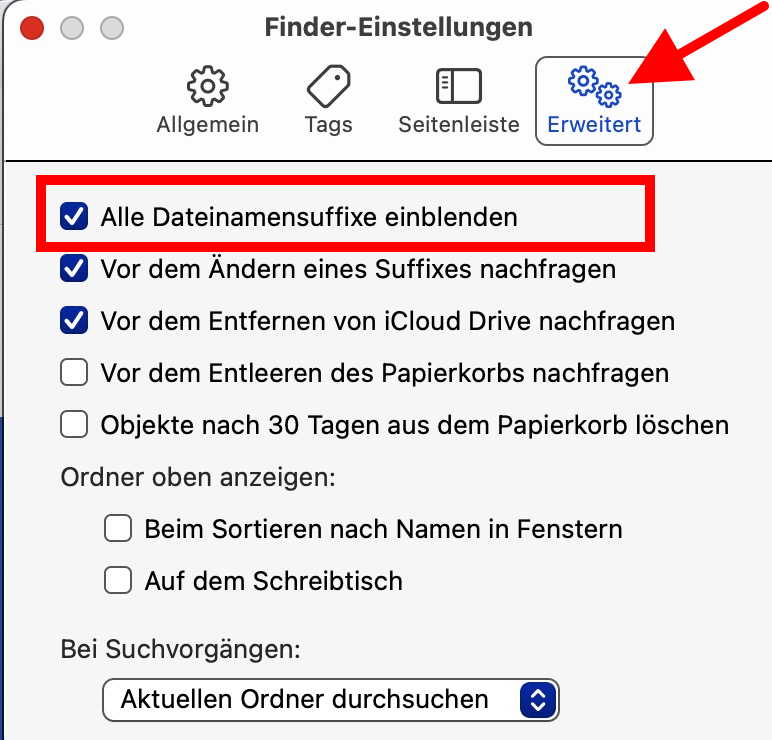
What I can see from your description is that you probably don’t show filename extensions (such as “worddocument.docx”), and therefore anything after the last dot is hidden. Go to “Finder → Settings”, and there to the “gear” symbol. Select/activate the first option (show all filename extensions or so).
An Audacity project should have an extension “.aup3” (or “.aup” and a related data folder, if you use Audacity 2.x). If you want a date as a filename, use “-” as a separator, for example “1963-07.aup3”. The “/” as part of a filename is disallowed by the operating system because it is used as a path separator. A blank in a filename is no problem for macOS.
That was the 8.3 rule in DOS. Since (I think) Windows 95 a period character can be in a filename, but I would not recommend doing that. It leads to files ending up with names like AutoExec.bat.txt and the like.
I realized I was confusing myself on the 100 times before. I was confusing two projects I was doing - This one as a cassette capture with Audacity, most of the others a simple CD import that didn’t need Audacity. I had actually done it about 30 times though on cassette with Audacity . But I realized most of those times I didn’t have any dots in the name. It was the last 10 or so that I started using a dot in the name where I got this odd dot and space behavior. I haven’t gone back to diagnose anything with it. But I did have a thought on it. One reply mentioned an archaic DOS rule about dots!!! I hadn’t heard DOS in 30 years! But it did give me a thought. On my simple short record test I tried that didn’t replicate the problem - maybe it’s the project file size. Old DOS systems had that stupid C drive and D drive and partitions and stuff back when memory space was a premium. (I’m totally Mac for a long long time!) My current Audacity project filesizes are about 3GB. I was going to try bigger and bigger test records and see if that has anything to do with it. It’s just a hunch…..
I would not care about DOS conventions nowadays, especially not on a Mac. However, one point should also be considered: Audacity works best on an internal drive (no matter if it is Windows, Linux or Mac).
Also, FAT32-formatted devices have a file size limitation of around 4 GB - any file bigger than this cannot be written to a FAT32-formatted device. Devices with NTFS, exFAT, HFS+ and APFS don’t have this limit. NTFS can be read but not written by macOS natively - you need additional software like TuxeraNTFS (which is a recommended buy anyway). So, how big are your .aup3 files normally?
I only mentioned DOS because the 1st or 2nd response I got was about a possible DOS rule being a factor! I’m lifetime Mac. I won’t touch a Windows machine for anything! I mentioned above, my project files export at just under 3GB usually. And it’s all MacOS filesystem (APFS , with external 2TB SSD APFS-encrypted to preserve the internal storage). But filesize is just a guess by me right now, given a short quick record didn’t show the problem. I’ll tyry some more tests on it, and see if it’s still occurring and if length of record gives any clues to it.