OK, this is what I’ve got:
1. A plug-in called “Loop Processing”.
Loop_Processing.ny (2.43 KB)
This plug-in needs to be installed. It will appear in the “Tools” menu. (Note that recent versions of Audacity require Audacity to be restarted after plug-ins have been added).
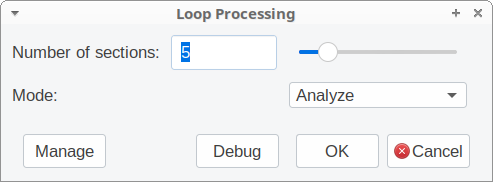
This plug-in has two “modes” (effectively it is two plug-ins in one).
- Analyze: This mode measures the length of the focused track and calculates the length of each section.
- Select: This mode selects a region of the track.
The only other control sets the number of sections.
Note that this control is only used when analyzing.
2. A macro script
The plug-in must be run in “Analyze” mode first.
Then, before the required effect can be applied, the plug-in is run in “Select” mode.
The whole macro would look something like this - note that in this example the effect is being applied to 4 sections (quarters of the track length).
LoopProcessing:mode="Analyze" num="4"
LoopProcessing:mode="Select" num="4"
The_Effect
LoopProcessing:mode="Select" num="4"
The_Effect
LoopProcessing:mode="Select" num="4"
The_Effect
LoopProcessing:mode="Select" num="4"
The_Effect
and here’s an example macro that applies the “Adjustable Fade” effect to quarters of the focused track.
loop process.txt (534 Bytes)