Hello guys at Audacity.
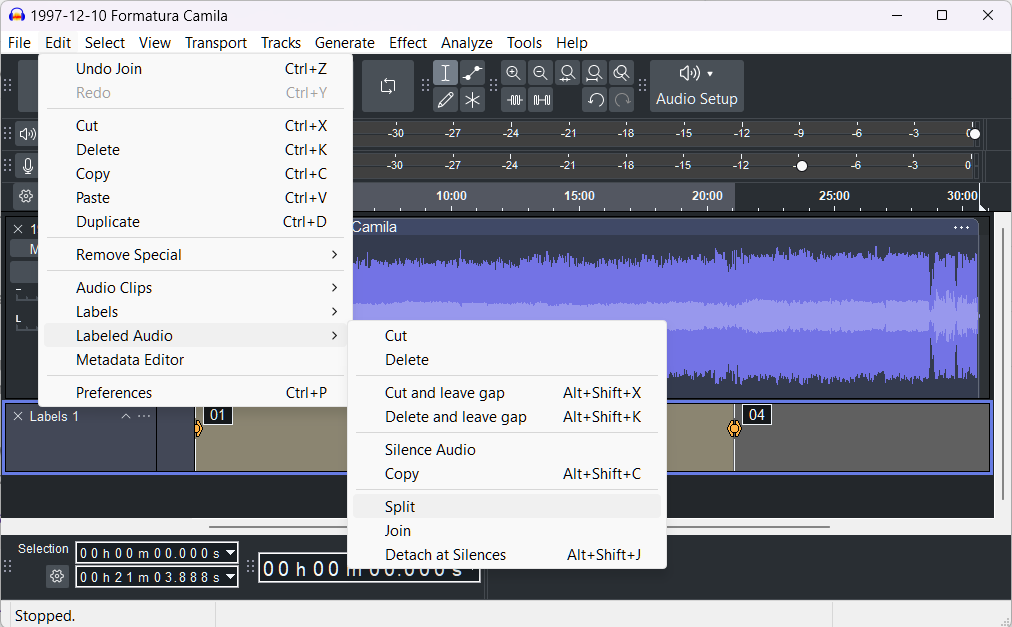
I noticed that Audacity 4 no longer has the “Edit / Labeled Audio” menu that was present in Audacity 3.x.
That is sorely missed! I used it a lot to automatically split at all the label points. (Menu Edit / Labeled Audio / Split)
Another suggestion: When importing WAV files containing Marker and Region information, preserve this data by creating a Label layer for those markers and/or regions. Also, when exporting to WAV, use the information from the Labels layer to write markers and/or regions into the WAV metadata. This way, other programs will be able to automatically recognize the marker and region information embedded in the file.