@Fraggle thank you for the update! It’s unfortunate that there are no more clues to what had happened, but we will continue to keep an eye on this issue.
@kryksyh It’s possible that the person in this post had a similar issue. I say this because your Python script project_parser fixed his wonky project file after trying, and failing, using the audacity project tools. Worth a look, maybe?
Mark B
Hello.
I was wondering if you could offer a little assistance. This “parser” has been the ONLY thing that has helped to recover files that have been corrupted, somehow in the “closing” process. I can’t identify how this can be, as I save and close the same, every time.
A VERY helpful individual, “Mark” has utilized his Linux installation, to re-parse my files and has fixed them. But I would like to be able to do this for myself, as this seems to be a BIG problem with current Audacity.
Anyway, using the command that you posted, on both my Windows 11 and Mac installations of Python3, it always comes back with a syntax error for “project_parser”. I was having trouble from the beginning, having placed the whole string, pointing to my problem file. Finally, to simplify the diagnosis process, I dumped the rest of the string and just typed in python3 project_parser.py and this is ALWAYS the result:
python3 project_parser.py
       ^^^^^^^^^^^^^^
SyntaxError: invalid syntax
Any suggestions?
HM
@evilmrb Thanks for pinging me!
SyntaxError: invalid syntax
@HALLANM luckily this is the easiest thing to help with  . You are starting the python interpreter first, and then typing commands inside the python shell, this is not how you usually start a python program.
What you have to do is open a terminal program (Terminal on macOS and Windows Terminal on Windows). And when it opens you need to type the spell:
python3 project_parser.py audacity_project.aup3
To spare yourself from figuring out paths to both files, I suggest copying the script into the folder with the project, and opening the terminal using the folder’s context menu.
I greatly appreciate the response. It seems that, with every new instruction, it creates more research. I am a babe, in this area of computing. I was wondering if I needed to do something with your 500+ line script. . .it sounds like I do.
Do I save it as a Textedit file? I am sorry. . .somehow, I thought this would be intuitive and “easy”.
I got the part of not starting python 1st. . .okay. .
I was in terminal, when I started python. . .so I know how to open and use Terminal. . .a bit.
Are you saying that after I place the script. . in some form, in a folder, with the problem file (this is still on a Mac at this point), I would select that folder and right click and select the “new terminal at folder” option?
Sorry. . .I guess I turned out to be a real dunce. I just wish Audacity worked without messing up MY work.
Thanks again for your help!
@HALLANM learning python and the ways to run scripts could be a great thing on its own, but that is not what regular users should do to get their data back. I’ll try to fix it in the next release, and make it a part of audacity.
Check this out, does it look more user friendly:
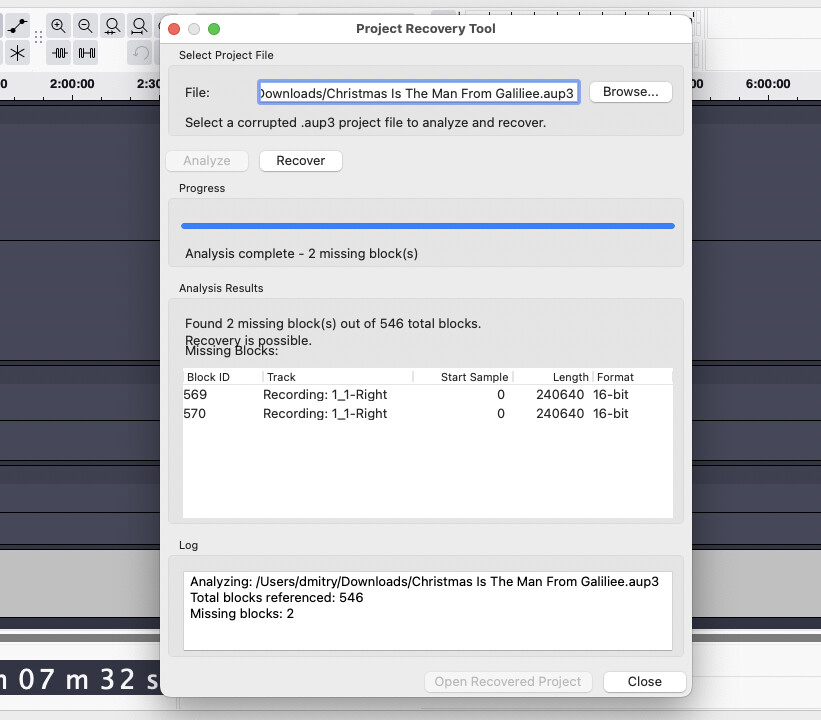
NO DOUBT!. . .This looks Lovely!!.
Greatly appreciate your taking this issue to heart and action!
HM
1 Like
Curious. . I was just looking at your screenshot a bit closer, and I just realized that it shows 2 missing blocks. . ."Recording: 1_1-Right. . .” etc. THIS showed up in the bottom of the file that Mark fixed for me, where the Track Titles reside. I had it’s own layer, but they were there. I didn’t know what to make of it, and since everything seemed to be working fine, I closed this section. . .but it was obviously reporting or showing these missing blocks, which seem to contain virtually no data.
HM
This topic was automatically closed after 30 days. New replies are no longer allowed.