Playback speed controls

Hi everyone,

I can’t find back the controls to toggle playback speed in Audacity 4. In the previous version, it was in the top-right part of the window.

Does this feature disappeared? Or is it just that I’m too noob to find it back? :sweat_smile:

Thanks in advance for your help,

Julien

1 Like

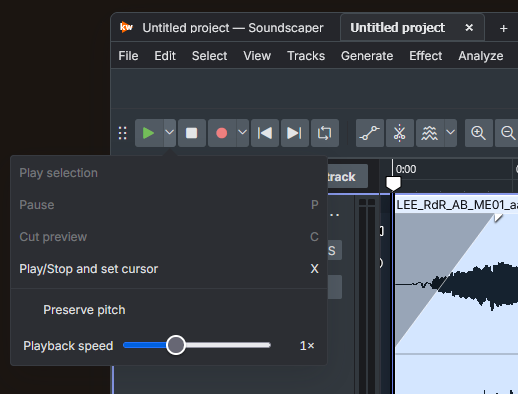
This feature is not available in Audacity 4 and may get added to a future version. In the meantime, I have added it to Soundscaper in the dropdown next to the play button

Ok, thanks for your answer. My project is already in Audacity, so I think it’s easier for me to roll back to Audacity 3 until the feature is added, than use another software :slight_smile:

Soundscaper can import and export AUP3/4 projects just fine. But you do you :slight_smile:

I’ll have to give this a try. Variable playback is crucial for remastering. I don’t have time to listen to a track at 1:1 speed three or four times.

I do a high speed pass to catch obvious interruptions—a cough, a restart (we use a clap to signal restarting, etc. After doing a single high speed pass, I do a second pass at 1.75x and usually catch any other issues with the track.

Hey @Ramdas

It should come back with 4.1. Currently planned to be be out around mid Jan!

Thanks for your patience!

1 Like

Unfortunately, it can’t read my Audacity 4 project.

Unknown Error
The action failed: A published document contains a mutable non-plain value.

1 Like

working on it, should be fixed soon.

Did your older Audacity 3 project files open fine when you went back from version 4?