Peaky notes, EQ and compressor limitations, uncontrollable

Interesting input gentleman, thank you.

I did read a book on editing years back and it did stipulate not to use headphones to edit. Unfortunately it did not give the “why”… So I thought… “What could it hurt?” …and I have had problems ever since … until just recently, taking that in to consideration.

And the type of speakers matter… With my terminology I would conclude ‘you need real speakers’ not desktop or any other kind of facsimile of a real speaker. I’m not sure where to draw the line but from what I’ve read (in this forum I think) is that some of these smaller speakers use certain technology to compensate for their lack of size and true bass. Which surely would complicate things when editing with such — trying to determine what the actual sound you are editing is…

‘Should the bass speaker in your speaker be approximately the size of your head?’ Maybe?

Some headphones use sound altering compensating techniques as well.

ALSO make sure your computer’s sound program does not have any “effects” on when you are editing.

Headphones are good for critical fixes (during editing) like listening for little noises you’d like to eliminate. Of course at the end of editing, after your general sound has been established.

…And of course headphones for monitoring are necessary, when doing over-dub recording. And I assume various other sound-engineering and recording type tasks, in a multi-person studio or group effort.

PEAKY NOTES UPDATE September 14, 2016

Recording my own acoustic guitar and vocal performances on one track, in one take, with one of the least expensive recorders, the Tascam DR-05. Then editing with Audacity.
Results here: https://soundcloud.com/blackdogsongs

Test song: “Bananas”

Back to the proverbial drawing board. NO EQ! NO COMPRESSOR! In yet another attempt to Be All - it - Can Be.

Again, Bananas was a quikee, to test… I’m not putting much in the actual song (i.e., practice, fore thought, writing) because I’m stuck on editability at this point.

This was recorded in my bigger room, not cavernous.

Noise Reduction applied due to room hum from unknown (though most likely neighboring air conditioners/Phoenix AZ summer!)

RMS balanced using WaveStats plug-in (Download in this thread)

Fixed spots only (not whole song) using various (e.g., Amplification, Adjustable Fade, Envelope, DeEsser*, High and Low Pass Filter, Repair)

  • For de-essing used “Spit-Fish” freeware plug-in.


    BLACK DOG What would Jesus do?! How would he do things today?! Check out Jesus in the New Testament — cool dude — fighting the good fight. Are you? — Am I? — https://soundcloud.com/blackdogsongs

PEAKY NOTES UPDATE September 15, 2016 “Mission: Player Reconnaissance

I decided to quit my 128k MP3 output to match these players (128k MP3 output)… Which means back to SoundCloud where I can upload WAV and hopefully get a better sound through how ever they’ll mangle it for their player. Why? Because WAV converts to MP3 (or whatever) better than MP3 converts to anything else! Just in case these other sites (ReverbNation, SoundClick etc.) were further converting my 128k MP3’s I was uploading (?)… Which I suspect they do/degrading an already horrible sound quality at 128 kbps even further! …Unless you pay.

Disgusting really, we’ve went from hi-fidelity records one hundred years ago to tinny cheapened hacked to death sounds currently called music. I still expect bad results with SoundCloud’s player/or any free online site… Though credit to SoundCloud for allowing WAV (with a free account), which not knowing the true nature of these site’s-players converting tactics… the WAV in SoundCloud, regardless, sounded much better. Which leads me to believe an unknown conversion happens when uploading lossless to these sites, and as stated, only lossless will convert without being damaged — Thus I must conclude: This is a problem with sites that are only allowing lossless uploads.

Lossless is already a sacrifice, we don’t need further damage on top of that!

The WAV should be converted by the player to 128k MP3 from my inquiries into this… i.e., SoundCloud, ReverbNation, SoundClick… are converted for the player (player only not subsequent downloads/downloads should be what ever you upload).

This was a problem I noticed early on… as I would upload high quality MP3 and wonder why it sounded horrible. FYI converting MP3 to MP3 is damaging, and to date, no lossy can be converted to anything without being damaged. “Lossless”, such as WAV, is different. You can convert to MP3 without damaging. of course it will be lower quality but technically not ‘damaged’. — “Damaged” is my word which seems the most fitting word in my opinion. ‘Damaged audio by any other name would still sound as depleat.’

BLACK DOG Live from The Quag Mire Inn https://soundcloud.com/blackdogsongs

UPDATE: This song/edit has since been removed

PEAKY NOTES UPDATE sept 17 2016

To edit or not to edit…

Well so far approach is all different, on last edit (this edit) → ‘gutter’ — I swiped hardly much per the whole song, de-essed at 6 sense (whole song). Noise reduction didn’t sound right, though this song has a lot of outside noise!! Bleeding in/with AC units propelling continuously around here — the grid — nature, remember that! No we are not natural. All we could hope for is a tweet that will lead to another and eventually return us to our prefuedal splendor/I know, you’ll miss your materials, not me! And I imagine it wasn’t easy… but at least it was free!

Janice/Kris once wailed …“just another name for nothing left to lose…” but they didnt have to eat GMO in a quarantined megatropolis of mind blowing proportion… No, they were always one thumb up away from some b-movie biker melodrama, I’ll digress… but It’s all about the size of the dubious thing you keep feeding… stop feeding it.

Back to Audacity

So the GUTTER work was mostly in the finer details — of fully amplifying then observing who is too much!! — That note, this note, using everything except my Smith & Wessonator to renegotiate this spur of live isolation to where it is — and where your not — unless you click here–> https://soundcloud.com/blackdogsongs

~Elvis shakes his head finally fully realizing how much of a tool he was. — Black Dog

NOTE: SC4’d some parts (not whole song) and noticed max attack (1.5)/200 delay worked great combined with the Geoffmobile tactic to determine threshold —there or less was always enough (oh and even at his recommended 1.4 ratio!). Peak or RMS depending on which one seemed dominate … brought down nicely/quite a few tangents of adrenaline surplus … and never used the limiter once on this song. Inspired by a William Holden movie… “picnic” “drifter”… one of a few cool creations to come out of that Hollywood mind re-arranging machine.

I think that Hollywood produced a lot of great films and not but a few.
Of course, there is a lot of trash amongst this stuff. One can certainly not appreciate the “Best Film of the Year” selections of the academy (Oscar).
From an artistic point of view, the supporting actor roles fit better as they are often played by newcomers and are elected for the performance sake and not the “This one is so popular, we should give him a price after all”.
You’ve mentioned Elvis and it is certainly a tragic fact that his real passion lied in acting and not in music actually. However, he had always bad directors, bad script writers and so on. Nothing that gave him a personal leap towards better acting (I think the B&W films started out promising).
Apropos black and white, one can’t put all the Hollywood production put into one or another category.
In each and every creation of art (or commerce) originating from there are some hidden gems and even if it is only one single picture ore one single line of the sound track.
The question is how much one can tolerate for the sake of this flighty moment…
(In jazz improvisation, they say, a solo stands or falls with the last note played).
Perhaps, you can also find a gem in my last project (in progress):

I would download it, the direct playback hangs on my system. It seems that SoundCloud has problems with rendering *.ogg [streaming file] to the actual output–which is probably re-encoded to mp3 and back to PCM…)

Best
Robert

PS
Do you have another (nick) name than Black Dog that I could use for salutation? It’s seems a bit weird–just as if you were calling me V.U.P. Lounge…

Great song Robert… and I appreciate the thoughts shared.

The Movie Industry and related (Art often inspiring art)

Yes, the “black and white films”… … Though, where did the movie potential peak? Probably somewhere in there… The B & W era.

Was it organic in the beginning? Or was it realized and co-opted… or rather ‘militarized’ from the onset? I think it has always been controlled, I mean it’s obvious — What movie has ever shared any ground-breaking truth?.. “Planet Of The Apes” comes to mind… with it’s original plot of mankind the dumb savage controlled by a select group, represented as apes, of a few different types ~~~ look around .

These mediums (e.g., movies, television, music, and others) have always been kept ‘at bay’, as “entertainment”. “Bread and circuses” if you will. From Shakespeare to the current. — All underlying elitist propaganda, ‘culture creation’, ‘programming’… with little to no brilliance seeping through the cracks. Though there occasionally is some, as you suggested … but overall a lot of talent wasted, and a lot of potential altered, for an ulterior agenda, with controlling ape-like moguls having the ultimate say. ~ Not to mention the ability to grope their all-to-eager to please dupes.

The internet, a blip on their radar screen… The internet, for now, allowing just about anything to be revealed… but who’s going to believe it? The truth … with generation after generation so thoroughly ‘dumbed’ down, i.e., ‘programmed’. ~ ‘As the internet is slowly reined in’… (The net cast, slowly reining in mankind… A virtual world wide web… ~ Who can escape it?)

“…Damn, dirty apes…”

Anyway, back to Audacity. Your “soundcloud.com/vuplounge/welcome…” song sounded great! https://soundcloud.com/vuplounge/welcom … -1/s-MQQbu

To what extent was Audacity used?

It did take a while for it to play… maybe you should export it to a more user friendly format… ? e.g., wave? (as I grow ever more put off by lossy).

Is .ogg a lossless format? I tried to download your song but it was showing as an HTML document, so I did not… It also shows as “private”. Should it be downloadable?

You (Robert) wrote:

“Do you have another (nick) name than Black Dog that I could use for salutation? It’s seems a bit weird–just as if you were calling me V.U.P. Lounge…”

‘BD’? ‘BDB’?

Crazy, I know, everyone afraid to reveal their true identity these days. Though, what is the true identity apart from a given strawman to be exploited? Ahh, to have such… I am more a dog than my own man in this grand illusion of enslavement we live. — If men were more honest they’d realize how true this is. I am a ‘black’ dog here, in the sense of a ‘black’ sheep. — To answer your inquiry, I prefer “Black Dog” at this point. I’ve yet to settle on a variation of this, which would be advantageous for exclusivity, and better ‘search engine’ results. E.g., “Black Dog Johnson”, John “Black Dog” Johnson…

— Black Dog https://soundcloud.com/blackdogsongs

UPDATE: This post and edits are old and these edits/songs have since been removed. See forward for newest strategy.

PEAKY NOTES UPDATE September 20, 2016

Recording my own acoustic guitar and vocal performances on one track, in one take, with one of the least expensive recorders, the Tascam DR-05. Then editing with Audacity. To listen to my final results click here–> https://soundcloud.com/blackdogsongs

NOTE I’ve been pulling and editing from my backlog with the song Bananas (Sep. 8) the only current “current” and only current recorded in a bigger room with less of a muddy sound, then the others, which were recorded previously in a hallway area. To which, from experience, neither High Pass Filter nor EQ can fix the resultant muddy sound, without ruining the sound other ways. This, when vocals and guitar are on the same track. Lesson learned.

Backlog /recent edits:

BUILD A BRIDGE
RMS Balanced/DEessed at 8sense[using spitfish]. And SC4 to whole song. SC4 set to Peak/-5 threshold/and 3 ratio brought down the tops of the trees very well… leaving the softer parts untouched, perfect! Great tool. Plus numerous spot fixes.

EVERYBODY’S IN THE CIA similar as above (SC4 Peak with just a little threshold a big help). I actually used very mild EQ on a few peaky solos, and limiter on this one as well.

IF YOU DONT HAVE AN ENEMY
No NR, RMS balanced, Spitfish de-essed all at 6 sense, fixed a few peaky notes then hit all with SC4 (Peak, -12 threshold/1.4 ratio), then a few more things down and a lot of repairs.

General Strategy:

Incrementally lower parts by fully ampifying then considering what-best to bring down given parts (e.g., Amplification, Adjustable Fade, Envelope, DeEsser, High or Low Pass Filter, Repair, SC4 Compressor) – also seeing standout peaks anywhere, then confirming too load by listening.

Often SC4 incrementally, per section, 1.5 ms attack, 200 delay… Varying between RMS and Peak reduction. Setting threshold about one decibel of lesser effect to highest plot-spectrum read. Threshold one decibel numerically lower than highest RMS value per given selection after deducing highest value per smallest sample of plot spectrum analysis possible. Highlighting what looks loudest (lighter blue of waveform)… analyzing with plot spectrum frequency analysis per section applying effect to; then setting SC4’s threshold one decibel or less lower then that highest peak of that plot sampling. Example: if highest RMS peak found was -20 decibels then setting threshold to -19 or lesser (-18 etc.).

SC4 ratio at 1.4, though once or twice raising to 2. This was adequate to conform all to similar and resulted in a final approximate RMS value of -16 dBs. for the whole song. Again SC4 was not applied to the whole song, just as needed to bring down sections exceeding what seemed to be where the song wanted to be.

Again, for SC4 basics see this video → https://www.youtube.com/watch?v=lcEQJBO1Kj0

When and where to use SC4?

When peaks or song seems fairly uniform yet volume still too low, SC4 to whole song makes sense, and probably set to Peak; When not so uniform — then only SC4 per the standout sections and set to Peak or RMS, depending on what seems to be peaking most. Remember, light blue of the waveform represents RMS. And also remember, these are my self-taught (current) conclusions for editing acoustic vocals and guitar that are on one track… If someone thinks otherwise, please share.

UPDATE: I’ve been using SC4 set to Peak compression to lower tops/peaks down. Example: Threshold -5 through -10/ratio 1.4 through 3 has been working great. Avoiding having to manually lower these, though I do that too but less so with SC4 help.

NO EQ or HIGH PASS on these voice/guitar on one track recordings. In my experience adjusting for guitar will only ruin the sound of the voice or even other frequencies of the guitar, as I combine bass type and lead type together. Or adjusting voice will ill-effect guitar.

ALSO NO NOISE REDUCTION, It did more damage than good, unfortunately. …I guess my ‘noise’ is not as bad as I thought.

“-16 RMS” is a recommended final volume value I once read, and seems appropriate, at least for what I’m doing. I don’t keep hacking until it reaches -16 but coincidentally when after I reduce what seems appropriate or too loud, -16, give or take a decibel, is where the song usually ends up.

NOTE: Not having to adjust the EQ (or High Pass) I’ve been able to edit with headphones. Though, I noticed on one song, Noise Reduction sounded good in my headphones but flat and horrible with my speakers… ! Which I then reedited without NR.

BLACK DOG Surviving The Monkey rule, in Jesus’ name. There’s more power in good than evil! https://soundcloud.com/blackdogsongs

Hi Black Dog
I certainly share most of of your views regarding the movie industry. It is crazy how paranoid the establishment is and was and how they tried to control the film makers.
However, I’d rather make films in Hollywood than e.g. “Bollywood”, Hong Kong or worse. Under some regimes it really degrades to bread and circus games.
Did you know that the first kiss on TV between “Black & White” happened in a Star Trek episode between Uhura and Captain Kirk?
I’m pretty sure that this 50 year old scene is still not broadcasted over some TV channels.
Anyway, the subject could be discussed for days and days…

Thanks for your kind judgement.
As I said, the song is still in process and I’ve only uploaded an intermediate result with help of automatic mastering by LandR.

Perhaps the download works only for me.
*.ogg is lossy in general but it has several advantages in comparison to mp3.
It is actually a container format and in this special case, it only provides streaming.
Thus, I can’t import the downloaded file directly into Audacity but I can play it with e.g. Foobar and convert it to wav, if I wanted to.
My Uploads to SoundCloud are normally *.flac files.

Audacity has been used for the whole song (except for drums and bass).
All in all the project has about 25 tracks. Sounds like much but most of them are duplicates with delay/reverb (wet only) on them.
Same for compression–all separate.
In general, I prefer to have effects applied on a copy of the track. It is a shame to come back after a day and to think “Oh boy, that’s much too much reverb”. Now, I can just turn the gain slider down.
Also, most tracks do not have the full length–only three in fact.

Just made a quick test:
The actual length of the project is 10:25 minutes.
If I put all tracks in series and remove the gaps, the total audio length is 50:36 minutes.

Robert

on “American TV”.

Of course, I should have added that… Thx Steve :wink:

QUESTION (export/import quality):

Per saving a copy of say an early stage of a song’s edit in case one later wanted to go back to it and reedit from there as opposed to starting all over again…

This, considering you did not want to just keep a duplicate in the project but rather wanted to export it, getting it out of the way.

So, the question is: Is there a format/export option to export as that will result in a zero quality loss? In case one wanted to later import this file back into the project.

In other words, an export format option or options that would result in no quality loss when imported back into the project, where it would still have the same quality as if it was never exported.

Example: If I am editing at 32 bit float, 44 kHz and I export the resultant track as WAVE 32 bit float, 44 kHz, then I later import it back in to the project, would it suffer any loss of quality from this?

BLACK DOG Acoustic guitar and vocals. https://soundcloud.com/blackdogsongs
No, it won’t suffer.
However, the file size might be extensively large…

24 bit is probably enough for storage.
Make the following test:

  • create a chirp
  • duplicate the track
  • open the track drop-down menu and change the format to 24 bit
  • invert one track
  • select all tracks and mix and render (Tracks menu)
    amplify this track and listen
    You will probably have to amplify a second time because the quantization noise is so low.
    I got a peak of the difference track of -106 dB.

Of course, you can export as 32 bit float but the crucial point is that your song is probably already under 0 dB Full Scale.
This means that only 25 bits are actually in use and the rest is just unnecessary burden.
In fact, it would be wiser to export as 32 bit integer…
…but only if the processing/editing would also have been done in this format.

That’s why I prefer to export as 24 bit FLAC files.

Another thing I’m just testing:

  • Export as 32 bit float wav.
  • compress all wav files with WavPack–generally the only one that accepts 32 bit float files.

The files can be reimported into Audacity (with FFmpeg presumably)

Theoretically, the files could directly exported in the WavePack format but the available export options seem to be buggy.
I’ve tried the custom FFmpeg export and also the external program feature but the results are highly unsatisfactory, namely 16 bit instead of 32 bit float. If I enforce the latter, the file will be corrupted somehow.
Anyway, the standalone packer, along with the mini GUI are great–you can even produce self-extracting archives (available feature for Windows only).
http://www.wavpack.com/index.html

thanks Robert.

UPDATE —old post/song/s since removed from link/s

Song: Bananas (LANDR master and My master for comparison) /here–> https://soundcloud.com/blackdogsongs

Recording my own acoustic guitar and vocal performances on one track, in one take, with one of the least expensive recorders, the Tascam DR-05. Then editing with Audacity.

Does using LANDR (an online song mastering website) now mean my amateur editing is best avoided? I don’t know. I did conjecture a “click here do-it-all plugin” to do all the deeds … well LANDR does this … better than I did it anyway. See both tracks at my site for comparison … BTW: The LANDR version is my edit (peaks reduced with amplification, envelope, and de-essing) uploaded to LANDRs. I did not send a rough, and this is my first LANDR trial.

Which would be better? Send rough no editing or do some preliminary editing with Audacity first, before letting LANDR perform it’s mostly undisclosed editing processes? They do disclose a general description of what they do, but nothing specific! Thus, unrepeatable.

I’ll guess, doing some preliminary editing with Audacity would be best. At least, trimming the ends and bringing down excess peaks — using Amplification, Envelope, and possibly de-essing … as far as Compressor and other effects, I don’t know. If I compress then LANDR compresses, will that be too much compressing?? I’ve yet to try LANDR straight, letting them do all the editing, so I’ll see.
LANDR will no doubt decrease the need for Audacity. Though, it is only free for a resultant 192k MP3 (— I uploaded WAVE 16 bit/44 kHz).

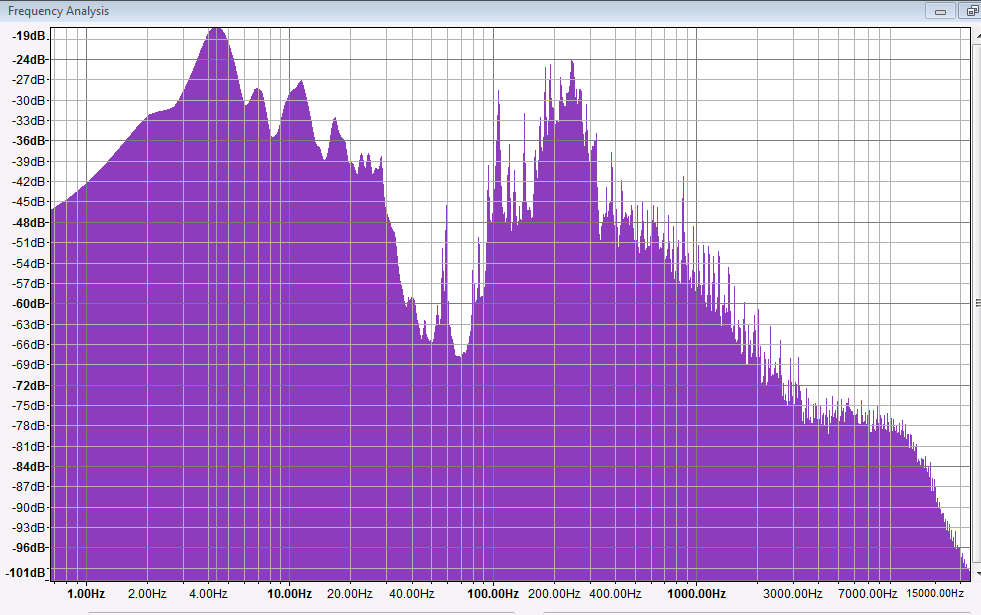
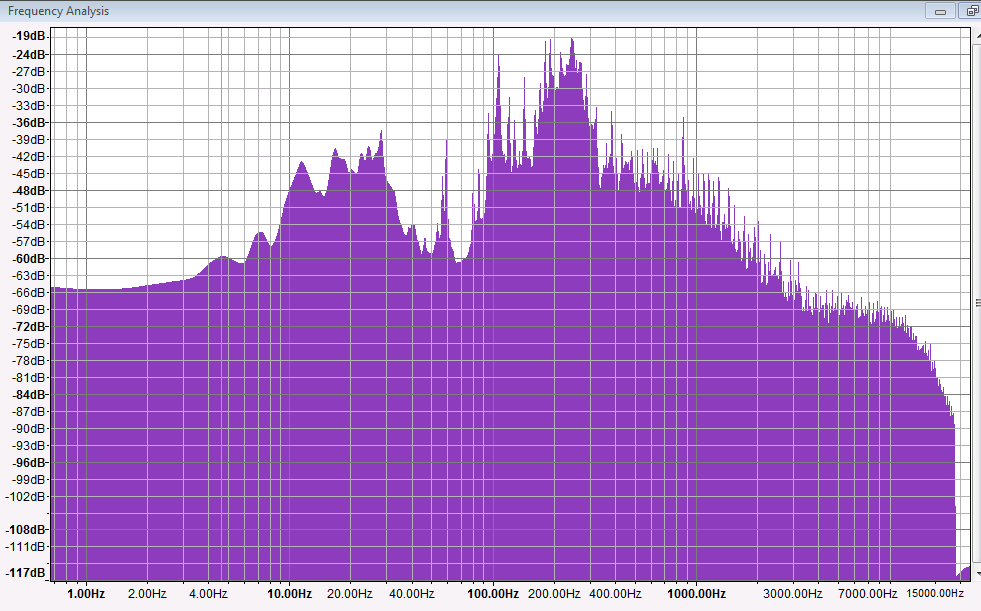
Here are the spectrum analysis’ of the different versions on my linked above webpage:

My edit:
CaptureROOT.PNG
LANDR’s edit of my edit:
CaptureLANDR.PNG
You can simply conclude LANDR added High Pass Filter and EQ but that would be a guess, exactly what they did and how they did it is a mystery. BTW: Also some interesting editing by LANDR going on in the 20k area. ALSO: LANDR’s version is 192k MP3, so does uploading and viewing the plot spectrum with Audacity of a lossy file distort what the true spectrum is? Being that a lossy file becomes degraded or damaged at some point with such processing.

BLACK DOG “Bananas” Fifty one years in the making. Improvised to endorse the fleeting now. soundcloud.com/blackdogsongs

They do not mention it but you can upload a *.Flac file, thus no quality loss on your side.

You can directly master to SoundCloud as private track (initially).
You’ll have a CD quality file *.wav file for free.

What’s more:
You can share for free as *.ogg stream which doesn’t seem to have the two file per month limitation.
The bit rate is very high (290/320 kbs, see below) but it may go back to a lower quality if your connection is not fast enough. But I suspect rather that it gives those drop-outs that I’ve mentioned in an earlier post if it can’t keep up.
Ogg has the other advantage of not being zero-padded at the beginning and should make it easier to have a 1:1 comparison.
To retrieve the file and convert it:
Enable download for the uploaded track and do just that.
Open it in e.g. Foobar2000 and save it as *.wav (context/right click menu).

There’s a free tool, called ABX that is very handy for blind testing one song version against another.
However, you can do it in Audacity as well, at least the AB part.
Set the solo button to multi track mode (in preferences).
Load the two files and mute one. Click solo on this track (it overwrites mute) alternatively and listen to the comparison. Adjust the gain e.g. with help of the wavestats plug-in.

Argh, there would be so much more to say, I have to write a book one of these days… :wink:

Robert

Thanks for the info Rob.

Based on your info my primary interest is receiving a free .wav LandR master (‘for my upcoming new, anticipated multi-million-selling album “Bananas!”’)

Are you stating that to get a .wav LandR master for free one has to upload to LandR a “.Flac” file and choose to have it delivered to one’s SoundCloud account? This combination only, or is the only prerequisite — being that you use your SoundCloud account to recieve the master?

Also, per your mention of sharing “.ogg stream” without the two file per month limit I am not clear on what the .ogg related procedure you are stating is, as I don’t recall LandR having such an option, though I did not choose to receive the master directly to my SoundCloud account …yet.

Also, I have never tried .flac (lossless?) or .ogg, (lossy?) are these considered better than .wav and .mp3?

“A book”? Sure … or a chart would be cool, especially per the numerous LandR/SoundCloud options you’re sharing. — thanks again.

(Hush, that’s all confidential… :wink: )

  1. Export your file as *.flac (either 16 or 24 bit). The quality is exactly the same as that of a *.wav file but the file size is about 50 % of it. The peak should be at about -7 dB because LandR’s compressor needs something to chew on.
  2. Sign in into LandR, connect with your SoundCloud account, if not already done so, and “Master a new track”.
  3. Adjust the intensity.
  4. Save and choose share it, click on the streaming option (free).
  5. In SoundCloud click ‘Edit’ on the track, go to permissions and enable the download.
  6. Download the track. It now has the extension *.ogg.
  7. Open in Foobar2000. Open the right click menu. You can choose properties in order to see the bit rate (second tab) or directly convert the file back to Wav (or Flac, or whatever) under the file utilities. There’s also ReplayGain available.
    The file could of course be newly uploaded to SoundCloud, does also accept Flac files.

Optionally, you can use AAMS (automatic audio mastering system) to compare the original with the master.

  • analyze the master, creates an *.aam file.
    -master the original with the created file as reference, gives you an *.aam, two *. wav (16 and 32 bit), an Mp3 and a word document with the applied settings for EQ, compression, loudness etc.

Robert

Peaky Notes Update October 4, 2016.

Thanks Robert, great breakdown… but I’m having second thoughts about LandR…

Seeking the best sound scheme for solo vocals and acoustic guitar recorded on one track… (with a cheap recorder) Things are always changing here for me, I know — my trial and errors… (with my newest posted last here). So far my recommendations are: No Noise Reduction, No High Pass Filter and no Equalizer with the main use of Audacity being to bring down the peaks to achieve a good volume with not too much volume differences throughout the song. SC4 will be a big help set to Peak, and Threshold set above highest RMS peak using Plot Spectrum Analysis to determine that peak, example -15 peak then set threshold to -14. Attack/Delay 1.5/200 ms, Ratio 1.4 to 3 is usually enough to lower the peaks and raise the songs volume near 16 RMS (plenty loud). Any louder will be louder at the cost of losing the differences between volumes in the song, differences (when not too great) always enrich a song. This is why I’ve decided against using LandR (thanks though Robert — probably not good for my sound situation).

LandR on closer inspection I feel did not improve my song but only did to some extent what I already tried — and again vocals and acoustic guitar on one track I feel is best without high pass… or EQ, or excess compression as explained. Another thing about LandR is they are not, to my knowledge (for free anyway) mastering per track then rendering all tracks to a master. I would imagine if one wanted that – they would have to have each track mastered and then mix all together by their self afterward. Well regardless, I am not multi-tracking as explained and such approach to multi-sounds on one-track is well sub par for the course — at least from such a vantage as we have possible with Audacity.

PEAKY NOTES Update Oct. 27, 2016. REMOVED

Listened to your songs on the link provided, nice job recording/mixing. Looked at it in Audacity, you did’nt compress it to death and kept some dynamics. Nice.
Bob