Peaky notes, EQ and compressor limitations, uncontrollable

Hi Black Dog Blues

It’s a bummer that you’ve abandoned all post processing with Audacity. I’ve always enjoyed reading your updates.
The message that now comes over is pretty discouraging for newbies: Nothing is best.
I know that a lot of editing is likely to produce ear fatiguing. Take enough breaks and judge the last editing session with some time passed.

And use reference tracks in order to set your songs in a contemporary perspective.
Furthermore, I recommend to record guitar and vocals separately. This makes it much easier to apply e.g. side chain compression.

Robert

PS. how can you see distortion with MP3Gain?
I thought that would be a simple ReplayGain tool.
If you wanna estimate clipping in a Mp3, look at its spectrum and how much high frequency content is above circa 16 kHz (cut-off used for about 128 kb/s bit rate).

Robert

Thanks Robert… It is definitely a learning curve and unrewarding on top of it! Well… it could be alright, I guess, if someone doesn’t mind performing live for real people… i.e., coffee shops and truck stops, street corners and dive honky tonks…

So, long story short — I think I was over-editing… UPDATE/LINK REMOVED/track removed.

I recorded this with an average digital camera’s video feature then converted it from WAV to WAV (audio only) with Any Video Converter… and edited with Audacity, started with a little limiter… then de-ess (Spitfish), and other little fixes… Then went with the Reverb/Vocal 2… and I kinda like it, considering how lofi and all it is… fun stuff… and Audacity was in the details… As needed, for me, for now… I love to simplify otherwise… Hey how about a plugin that does everyhing with one click? (???..). Peace and love, Black Dog.

PS. Need to reread your last reply but just wanted to send this ASAP.

Cool performance, I like the intimacy of the vocals.

MP3gain has a column that will contain a Y if clipping, and of course the advantage to MP3gain and MP3directcut is their claims of utilizing their features without reformatting/degrading an MP3. Something that is never even acknowledged with other programs, how lossy songs should never be reformatted. Of course working with WAV (lossless) is different.

BTW I never use any players’ auto-volume adjusting program (e.g., ReplayGain). Because I find them crude, inaccurate, and distorting … I wonder what (unknown to me) tactics they utilize anyway? Can this ever be as careful as what the original edit delivered? Of course not. I suspect they may even create irreversable damage.

I find it better to check MP3s (with MP3gain) before-hand for yourself before adding to your library. For MP3 albums: I max to just under clipping, by the album, not per each song.

ALSO many CD volumes are maxed and when MP3s are created from them they are often clipping.

…And of course there will be the overly compressed from the source, a problem if you are listening to a shuffle of various songs from various albums and genres… I usually listen to one album at a time so have not had to deal with that. But, regardless, if you pre-check/adjust everything it may not be that bad.

Hey thanks… It’s my psychotherapy to deal with the worlds mental problems

post new top

Question anyone- What is the advantage recording at 96 kHz when you will export to 44 kHz… Is there any advantage to this? And if so does it have to be edited at 96 — which slows my computer down…

In nearly all cases, none at all.

A few special cases where recording at 96 kHz may be an advantage:

  • Measuring the speed of a bullet or other “scientific” uses where you may need to determine the precise time of a signal pulse.
  • Aligning tracks to achieve “phase cancellation”.
  • Testing the frequency bandwidth of audio equipment.

Also, some distortion effects perform better at higher sample rates, though in this case there is no need to record at a high sample rate, you can just “over sample” (resample to a higher rate, apply the effect, then resample back down to 44.1 kHz).

cool beans — big thanks Steve.

“PEAKY NOTES/DIGITAL CAMERA” UPDATE Aug. 15th, 2016 - HOW TO DEAL WITH PEAKY NOTES by Black Dog Bluez

Recording my own acoustic guitar and vocal performances on one track, in one take, with one of the least expensive recorders, the Tascam DR-05. Then editing with Audacity. Results click here–> https://soundcloud.com/blackdogsongs

The Lo-Fi Challenge…

Recording with a digital camera, Canon’s S90 — video converted to audio, edited, then re-added back or as audio only:

Okay, first note: Video uploaded online (YouTube; YT, etc.) sounds better unedited!

Considering these circumstances: the camera produces WAV audio, which does well being converted — YT will convert the audio — Exactly how and to what they seem to consider a secret/…because Google/YouTube (CIA?) sucks)…

Comparing that to crafting a nice video on your computer, even utilizing your top notch (Audacity) edited audio (exported lossless!) …combining it with video, pictures, whatever, to only be able to output the audio as ‘lossy’, per the audio quality/format export options of the video making program!

Exception being: if you have a video making program that gives an option of outputting the audio as true lossless, PCM (e.g., WAV, Aiff, etc.)…

ANSWER: ANY VIDEO CONVERTER (AVC) by anvsoft

Here’s “Had To Lose” with audio edited with Audacity then re-added back to the video (as WAV) and exported as WAV with Any Video Converter:

https://www.youtube.com/watch?v=6ILIjjWNXRE

AND HERE’S HOW TO DO IT:

https://www.youtube.com/watch?v=a-D5VKSyjHA

So, the problem is lossy being converted to some other lossy… which does not sound good!

Anyway, to create the audio only from video, you can extract the audio from a video with Any Video Converter (AVC; freeware)… and then edit with Audacity (NOTE the S90’s videos audio is WAV/mono - Do not edit lossy unless with MP3directcut or MP3gain - programs designed to not degrade lossy sound quality - but even extracting lossy from video that has lossy audio is degrading it. For audio extraction from video it is best only when the video’s audio is lossless (e.g., WAV, AiFF).

My digital camera does not have the editing features the Tascam does though… so editing this extracted (lo-fi!) audio with Audacity becomes more desirable…

AVC outputs to WAV at only 48khz for some reason, and gives no control over the kHz output.

NEXT video experiment will probably be recording with camera and recorder simultaneously to get better sound… or possibly miming for video… a song already recorded?

Black Dog Bluez… (Lost Here … and fighting the insanity!) https://soundcloud.com/blackdogsongs
Peaky Notes Update Aug. 17, 2016 for the song “Up From The Gutter” edit # 160817… UPDATE: I pulled this song/failed NEW Update coming soon[maybe]

The edit was with Audacity (freeware) v2.1.1 (not the current 2.1.2). Overall for what I’m doing I like this previous version better… though Audacity 2.1.2 is better …in some areas it is not! Hopefully ‘they’ …are aware.

Recording my own acoustic guitar and vocal performances on one track, in one take, with one of the least expensive recorders, the Tascam DR-05. Then editing with Audacity. Results click here–> https://soundcloud.com/blackdogsongs

On my page my older songs (bottom) were edited with the recorder only as mentioned in a previous post, which to me sometimes seem okay and sometimes seem would be better edited…

Next songs up the list there are labeled “Canon S90”. These were extracted from my videos using Any Video Converter (then edited with Audacity). They are here as audio only and were also re-added to my videos. I posted info on that in a previous post here. …I’m really impressed with the sound as lo-fi as these are… Rivaling the Tascam’s quality.

“Canon S90 Edits” Info: (No High Pass, EQ or compressor):
PARASITES: De-ess (Spitfish), Limiter, and fixed misc. spots.
HAD TO LOSE: same plus added Reverb/Voc 2.

Under Construction is: — song "Up From The Gutter edit-info.

This post was deleted though not completely due to the following comment/reply.

Audacity is a community project, created and supported by enthusiasts. There is no “they”, there is only “us”. So if you think that 2.1.2 is less good than 2.1.1 in some ways, then please do say so that “we” can do something about it. We aim to make each release “at least as good” as the previous release - if it’s not, then there’s a problem.

Okay, thanks Steve… Finally a “they” less mysterious… Thinking: “Now, what could be the ulterior motive here…?”

Bug Report:
https://forum.audacityteam.org/t/fit-selection-eq-bugs-in-case-ya-didnt-know/43284/1

UPDATE… this whole post is null/void (deleted) keeping excerpts to retain following comment/context

…Notch Filtering: a 59 hertz peak … assuming it should have been done! Use your plot spectrum at an expanded size to detect these sometime alien invaders.

Alien Peaks: Recorder motor? Outside noise? Part of the song? Solution? No doubt, better recording equipment and better recording space is needed. Because, surely all filtering and noise reduction is best avoided for better equipment and recording space/studio. I assume much of ‘editing’ not only takes away the bad but also some of the good with it and is mostly unable to thoroughly and properly distinguish between the two (i.e., ‘a trade-off’)…

Hi BDB
Are you sure that the peak of the alien noise is at 59 Hz, do you have a noise-only sample?

Analysis: Strange enough, spectra for music do not change very much, independent of the song. The roll-off is about 3 to 4 dB per octave.
Modern recordings are certainly crisper than old ones.
Try for a change a multi-band compressor for the ssss-sounds (3 kHz to 7 kHz) but still have a high-shelf boost (at 7 to 8 z) to add some air.
You can also try some tape saturation, harmonic enhancer or exciter (La Petite Excite is excellent, imo).

Robert

Thanks Robert, as usual, I was not content with that edit (and have removed it)… and on this next one I decided to leave the 59 hertz peak be! Not wanting to risk… Well and I sampled at silence at end and did not notice any notch-benefit /It may be alien? But inconsistent? Regardless have taken a more minimalist approach and left it, thanks.

BTW the La Petite Excite’s page/and or DL froze my computer (I had to force shut-down)… Something going on there is my guess BE WARE freeware people… Thought I’d try it but am now afraid to open it, and I do like freeware.

UPDATE; This is an old post (song/edit since removed)/for newest info read/see forward

PEAKY NOTES UPDATE September 8 XVI Featuring the song “The Ladies Man” re-re-re-done.

Work notes:

THE LADIES MAN 24B/[96KHZto 44/16b/]2ch … b L3 fxs eqRIAAinverted/21[filter] L4 L1 162r =0908b

b = RMS balance using WaveStats plug-in (download attached below)
fxs = minimal spot fixes using various (Amp., Adjustable Fade, High Pass…)
L3 = Limiter at -3 /soft
eq = Equalizer (Audacity’s)*
162r = final RMS value of -16.2

  • using the RIAA preset inverted with the filter at 21

Recording my own acoustic guitar and vocal performances on one track, in one take, with one of the least expensive recorders, the Tascam DR-05. Then editing with Audacity.
Results here: update/removed

— Insane, I know… editing one song seemingly endlessly over and over again in some perpetual, virtual, living hell… Squandering all my precious God given time in this Devil’s matrix that I can not seem to find an escape from. So while here, there are things that need editing (more trickery?)! Nature’s perfection left ravaged by man (and woman…). A perfection that is my only template and me it’s miserable admirer from afar. If awake, only to yearn for such indefinable perfection.

No compressor but the Limiter was useful; and Amplification, balancing the RMS left/right… and Equalizer! I also rendered from 96 kHz to 44 (at the start)… Back in July thinking recording at 96 was a good idea… Next I’ll record at 44, and either 16 or 24 bit … (?) — and in a bigger room. The boom in this recording, from the small room recorded in, EQ may have edited out! Audacity lending a big improvement to the original, muddy … lower volume, out of balance, and with harsher peaks root — .


BLACK DOG Raising my cup of sienna leaf tea to you… www.SoundClick.com/RonaldNewman
www.SoundCloud.com/BlackDogSongs

wavestats.ny (2.3 KB)

This original PEAKY NOTES UPDATE has been cancelled and this is that post reedited/for current status see forward posts. Content deemed relevant remains.

RMS balance your stereo tracks using WaveStats plug-in (Download in this thread)

Fix spots (not whole song) using various (e.g., Amplification, Adjustable Fade, Envelope, DeEsser*, High and Low Pass Filter, Repair, Limiter)

  • For de-essing using “Spit-Fish” freeware plug-in

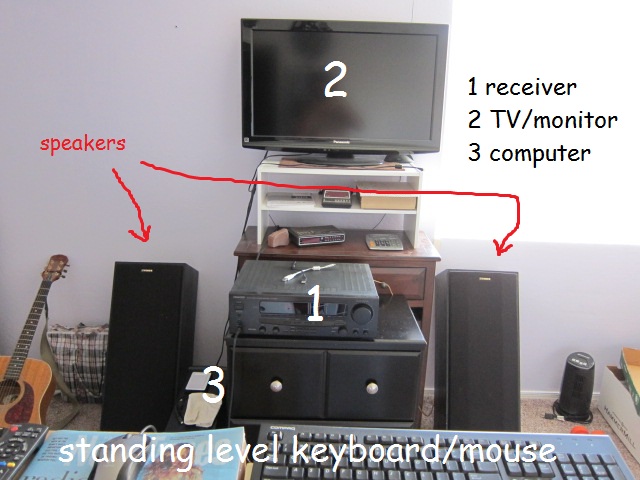
IMPORTANT! Get off the headphones! At least to set the initial levels — which require speakers! Luckily I had a ‘Y’ RCA adapter I found at a thrift store I was using for cassette to digital transfers (a waste of time/unless a rare cassette unavailable elsewhere…) The ‘Y’ a separate left/right to one-stereo connector cable/adapter… to merge my stereo system with my computer … and have decent speakers to edit with. Use the “Tape”, “Video” or “CD” input on older stereos that have no auxiliary, computer or other type inputs.

NOTE: I used full size/range speakers. — I’ve tried desktop speakers in the past which did not seem to reveal the true frequencies or ‘fullness’ of the sound as I assume bigger better speakers do. PICTURE:
speakers2computer.JPG
WHY NO HEADPHONES? I’m not sure… but from my experience headphones inaccurately deliver the sound as it will sound through speakers. It may sound fine with headphones then horribly bass-heavy when listened with speakers… Maybe someone else here can explain this further… why this is? Regardless, it is!

CAN INITIAL LEVELS BE SET BY ANALYSIS READOUTS ALONE? I’m not sure if there are general rules per plot spectrum analysis which for example give a set parameter of where all levels should or should not be. It doesn’t seem logical that such a formula could exist — as I assume every song has it’s own unique balance of frequencies — which again, I’m assuming can only be corrected by ear, if correction is needed or desired.

FiXeS: After the initial settings, when doing ‘fixes’, I was able to use headphones and proceed further with intense deep down editing into the furthest depths of the sound. Further then anyone has ever gone before! … All proprietary, of course.

BLACK DOG Believe in something! Check out Jesus in the ‘New Testament’ — cool dude. https://soundcloud.com/blackdogsongs

My thoughts regarding headphones:
Bass sounds are not actually caught by the ears but the bones and the skull. Headphones are thus created that they are comfortable to wear, I think a better bass could be achieved without the soft padding that encircles the outer ear (although some models have a remarkable frequency response).
The wave length of a 20 Hz tone is about 17 cm and fits almost exactly into the head.
The opposite is also true; lay your hand on your forehead (or your bold head, as in my case), sing from low to high and feel the vibrations slowly decrease. Our head is like a big bulb that radiates bass.
Should we use full-head sized mics and headphones? Perhaps… :wink:

Very low bass is felt through the body rather than the ears, primarily through feet and torso. Ideally we would have “full-body phones” :wink:

:grin:
Very true

My previous calculation was wrong, sorry…
20 Hz means a wave length of 17 m not cm.
The consequence is that we can’t “hear” phase information for bass and low-mids. Therefore, it becomes increasingly harder to locate sounds below 2000 Hz.
Does anyone know Douglas Adams book “The last of their kind”.
There’s a bird in New Zealand that woos for a mate with sounds that are so low that they can be heard/felt for many many miles. Unfortunately, the “female of the species” has no idea where the sound is coming from… :wink:
Listen and enjoy: https://youtu.be/_ZG8HBuDjgc?t=32m42s