Thanx … ACX is not user-friendly, as least as far as I’m concerned. For instance, a month ago my initial 15 min test failed because of RSM issues. Since then, you’ve fixed that. I tried to upload another 15 mins but it doesn’t seem to go through … I’ve also attempted to upload two complete chapters … but I have no idea if they went through. Obviously, this is a simple issue … but not for a simpleton like me.
How do I know WHAT they’ve received and whether or not I’ve ‘passed’. Aaaarrgh…
It was a sentence that … I skipped over somehow and it was lost.
While reading? People find ways to gussy up their scrips such as double spacing and putting extra spaces between paragraphs. On some stories, they change their voice for different characters and they mark up the scrips to keep track of who they are.
You can put special characters in the words to help you with pronunciation and emphasis, Your English teacher is never going to see this, so it’s just for you.
I may be the only person on earth who reads from paper, so my only problem is page turning noises. If you’re reading from a device you have to work with the display system and text program. I don’t know how people read from a phone, but I guess they do.
Did you get turned down? What was the exact complaint? Post it.
Koz
How do I know WHAT they’ve received and whether or not I’ve ‘passed’.
I think their note about responding to you in five or so business days is a fairy tale. Since the virus scare, everybody on earth is trying to read for audiobooks and I’m not shocked if the response time is going into weeks.
Koz
– A Message to the ACX Community –
Employee Safety – All of our associates are working remotely at this critical time. You may experience delays in response times as we make this transition, but we are striving to maintain an outstanding creative experience.
Koz
I see. You did post a live link.
“Mr. and Mrs. Stanley Morgan, the liveried footman called out as they entered…”
I didn’t pull it down and inspect it for waveforms but it doesn’t appear to have anything theatrical broken. It’s a good voice for reading. That explains why the client wanted you.
“His glasses riding on the end of his nose forced him to tilt his head back…”
It’s all up to poor, overloaded ACX.
Koz
Thanx, Koz … what I can’t figure out is whether I’m to submit each completed chapter to ACX singly … or wait until book is completed and then upload ALL the chapters. I tried to upload the two completed chapters but have no way of knowing if they went through.
Frustrating …
Since , because of your expert tutoring,I know I’m within acceptable ACX ranges I’m going to go ahead with recording individual chapters, submitting each to the author to see if he has any hiccups, and then just park them all on Dropbox until I learn when (and how) to upload to ACX.
Koz, is that a reasonable approach?
Without being too much of a voice from the heavens, I would probably wait until one test succeeds. You do still have one pending test, right? The first test failed from simple volume and technical standards issues. We got that. Then you posted a corrected one and that’s where it’s sitting, waiting for review.
Reading the whole book, besides giving you something to do, runs the risk of failing, and failing in a way that you can’t easily correct and so flushing days of work.
There’s a more sinister version. I can’t prove this, but I strongly suspect they will occasionally complain about “noise” problems, when they really just hated your reading style. We have had posters who were rejected and arrived on the forum with cartoon question marks over their heads because they couldn’t resolve the reading with the complaint. We couldn’t either, except their presentation was painful to listen to from simple theater problems. One clinically asthmatic reader comes to mind.
How do you tell someone their voice sucks?
Audible is in the business of selling audiobooks and they want a desirable product. They’re not in the business of fixing your reading style, microphone, or studio.
Koz
OK … WILL WAIT … BUT HOW DO I KNOW THE UPLOADED TEST WENT THROUGH … I DIDN’T RECEIVE ANY CONFIRMATION
Author approved the test and now good to go … question remains as to whether I submit Chapter at a time or wait until end and then submit all the chapters.
This seems to be never ending …
As you know, we already recorded Chapter 1 with opening credits, etc. and put it ‘on the shelf’ awaiting further instructfions.
So today, the author approved it and we thought we were good to go until we noticed in the new instructions that in the opening credits you do not read any dedications or acknowledgements, etc … both of which I recorded.
Short of re-recording the entire Chapter 1, is there a way to go into the wav file and simply delete those two items … and then save again as a new wav and export again as v2 of Ch 1.
Hope my question makes sense
Back in an earlier post, you said:
Back to Audacity. File > Save Project > Save Project. Use the filename rules and call it something you’ll remember.
But when I attempt to do that, a box appears saying you can’t do that with an audio file (or words to that effect) … so in every case, I’ve just skipped that step … is that a fatal mistake on my part or a misstatement on your end? For all you’ve done for me, you’re allowed a hiccup or two if that’s the case.
A Project isn’t an audio file. It’s a collection of files and folders that can reconstruct your editing environment. It should give you the chance to save an AUP file like this.
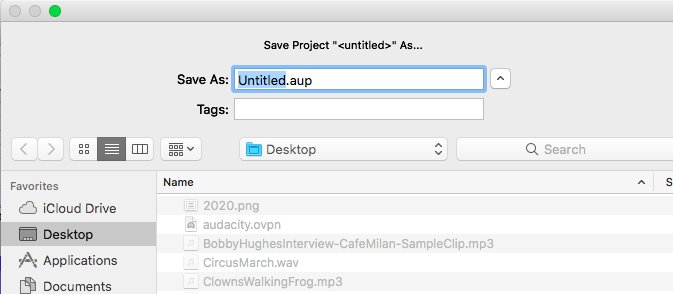
That should allow you to use safe filename characters to call your show what you want. I think there’s a filename limit to 255 characters or something like that.
This is an Audacity Project.

You need both, they have to live in the same location or folder and you can’t change the names once you make them. Double click the AUP file to open your show.
Audacity Projects will not save UNDO.
Audacity Projects seem to be a best of all possible worlds of saving methods because they record environments, edit points, tracks, selections, etc. But they are much more likely to break than the other two contenders, Lossless Projects and WAV files.
When Projects break, they can destroy the show, forever.
Koz
Koz … pls take a look at my question in Post #49 … waddayathink?
Disregard the thing about post #49 … instead look at the last post on page 5 … can you give me some guidance on that issue?
So today, the author approved it and we thought we were good to go until we noticed in the new instructions that in the opening credits you do not read any dedications or acknowledgements, etc … both of which I recorded.
Short of re-recording the entire Chapter 1, is there a way to go into the wav file and simply delete those two items … and then save again as a new wav and export again as v2 of Ch 1.
That’s editing or cutting.
How have you been correcting your work when you make a mistake reading? I’m trying to avoid going all the way back to Introduction To Editing, particularly since I’m not that good at it.
save again as a new wav
It rings bells when you say things like that because you Save Projects and Export WAV files. If you reverse or scramble them, it could mean you’ve been making safety backups wrong.
I don’t remember if I covered this earlier, but during editing and post production is a good time to start using plain Projects. Open your chapter and File > Save Project > Save Project. That will open up and arrange all the Project tools and processes you need to make corrections and updates to it later.
Then start your editing and cutting, etc. Save Project as you go to overlay the last batch of corrections and edits to the show. You can Edit > UNDO at any time to remove the last action. It’s good to know that Projects do not save UNDO, so once you close Audacity the last save you made is the only save.
Every so often File > Save Project > Save Project AS and pick a new filename. That will create a whole new Project whose reference time is the exact time you made it. The first project’s reference time is when you started editing or the last save.
I need to drop for a while.
Koz
Koz, you asked: How have you been correcting your work when you make a mistake reading?
Simple (I think) … if I know I’ve screwed something up, I immediately stop, back up and erase with the scissors whatever I wanted and then record again from that spot. I never do a word or two … I’ll always go back to a complete sentence and go from there. In other words, it’s not a cut and paste … when I start recording again, there is nothing ahead
In the case in point, I guess I need to know how to go back into the appropriate wav file and delete the Dedication and Acknowledgement sections. Then I’m guessing I would save the NEW wav file as v1 and then export a new MP3 file (again something like v1)
Sorry to be so dependant but, without your thoughts and guidance, I’d be a basket case by now.
Move or copy your unedited show and/or Edit Master-1 WAV to a thumb drive or someplace off the machine. This is your backup if the machine takes a dive in the middle of the edit.
You need to get good at Zooming. Zoom into the blue waves and set a Label at the start point you want to delete, zoom out (if you need to) and zoom into the place where you want to stop deleting. Set another Label. The labels are magnetic and the cursor will stick to them. Click on one, drag to the other and DEL key.
You should link the Label Track with the sound track. That’s in the instructions…somewhere. If you don’t, they won’t track each other through editing.
https://manual.audacityteam.org/man/label_tracks.html
If you get lucky, that portion of the show will play gently from one segment to the other without playing the part in the middle you deleted. If you made a mess of it, Edit > UNDO.
You can scan back and forth down the timeline with SHIFT + SCROLLWHEEL.
SPACEBAR will stop and start playing.
There a number of different zoom tools but I only ever use three. I can remember that many.
– Drag-select a part of the timeline and zoom into it with CONTROL+E. The intended memory jogger is zoom into sElected.
– Zoom out a little bit with CONTRL+3. That doesn’t mean anything. It’s part of a pile of numbered zoomers.
– Zoom back out to the full show with CONTROL+F. Zoom to **F**ull.
Audacity will try to keep the play position in view, so it auto scrolls the timeline for you. Unfortunately, when you’re editing, it constantly shoves your edit points off the screen. Prevent that with Audacity > Edit > Preferences > Tracks > [_]Auto Scroll (de-select).
There is a thing called Pinning The Head and I know nothing about that.
https://manual.audacityteam.org/man/timeline.html#pinned
Someone who actually knows how to edit may drop by.
Koz
You only need the MP3 file for the Final Edit Master you plan to send to ACX. It’s pretty much useless before then.
Koz
So,if I understand this correctly, I would delete the two sections (Dedication and Acknowledgements) by doing so FROM the wav file … correct ?.. and then uploading a new MP3 file containing the deletions, labeling the new file v1 or whatever. Am I close, Koz???
Since I’ve changed the original wav file once I do the deletions, wouldn’t I also need to rename the new wav file (again like v1)
I gotta be the dumbest of your ‘students’ but I’m trying …
Do you have an Edit Master Project? The intent is to do most of the work in Projects (perfect quality, but brittle) and export WAV at the raw reading and Edit master stage. That’s bare minimum.
So without getting into bookkeeping, yes, open the current Edit Master WAV, remove the evil segments and export a new WAV, Version 2. While the show is still open, Export a new MP3 for ACX posting.
Since you’re in Windows, it may be beneficial to tell Windows to stop hiding filename extensions. For example, MyMusic.mp3, MyMusic.wav and MyMusic.m4a, in normal Windows will look like this.
MyMusic
MyMusic
MyMusic
They hide the filename dot extensions “so as not to confuse you.”
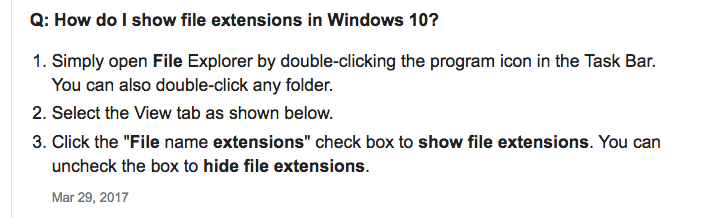
Are you following their MP3 quality recommendations? 192 quality, Constant Bitrate?
Koz