Peak and Floor levels

So then I went back to the raw recording and adjusted according to your earlier success and came up with:
Peak was good 3.5
RMS was now good 20.6 … BUT NOW …
Noise floor failed 50

You’re great to work with me on this and I deeply appreciate it.

My head is turning to mush …

Isn’t this fun?

The ACX Standard has two limits and one range. The peaks can not be louder than -3dB and the noise can’t be louder than -60dB, but the RMS must land between -18dB and -23dB. You do have to meet all three in the same show.

Could you get the tiny LEVEL SET light in the upper left to flash when you talked? That’s kind of step 1.

Koz

yes … it flashes. If I turn it up too much, it squeals. Right now I have it set at about the 3 o’clock position … any higher it squeals.

I’m gonna take tonight off … we can continue this tomorrow if you’d like

Koz, I dreamt about peaks, noise floors and RMS last night …

I’ve promised the author that I’d record Chapter 1 today for him and will do so. We can use that, I suppose, to work magic on the peak/noise/RSM stuff when I’m finished. Once I finished the raw recording, I’ll send you the ACX scorecard and maybe you can tell me what to do next …
Thanx, Tom

If I turn it up too much, it squeals.

That’s a danger sign. We’ll discuss that when you’re done.

I’ve promised the author that I’d record Chapter 1 today for him and will do so.

That’s a New User error. “I need to become a professional engineer and actor. By lunch.”

I need to go back up the message thread and see if I gave you enough details so you can patch it together yourself.

Are you good with editing out your mistakes? There’s a fuzzy rule that editing takes five times the length of the show. That’s if you’re good at it and know all the tools.

Koz

One bright spot. I expect your new microphone and mixer to work. We just have to figure out the settings.

Read through the chapter and be sure you put that hold your breath and don’t move segment at the beginning. That’s called Room Tone. ACX needs Room Tone as part of the submission requirement and we need it for the filters and effects.

When you get to the end of live reading and before you do anything else, File > Export > Export as WAV. That’s the safety backup. There are no options for this format. This is the first time you need to settle your bookkeeping.

Everybody knows what this is.
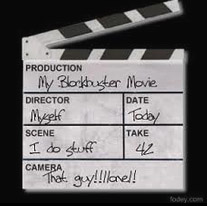
BoardInvert2.jpg
It’s for sound synchronization, etc, etc, but less well known is the bookkeeping. Somebody looks at you weeks later and says: “I need everything we shot for the Scene “I Do Stuff.” Where is it?”

It’s your job to know.

Filename hygiene tells us it’s OK to use Upper Case letters, lower case letters, numbers, underscore and -dash- in filenames. No Other Characters. Today is 2020-04-18. No slash marks.


Back to Audacity. File > Save Project > Save Project. Use the filename rules and call it something you’ll remember.

Apply Audiobook Mastering.

Screen Shot 2020-02-15 at 4.16.02.png
If you’re missing some of the tools, you can get them from the instructions.

https://wiki.audacityteam.org/wiki/Audiobook_Mastering

You’re getting power line hum and buzz from somewhere, so I applied US Hum Remover.

de-hum.ny (2.11 KB)
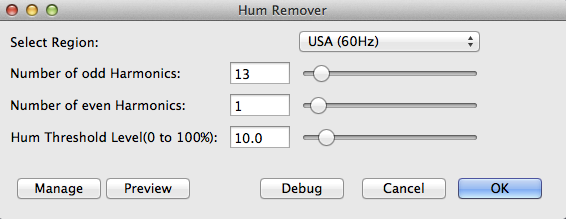
HumRemover.png
Followed by medium Noise Reduction.

If you’ve never used Effect > Noise Reduction before, it’s in two steps. Drag-select a portion of your Hold Your Breath and Don’t Move (Room Tone).
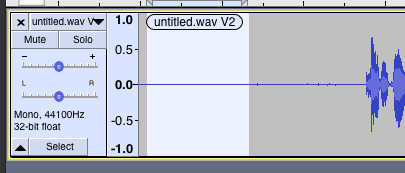
SelectRoomTone.png
Effect > Noise Reduction > Profile.

Then, select the whole piece with the SELECT button on the left and actually apply Noise Reduction according to these settings.
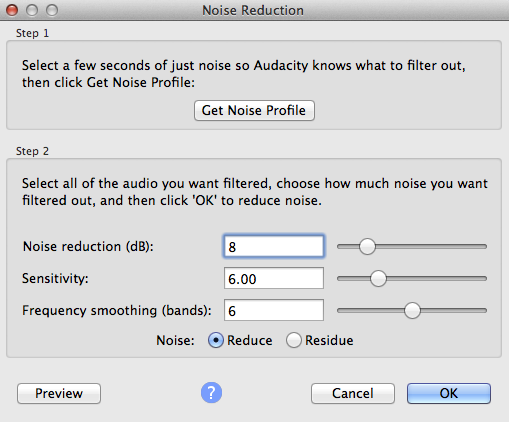
NoiseReduction_8-6-6.png
You should be able to inspect the piece with Analyze > ACX Check and it should pass like this.
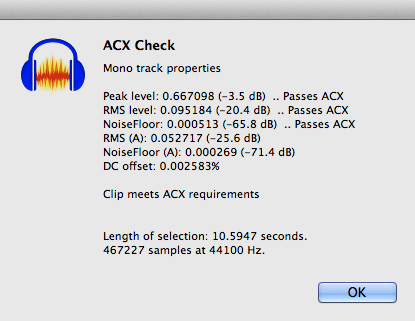
Success.png
Piece of cake, right?

Then you can get to work editing out your mistakes and fluffs.


You can zoom in and out to see accurate edit points and beginning and endings of words. There are thousands of Zoom tools. I only use three.

Drag-select some of the blue waves and zoom into them, Control+E. Zoom back out to the full show, Control+F. Zoom out a little bit Control+3.

When you get everything in perfect order, File > Export > Export as WAV a file called Edit Master followed by the names you settled on.

Then File > Export > Export as MP3: 192 - Constant Bitrate.

That’s the one you actually send to ACX. They’re not interested in the WAV files and you can’t ever edit or change the MP3 once you make it.
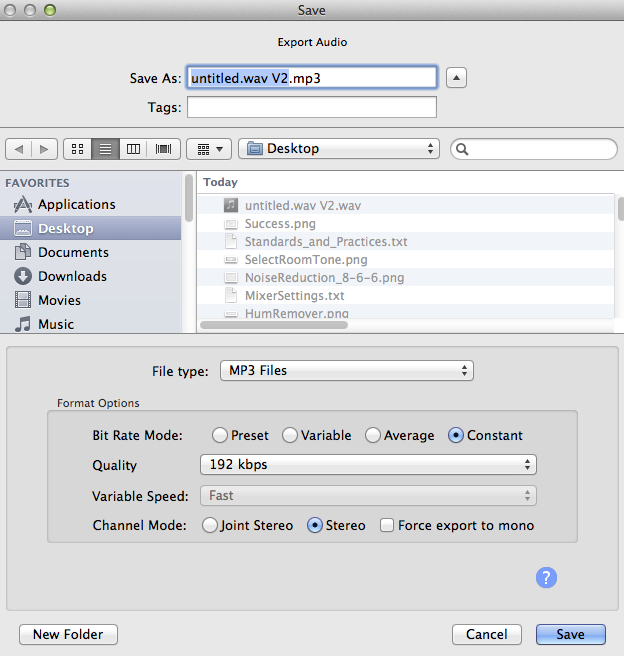
192-ConstantBitrate.png
ACX has a way for you to send them a test rather than taking a chance on the whole book failing in one go.

They changed it since the last time I looked.

https://audible.az1.qualtrics.com/jfe/form/SV_265YEkshVJXHqPX?c=


Koz

Koz … fantastic … how can I possibly go wrong

Here goes … see you in a couple of hours

This is the landing page for ACX submission requirements. They don’t mention submitting a test.

https://www.acx.com/help/acx-audio-submission-requirements/201456300

This is where you post back when you figure it out. I don’t know.

All that filtering and patching is only going to get you past the first of two ACX inspections. The “robot” which works a lot like ACX Check and automatically figures out whether you have your microphone act together or not.

But then it goes on to Human Quality Control where an actual person listens to the work. That’s where you get into trouble if you used too much Noise Reduction and your reading sounds like a bad cellphone. It has to sound natural and you have to pass everything.

Everything has to match. The beginning and endings of chapters, all the chapters in the middle and the first and last chapter. That means you can’t change microphones or studios in the middle of a job. One of the forum posters had to move houses in the middle of reading a book. That was not fun.

It’s not unusual for a New User to get to the end of a book a seasoned professional and go back and listen to the first few chanters when they read as rank beginners. And then read the first few over again.

Koz

KOZ, YOU’RE A MAGICIAN … I FOLLOWED YOUR STEP BY STEP INSTRUCTIONS STEP BY STEP … 24 MIN RECORDING WITH PASSING GRADES IN ALL THREE AREAS (NOISE, RSM AND PEAKS).

IF YOU’RE EVER IN LOUISVILLE, I’LL BUY YOU DINNER AND A BEER

This process is not in addition to the other tools you’ve been using. It’s stand-alone. The tools are designed to follow one another and do their job with little or no sound damage.

Compressors in particular can cause sound problems and distortion that can’t be fixed later.

There are postings from people who designed different methods and tools for meeting ACX Standards, this isn’t the only one. But, as a rule, you can’t cross the methods and you can’t pick and choose which filters and effects go where.

Koz

Does it sound OK? I’m expecting it to but does it?

IF YOU’RE EVER IN LOUISVILLE, I’LL BUY YOU DINNER AND A BEER

Pick a hospital worker and buy it for them.

Koz

HOLLER IF YOU WANT TO TAKE A LISTEN

Do you have a sample posted somewhere?

Is the customer happy?

Did it pass ACX Company?

Koz

Koz: The MP3 file is on Dropbox … the author likes it … and it met the ACX review requirements

Dropbox link is: https://www.dropbox.com/s/l3j0yybvo788tjl/JOURNEY%20TO%20DESTINY%20CHAP%201.mp3?dl=0

The reason it’s in Dropbox is I didn’t know where else to hold it … my understanding is I have to submit all the chapters at the same time and didn’t know where to park them in the meantime. I’m open to a better idea. The wave file is still in Audacity but for some reason the MP3 file is not.

I have to submit all the chapters at the same time and didn’t know where to park them in the meantime.

I didn’t think you had to park them anywhere. I thought you could submit right from your machine. In my case, that wouldn’t work so well because my upload speed is terrible and that would be day job or longer, but still, I did post sound work to them and did it from my home desktop.

In any event, you would have to disarm your DropBox or change the security settings and that wouldn’t be worth the effort.

If the client and ACX are both happy, that’s what counts.

If you have your Edit Master WAV, then you don’t need the MP3. You can make another one at any time.


There is one Obsessive Engineer item here. Be able to point to two different places that have your valuable work.

Normally, that would be your work machine internal drives and your backup drives. USB Sticks work as do on-line storage and even, I know people who store things in their email service. Two different folders on your work machine does not count.

One of my Windows machines eyes rolled up and it started blowing spit-bubbles. I was able to rescue some valuable work from the second internal hard drive D:.

C:\ was gone. That’s actually too close. If the wrong thing failed, it might have taken out both drives.

Koz

THANX, KOZ , I’LL SAVE AN EXTRA CY AS YOU SUGGEST.

IN THE MP3 VERSION THAT I SENT YOU, THERE’S ONE SENTENCE MISSING TOWARDS THE END THAT I’LL NEED TO INSERT AS IT PROVIDES IMPACT TO THE SECTION. NOW … BECAUSE OF YOU … I HAVE A WAV FILE WITH WHICH TO MAKE THAT CORRECTION. MY ONLY QUESTION NOW IS “HOW”. IN THIS CASE, SINCE IT’S IN THE LAST MINUTE OR SO OF THE ENTIRE RECORDING, I’M THINKING OF JUST DELETING THOSE LAST FEW MINS AND RE-RECORDING … BUT NOT SURE EXACTLY HOW TO DO THAT.

THEN, WHEN I’M DONE, I ASSUME I’LL NEED TO SAVE THE NEW WAV TRACK AND EXPORT A NEW VERSION OF THE ORIGINAL TRACK … AND DELETE THE OTHERS (BOTH WAV AND MP3).

AM I CLOSE ON THAT ???

It’s possible to Punch and Roll to add stuff to an existing sentence.

https://manual.audacityteam.org/man/punch_and_roll_record.html

But. As it says in the instructions, you have to set up for overdubbing to get the delays, timing and latency right and then the possibility of you announcing the new work days later at exactly the same rhythm, emphasis, timber and pitch as the original is zero. The people trying to keep up podcasts with the coronavirus news run into this.

“A recent publication from the American CDC claims that the virus is passed along by touching.”

Nobody has time to go back and correct the voice quality matches, so everything starts sounding like a kid recorded it in the garage.

ACX doesn’t have that problem. The first time you submit that they will bounce you.

THERE’S ONE SENTENCE MISSING TOWARDS THE END THAT I’LL NEED TO INSERT AS IT PROVIDES IMPACT TO THE SECTION.

Was it missing from the reading script? You just thought it was cool to have it there later? Now you know what the script writers do.

The easiest way is to cold read the new block of script into a fresh Audacity and then try to get it to insert and match later.

What you’re supposed to do is make a mistake or fluff, pause briefly (leave Audacity recording), make a noise such as a loud clap or toy ticker sound (with a toy clicker) and read a correction right then and keep going. You have a much greater chance of having everything match later in post-production editing if you record it while you’re still in the moment. Cut out the fluff leaving the two good sentences flowing together.

It helps a lot of you’re listening to yourself with good quality, sealed-against-your-head headphones.

What you can’t do is insert blocks of new text or add new words to the end days later. That’s really rough to do. Different time of day, different sadness, different stuffy nose, different spacing, and different coffee.

Koz

It was a sentence that, while editing, I skipped over somehow and it was lost. Altho it would be nice to have it in there, it’s not a deal breaker so I’m of a mind not to attempt to reinsert some dialogue.

On a separate issue … is there any hope of contacting anyone in ACX tech to answer some questions. I’ve tried, as has the author, with no luck for over a week. Just wondering …

… and another question.

I have at the beginning of ea recording about 5 secs of dead time and another 9 or 10 at the end. I know now the purpose of the first section but wonder about the end section.

Further, when I export to MP3 should those dead time sections still be in there … or should I delete those somehow in wav before exporting to MP3?

I can’t find anything in FAQ on ACX to address this

is there any hope of contacting anyone in ACX tech to answer some questions.

No.

The closest you get is the posting comments when they turn you down. For example: “Your background is too noisy and your voice has too many lip smacks.” I’ve never heard of them complaining about reading skills, but I guess that’s possible, too. There was a recent poster that had a terrible voice. We could get them past the technical test, but no word on how they made it past the reading evaluation—if they even did.

The only other option is “Congratulations, you made it.”

when I export to MP3 should those dead time sections still be in there

Yes. See: Have room tone at the beginning and the end…

https://www.acx.com/help/acx-audio-submission-requirements/201456300

That dead time is called Room Tone. It’s the noise your room makes with you not breathing or moving. It’s not the same as Audacity > Generate > Silence. You can record some Room Tone and keep it around as its own sound file for pasting wherever it’s needed. You don’t have to hold your breath every time. This stuff is exactly the same as the two seconds of background noise when you submit a test to the forum.

https://www.kozco.com/tech/audacity/TestClip/Record_A_Clip.html

And this is exactly why it’s there.

It does need to match the room you’re in and the performance background sound. In your case, that’s really important because your background noise is louder than most people’s. If they don’t match, you will get background noise that pumps or jumps in volume here and there. That’s distracting and ACX hates distractions.

Koz