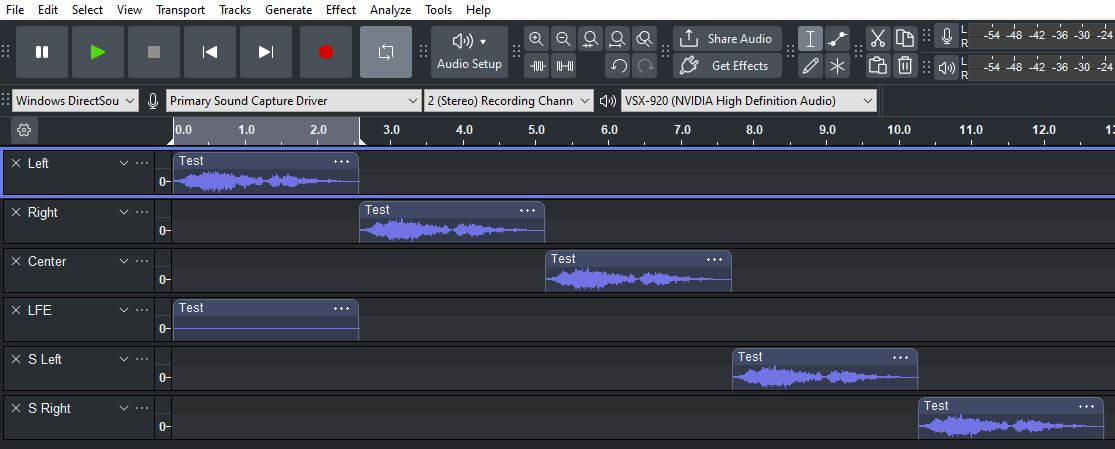
Is there a way to export sound in a WAV format that will allow me to push sound to specific speakers one at a time. I understand how to set up Audacity to export to a Dolby 5.1 specification, however, when I set up a sound byte that is duplicated across all 5 channels to play one after the other as shown below, the sound for the rear speakers is mute. It seems as though I have to have some sound coming from the front speakers before the rear speakers work at all. Is there some way to overcome this?
I do have my export setup configured correctly with all 5.1 channels defined. I cannot upload a screenshot of it because I am a new user and only allowed to upload one screenshot.
Is that while you’re working in Audacity, or after you’ve created the Dolby 5.1 channel file?
Audacity can’t play/monitor surround sound (unless something has changed that I don’t know about).
You’ll have to export and play it on something that supports surround sound and Dolby AC3 files. usually that means making a DVD and playing it on a DVD player or with a DVD player application.
I assume your screenshot is before exporting?
Are the surround channels there when you re-import?