I see I’m not alone in this problem but I’ll post my memory dump anyway. So, I installed Audacity 3.7.7, then the OpenVINO tools via MuseHub, and Audacity started crashing upon start. A few days later, and a few reinstalls later, Audacity crashes when opening the plugin from the menu. It fails to send the crash report too, so that’s why I’m writing here. Here’s the memdump, please help:
Hmm, this crash report indicates a ‘divide by zero’ exception in the CPU plugin. I’m not really sure why it would be, the processor here seems very old though (AMD processor from 2009-ish timeframe?).
Around that time, I think 2011 or 2012. I thought I’d give it a try anyway, thinking the worst that can happen is that it’s going to be slow. Anyway, it is an x64 processor of course, IDK if that’s relevant.
Anyway, in case you needed a second sample, here’s a report after I uninstalled all OpenVINO plugins and installed only the Base Whisper model (the smallest one).
So in this case, what is the action that triggers the crash? Does it crash upon launching Audacity, selecting an AI effect from the menu, or when actually running the effect?
Memdump #1 if I recall correctly was created after selecting the effect from the Audacity menu and hitting OK, although I don’t remember how I got Audacity to even run while still having the plugin loaded. I renamed some dlls for that but I don’t remember which ones; suffice it to say, the combo box for Whisper model selection in that menu was unpopulated (blank), so the code that populates it must not have executed. For the record, I had a couple models installed back then. I uninstalled everything (OpenVINO and Audacity) and reinstalled it since then.
Memdump #2 and #3 (attached) were both created upon starting Audacity (so right now Audacity just crashes a couple of seconds after start) in the same conditions. There are a number of similarities between them when I view them in Notepad++.
When I rename models\mod-openvino.dll, Audacity starts although of course the plugin doesn’t load.
I see – it’s strange that you used to be able to get into Audacity with the plugin loaded – from the crash report thrown upon starting Audacity (e.g. memdump3.txt), the crash happens within openvino_cpu_plugin.dll – which is very odd – I can’t think of any DLLs that you could delete / rename that could affect that behavior. For the heck of it, you can try deleting openvino_gpu_plugin.dll & openvino_npu_plugin.dll – those certainly aren’t needed in your case – who knows, maybe the attempts to load those ones are corrupting the process heap and causing the CPU plugin issue.
So, it turns out I still can reproduce the behavior where Audacity loads and then crashes upon running the effect.
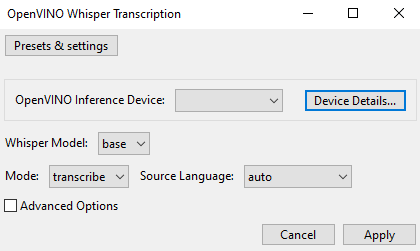
With cpu, npu, gpu DLLs all “disabled”
I can get into Audacity and into the dialog box as shown in the replies below (I can only paste one image per reply). When I hit Apply, the crash produces memdump4.txt.
With just openvino_intel_cpu_plugin.dll enabled
Audacity opens and upon clicking Effect | OpenVINO AI Effects | OpenVINO Whisper Transcription, the dialog box isn’t shown but Audacity crashes, producing memdump5.txt.
I just loaded Audacity 3.7.7 and it worked fine. I then installed openvino and Audacity immediately began to crash. I received an error log and when attempting to send it failed. I have uninstalled openvino and Audacity is once again working.