No headphone output (minijack into chassis) in Audacity

Audacity 3.4 & 3.7.3 on Linux Mint 22.2 (previous;ly was on Mint 20 with an older vrsion of Audacity)

Recently upgraded to 3.4 and then 3.7.3 due to the issue in 3.4, but it’s still there.

Recorded mic input from a USB soundcard, as l’ve been doing for about 2 years with a much older version of Audacity, can’t recall which.

NOW: I can no longer hear what l have recorded, when l play it back, via headphones. I cannot hear any waveform in Audacity, via headphones. I can not hear anything in Audacity via headphones. No headphones work with Audacity. Audacity no longer works with headphones. I trust that is clear.

Headphone is plugged into PC chassis’ headphone jack port (3.5mm mini jack).

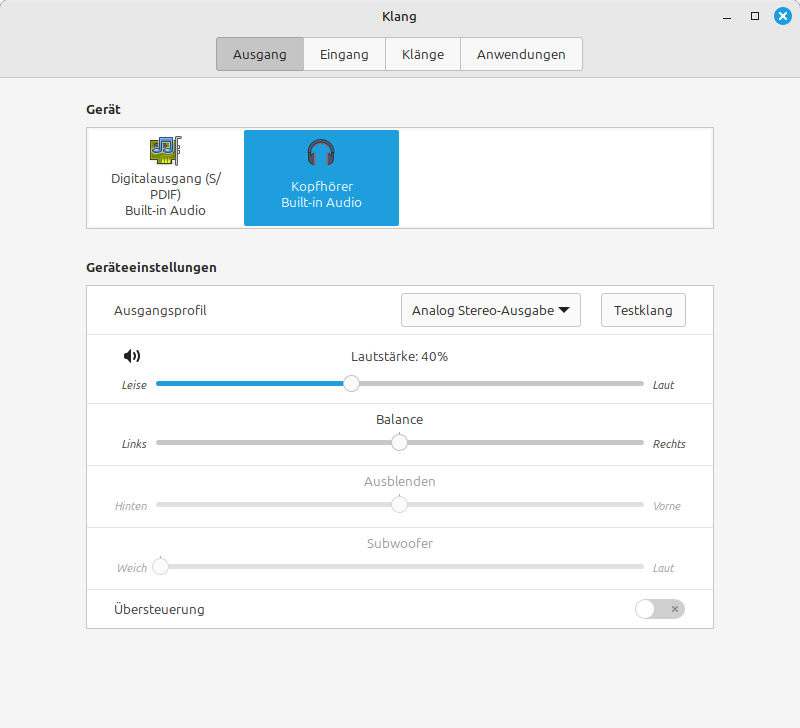
Headphone output selected as audio output in system sound settings. I can hear YouTube (and mp3s in the native Linux Mint audio player) in my headphones. I can hear the left and right sound test in system settings too.

TROUBLESHOOTING ATTEMPTS:

  1. The only host available is ALSA, but l don’t think that matters. I’ve tried to activate Jack with QJackCtrl app but that doesn’t work.
  2. Audio Playback device set to (l believe) every possible option one by one. “Default” is l feel the correct option.
  3. I have rebooted.
  4. When outputting the Audacity waveform to .wav, it is an inaudible silent audio.
  5. When outputting from Audacity to mp3, l can finally hear my recording in headphones.
  6. I’ve checked Linux Mint Sound Settings —> Applications. Guess what? Audacity does NOT appear as an application on that list, though every other app that uses audio at the current time, appears on that list.
  7. Weirder still, when starting up Audacity Audacity appears as a flickering entry on the Applications list for Sound Settings, then disappears

How do l make Audacity oputput to my headphones?

And why on earth can’t Audacity save to USB drives anymore?

{ This feels like someone wants to ban microphone sound analyses (done carefully on headphones), and ban saving them into portable folders. Bizarre. Could this be the work of the millionaire who stole Tim Tyler’s smile? Another meaningless project of his? }
I’m a Windows user but…

Make sure you’ve selected the correct Playback Device in Audacity.

Audacity AUP3 project files have to be Saved to an NTFS or ExFAT drive. After being saved the can be copied to a thumb drive but when used “live” you have to work from an internal drive.

You should be able to Export MP3 or WAV to a thumb drive.

All I can say is… Weird!

The entire point of my writing up a troubleshooting report of everything l’ve tried, is in anticipation that someone would tell me to do this. Please see troubleshooting entry no. 2.

The entire point of my asking why Audacity can’t save to USB drives “anymore” is that it used to be possible. EDIT: By the way, it is possible still, to copy the Audacity file from desktop to USB, but no longer to save direct to USB. Please, don’t offer anymore workarounds, l’m not talking about workarounds and it wasn’t my main query in the OP anyway.

So? That’s not of my concern. I’ve not even given any indication that exporting as mp3 / wav is something in my workflow. It was only done as part of troubleshooting (entry no. 5).

I’m sorry for sounding harsh but l’m the person with the problem, l know it’s easy to dive in and offer something off the top of your head, and l know you have good intentions there, but irrelevant replies do not actually help, and a good clue as to the relevance of a reply is: ask yourself if you have really, really, read the OP?

^^^ if anybody’s genuinely interested and has actual knowledge of what is causing this, l’d like to know, as l think this is crucial to the issue.

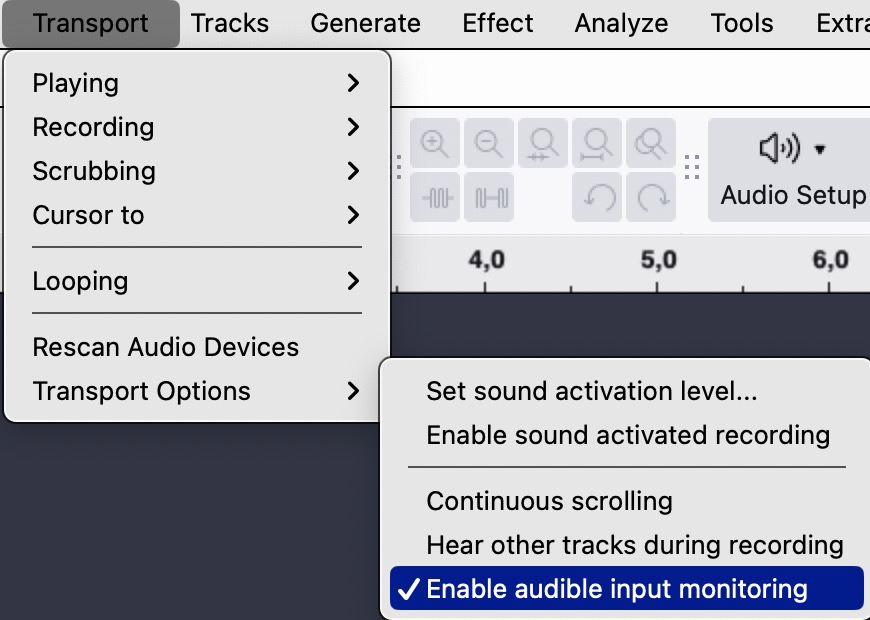
Do you want to hear while you are recording?

If so, you should activate “Enable audible input monitoring” from the Transport menu.

Thank you for the careful and well meaning response, but nothing in my OP indicates this is my problem and l recommend a full re-read of my OP.

The problem is: I cannot hear audio in Audacity via my headphones, whereas l used to be able to in older versions. This means l know how to do it, l’ve done it before, l’m not trying out a new feature or something new to me.

As you can see, the headphones work for YouTube and playing a soundfile not output by Audacity by the native app for playing audio files in Linux Mint.

When outputting to audio file in Audacity, the .wav output is silent, the mp3 output is audible.

When looking at the Sound Settings —> Applications list, Audacity isn’t present. When starting up Audacity with this list open, Audacity appears as a flickering entry then disappears. Audacity is not appearing as an application that uses audio in Linux Mint.

I used to be able to do this basic thing (listening on headphones) as well as other basic things such as saving .aup to a USB drive directly, and opening .aup from USB drive (and l still can, but just not with the new .aup3 format).

My dear friends, please avoid the following types of resopnse:

  1. Throwing a watch spring, a helmet, a notepad, into a 20 metre hole where a person is stock trying to get out. These things aren’t helpful, l mean they could help in some way, but in a very real way, they just annoy.
  2. Telling a person stuck down a 20 metre hole that they cannot get out BECAUSE the sides of the hole are too steep

Well then you should maybe another “wording” to describe your problem. I answered what I understood from your question. I am not sure if you make many friends in this forum when you just tell all to re-read what you wrote…

If you play something from an Audacity project file (.aup3), you should hear the sound if the correct device is selected in the audio setup of Audacity. In Mint’s “Sound Settings” you’ll see your headphones in the sound output pane. Select them there also.

^^^ from the OP

^^^ also from the OP

Note that l am not doing something new, so l know the basic setup, but it’s just not working now

^^^ also note the updated OP description of problem, apologies for any confusion

Are you actually hearing anytihng in Audacity, with your headphones in (and obviously, after having selected headphones as the Linux Mint sound output device and verified it working via Test Left / Test Right)?

Without doing any left/right test, I hear very clearly what Audacity is playing. Audacity 3.7.5.

Thank you, that helps. It may be an issue localised to my system. Sorry for being in such a bad mood, l just lost a lot of valuable time over this. I still suspect Audacity being partly to blame. Hopefully l will solve the problem soon.

PROBLEM SOLVED (? BUT RAISES SOME QUESTIONS)

I uninstalled Audacity and installed Tenacity via Linux repository thinking it was a breakaway group rebelling against Audacity’s “improvements”. However, it appears to just Audacity shrugs.

I recorded a mic. Couldn’t hear a thing on headphones again. So l exported to mp3, without tweaking the export parameters. I couldn’t hear a thing even on exported mp3!!!

This my darkest hour, was the kernel of the solution. Without tweaking the mp3 settings, it exports as Joint Stereo. However, when l force export to MONO, l can hear the mp3, and this made me realise the problem was in the stereo lanes of the software.

So, in Tenacity, l right clicked on the track’s leftmost panel, and selected “Swap Stereo Channels” - and l was finally able to hear the mic recording on my headphones, within Tenacity itself, without exporting.

I therefore would suggest that something has changed in the software itself. I never had to swap stereo channels before.

Aggravating factor: I am partially deaf.

However, when l swap the headphones around, l still cannot hear a thing, UNTIL l Swap Stereo Channels, and doing so will enable the recording to output to one of my headphone speakers.

How does something so basic get so messy?

I recently installed some nVIDIA drivers and they are appearing as sound output devices, making me wonder if nVIDIA has messed with my sound, but l don’t think it should matter, if l select the sound outout device in Linux as Headphones and in Tenacity l select the “default” sound output device, then it all works smoothly, ONLY if l right click —> Swap Stereo Channels

This topic was automatically closed after 30 days. New replies are no longer allowed.