I have an Audio Technica AT-LP120XUSB connected to my Windows 10 PC & am using AudaCity to record vinyl. When I record a wav file is created on screen in AudaCity & when I stop recording I can hear the audio back through my headphones which are connected to the audio card at the back of my PC. I can also hear a wav file through my headphones played in Windows media player.
The problem I have is that when I’m recording vinyl through AudaCity I cannot hear the audio/vinyl playing….I can only hear the wav file it creates afterwards….why can’t I hear the vinyl whilst it’s being recorded?
First: You do not record a .wav file in Audacity. You are recording the sound, and it is saced as an “Audacity Project File”, aup3. This aup3 file is not a sound file. A sound file is only created after you select the “Export” command. So much for the technical part.
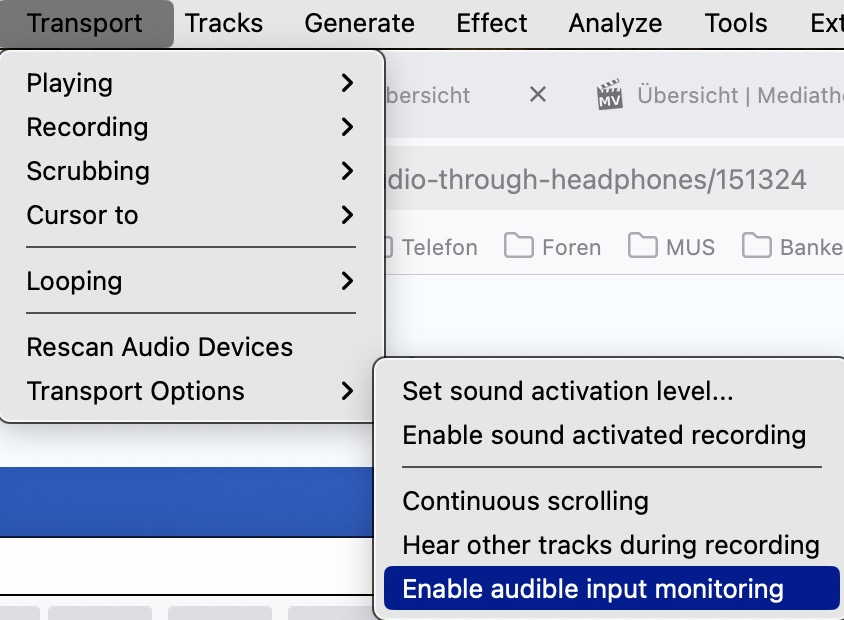
To hear on your headphones what you are recording you need to “Enable audible input monitoring” in Audacity’s “Transport options”.
I can only guess, but if you’re recording streaming audio (the sound coming out of the soundcard) it creates a nasty internal feedback loop, recording what’s playing and playing what was just recorded… And there are other situations where you can be playing through your stereo while recording on your computer, etc.
Thank you….I understand all that, but I just wondered why the Enable Audible Input Monitoring isn’t on by default….it seems such an obvious thing users would want to do?
If people don’t know about it, then they’ll end up asking this Forum just like I had to?
If I record vinyl, I use my stereo equipment. That sounds much better than the computer’s audio - no matter whether it is through loudspeakers or headphones.