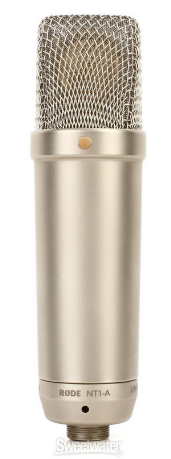
Does the NT1-A microphone have a light while it’s running?
Can you post the traditional 20 second raw voice test after you get settled? I’ve never heard a voice on one of those.
Sound test: Can your Audacity bouncing sound meter go all the way up to 0dB when you speak loudly or yell into the microphone?
Never blow into a microphone, but talking loudly or yelling is perfectly OK. Start Audacity recording and turn the UMC22 Gain-1 all the way up. “WOOOOOOOOOOF” louder and louder until the sound meter stops getting higher no matter what you do. Can you get it all the way up?
Yes, the microphone has a light when it’s running. It also has an on/off switch in the back that when turned on, turns on another light that tells it is running at +48v power.
No, I can’t get it to go to 0.
I bought the equipment from a company called Musician’s Friend. Here’s their ad, I didn’t get the bonus DVD.
“To celebrate 15 years of the RODE NT1 and NT1-A, RODE Microphones has created a revised NT1-A package including a premium shockmount, pop filter, cable, microphone dust cover, and a bonus instructional DVD. Originally released in 1995, the RODE NT1 mic is found in professional and project studios the world over. Its combination of clarity, warmth, extended dynamic range and high SPL capability made it an instant classic with professional engineers and home recording artists alike.
Following heavy investment in precision manufacturing, RODE revised the microphone capsule and electronic design of the NT1, resulting in only 5dB SPL (A-weighted per IEC651) of self noise. Released in 2003 as the NT1-A, it has since become one of the world’s biggest selling and most recognizable condenser microphones. Now RODE has truly made the NT1-A the complete recording solution by including a premium shockmount with integrated pop filter, high-quality 6m (20’) XLR cable, microphone dust cover and even a bonus instructional DVD. Presented by RODE founder and company president, Peter Freedman, The NT1-A Studio Secrets DVD features a range of tips and techniques to help RODE NT1-A owners get the most from their new microphone.” Bold added.
I’m happy with the equipment. Though I think it will take a lot of experimenting with Audacity to figure out how to record and make it pass ACX Check. I guess there’s no way to do that without applying the Effects?
Yes, the microphone has a light when it’s running. It also has an on/off switch in the back that when turned on, turns on another light that tells it is running at +48v power.
I don’t think any of those lights is mentioned in the instructions…which makes me think I have the wrong instructions.
No, I can’t get it to go to 0.
Where does it turn red and stop getting louder? -3dB by any chance?
I guess there’s no way to do that without applying the Effects?
It is possible to read directly into ACX sound format, but it’s very, very, highly unlikely.
The book is performed with the blue wave peaks reaching roughly half-way (0.5) and the bouncing sound meter reaching between -10dB and -6dB. That allows you room to get expressive and theatrical during a read without damaging the sound. Try not to do that too much, however. Experienced readers know how much to back away from the microphone when they yell so the yelling expression is preserved without overloading anything.
I know Mastering 4 seems complex, but it’s only three filters (if you don’t need noise reduction) and the settings are sticky so you don’t have to type them in every time.
Effects > Equalization > OK.
Effects > RMS Normalize > OK.
Effects > Limiter > OK.
That was it. One might even suggest I could make this into a chain, so you could run one chain and it automatically applies all three.
Speak normally and keep turning up GAIN-1 until the little green SIG light starts to flash. Can you ever get there? Some microphone amplifiers are OK turned all the way up. That’s valid.
Sorry, I wasn’t clear, on/off switch is on the back of the interface, not the microphone.
I’ve been experimenting, below is the best I seem to be able to do. I tried it with the Gain turned all the way up (green light flashing) but I thought that made it sound like my mouth was too close to the mike so I reduced it down a bit. Any recommendations you can give me to get a better sound, I would very much appreciate. Or, this is maybe as good as it’s going to get?
Yours is SO much better! Please tell me how you did it!
I live in a cinderblock condo building in Florida --and it’s July. Everyone is blasting their air conditioners and fans. I’ve checked, that hum is permeating everything. I don’t think I can get away from it. Sometimes just before dawn I can catch a brief window when it’s not there (that’s what I was doing) but lately even that is gone. I think I will need your filter.
Also, I was wondering if you might be familiar with any sound that can be used as an unobtrusive, bland, scene separator. I’ve experimented with Pluck and Risset Drum but I haven’t been able to make anything that I thought would work (probably my lack of skill). I really like the little xylophone-like tone Audacity uses when it tells you you’ve screwed up, I’d swipe it if I could!
PS-- the book is a humorous cozy murder mystery, and, sadly, Uncle Armitage is about to buy it --so to speak.
I was just approaching the lychgate in front of the house with my Tesco haul. I looked up and froze with the hair on the back of my neck standing up. There, in the second floor music room window was Aunt Letty waving me to come up and join her in one of her randy but endlessly entertaining glockenspiel duets.
One catch, though. Leticia’s been dead for three years.
It’s just not that hard. I know what that microphone can do, so it’s just a matter of preserving what you have. The hum problem is not dreadful. If you had a lower pitched voice it would be a problem. In that case your voice tones and the hum can be similar and rough to separate. It doesn’t seem to bother you at all. You win.
I think you already have ACX-Check, right? A quick and easy way to tell if you’re close to ACX conformance.
This is what I think is the current RMS-Normalize. That’s one of the tools you need to add to Audacity for Mastering 4. rms-normalize.ny (810 Bytes)
This is the write-up for Audiobook Mastering 4.
I don’t think I can get it any simpler than the post up the thread one or two chapters. It’s only three effects plus one analysis tool.
Select your reading by clicking just right of the up arrow.
Effect > Equalization That’s your rumble filter. That gets rid of most of the environment fan and traffic noise (whether you can hear it or not). Hollywood loves these things for outside recording.
Effect > Notch Filter: 120Hz, Q of 3 > Enter. That’s your Special Florida Filter. It specifically attacks that one hum tone you have from all the Air Conditioning motors.
Effect > RMS Normalize. This is fancy electronics-speak for loudness. It sets your loudness in the middle of the required audiobook range. Use the one I sent. It’s a fixed version for long postings.
Effect > Limiter. This one cleans up any errors left by RMS Normalize and sets the ACX overload value.
That’s it. The tools are a “suite” — a harmonious grouping. It doesn’t do to scramble them or leave tools out.
Do it to the raw clip you posted for us. See if you get similar results.
Post back if you get lost. Do the shortcuts in the mastering posting make sense? In general it’s the numbers you put in the boxes to make the tools and effects do what you want. I tried to write it in plain English as much as possible.
That was almost an accident. That’s a rock band organ (on my Yamaha keyboard). I was shooting for a plain C Major chord and instead of going up, 1, 3, 5, 8, I went down 8, 1, 3, 5. It came out better than I thought.
It’s in full theatrical stereo, but if you jam it into a mono voice recording (recommended) you’ll need to produce a version of the tone in mono.
Tracks > Mix > Mix stereo down to mono. Export new mono tone.
That’s also supposed to be a cousin to the Mac diagnostic/startup tone.
If you can remember how to make Audacity or the Mac error I can try to grab that one.
I sent in a sample to ACX —I’ve have made a lot of improvements (thanks to you) since then, but I just got back this:
"Hello Lorain,
Thanks for submitting your sample, “0.200_Sample_HDG_mastered.mp3”, for review. This is a great start and there are only a few minor items that need adjustment. Below are the issues to address before submitting your final files:
This file contains insufficient spacing at its end. During a production, be sure that every file meets the following ACX spacing requirement - All submitted files must have between 0.5 and 1 second of room tone at the beginning, and between 1 and 5 seconds of room tone at the end. Click here for more specific techniques and tips on editing and spacing your files.
Though the audio is recorded well, some of the louder segments sound distorted (Ex. 03:06 – 03:10). When recording the louder parts of a narration, be sure that your input signal is not clipping the meter. This is often interpreted as an undesirable distorted sound, and should always be avoided. Then in post-production, you can use automation to level the volume being output to the master fader.
The file does not meet the encoding requirements. This file is encoded in Variable Bit Rate (VBR) at 104kbps. All files submitted to ACX must be 192kbps or higher Constant Bit Rate MP3s with a sample rate of 44.1kHz. Audacity supports mp3 encoding using LAME. This should be selected when exporting your audio file. Click here for more specific techniques and tips on encoding.
Regards,
The ACX Team"
Bold added.
I haven’t got a clue what “you can use automation to level the volume being output to the master fader” means. I figure it means I have to apply some sort of Effect or Filter or something else to either some portion (or the whole thing?) of the recording to make the ‘loud’ portions not clip, but I don’t know how to accomplish this. I Googled “Audacity Master Fader” but I wasn’t really able to find it on Audacity’s dashboard. Could you by any chance point me to something that explains what it is and how to use it? Thank you.
you can use automation to level the volume being output to the master fader
People who use large professional sound mixers in studios may be able to do that. Those sound mixers have automated voice processing and can be used to automatically set voice volume, or at least keep the volume from getting so loud it distorts.
You can’t do any of those things because you don’t have a sound mixer. The best you can do is record with gentle volume and apply post production processing in Audacity to conform the reading to ACX requirements. Audacity doesn’t apply any corrections during recording.
Can you hear the distortion at that show time when you play the submitted MP3? Were you being expressive?
Did you keep a WAV copy of the original raw reading? MP3? Any copy?
I’ve have made a lot of improvements
Did you apply the corrections in Audiobook Mastering 4? If you didn’t then it’s going to be impossible to separate recording the chapter wrong from possibly bad corrections.
The other problems are a piffle compared to that. Which corrections did you use?
This file contains insufficient spacing at its end
You do have to pay attention to the ACX requirements for submission other than sound. They need file size, silent lead-in and lead-out, chapter announcements, etc. That has little or nothing to do with Audacity. That’s all up to you.
When you get an edited chapter you’re happy with, File > Export > Export WAV and make a perfect quality WAV of the work. That’s your edit master and it’s used if you have to make changes or repurpose the reading for a different venue. Do Not use the lesser quality MP3 for that.
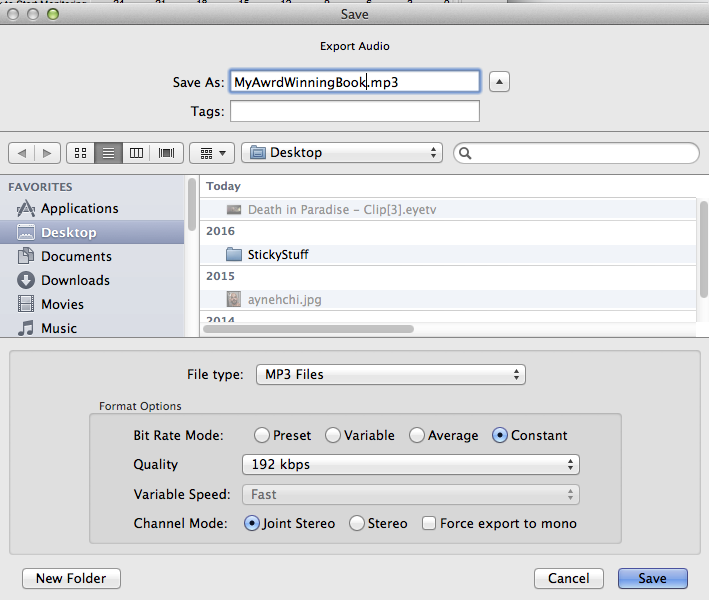
Then File > Export > Export MP3 according to these settings.
File Name Hygiene is good here. Upper case, lower case, numbers, underscore and -dash- are the only characters allowed. Dates are done in ISO format: today is 2018-07-26.