And as I recall, both eventually succeeded.
Koz
Yes. Yes it is. Although I’m sure to have much better luck doing it from Citrus Heights.
I tried to PM you but I can’t tell if it worked. I’ve never tried to share a file through Dropbox but am willing to try. I guess I need your email address for that. Or is there another way? Do you want a .wav or .aup?
Private Message worked perfectly. You are no longer under moderation, so your juju on the forum is greatly increased, to include sending PMs.
I’m not sure how to respond.
-
I’m digging myself a technological hole here in Los Angeles. I’m a dot-com, or at least I was until the host company started upgrading its servers. I learned quickly not to make changes “up there” until they finish. So I can’t accept or post large files that way…for a while.
-
I had a Drop-Box account. It may still be up there somewhere napping. I need to dig in the grown-up computer to find out.
-
If the file doesn’t go over 25MB, plain-old email should work to transfer files. I need to do the file size calculations.
-
You could shrink the size of the sound file with MP3 or other file types, but those all cause distortion and we would not be correcting an identical file to yours. MP3 is notorious for causing normally minor blue wave errors. “But,” you may well say, “ACX demands submission in MP3.”
That’s correct. And MP3 occasionally causes submission conformance errors. “How come my reading passes ACX-Check here, but ACX complains it doesn’t pass their tests when it arrives there?” If there’s any question, we recommend running your final MP3 through ACX-Check before you send it.
If this was easy, anybody could do it.
As we go…
Koz
20 min mono WAV clocks in at about 105MB, so no, it’s not going to fit in a 25MB email.
No more Drop Box for me and apparently, nobody is offering free 1GB storage any more as a loss-leader.
This is an explanation of Google Cloud:
For example, a 15 GB object that exists in a Multi-Regional Storage bucket for 12 hours will incur a charge of $0.0065 (0.026($/GB/mo.) * 15(GB) * 0.5(days) / 30(days/mo.)) in a month with 30 days – the charge is slightly lower or higher in a month with more or fewer days
Well.
That’s perfectly clear.
I’m out. Anybody else have any ideas?
Koz
How about if I send you a chunk instead of the whole thing? I imagine whatever diagnosis you give me I can then apply overall … whatever fix you prescribe, I can try on the entire chapter. What about compression and/or limiting? Won’t that take care of spikes where a character suddenly shouts?
Meanwhile, I’m going to tinker with my Chapter 2 – the one that gave me the impossible ACX check results – and see if I did something wrong in following your instructions.
Wow, you have some great help with these guys.
I have been through this teething phase myself recently. Take some time to watch a few of the many Youtube videos, you will not regret it. This series was done well: https://www.youtube.com/watch?v=p74WWrOgkfo
Some important take-a ways for me were to get the recording level set first. You can do short tests and either run the acx check to get an idea of the direction to go in but I really like doing it with the method listed in the above link. I think that is very important to get straight first then you can dive into the other two main requirements. Someone here said that your levels should be within %10 of where you need to be.
Second, the more I treated my too soft recordings with amplification, equalization, various plug-ins, noise reduction, etc…the more I sounded mechanical, like a robot. The more I cranked up the mic volume, the worse the room tone and outdoor noise and mouth clicks and other junk became more audible. A quiet room and the right levels are critical and you will sound most like you.
I know this is not technical advice but you have that covered from the great posts above. Sounds like you have the performance bit covered, that is the hard part. You will get the mastering down and be a pro.
What about compression and/or limiting?
Compression can affect the sound of the performance and mess up chapter to chapter matching. Limiter less so, but limiter has its limits (so to speak), too.
How about if I send you a chunk instead of the whole thing?
There’s no guarantee that any “volume event” will be included in the portion you send, and global corrections sent “blind” are just a really bad idea.
Tell you what. Open the raw recording WAV. Control-F to make sure the whole chapter is visible left to right. Take a picture. Now run ACX Check and take a picture of that.
If you’re going through Microsoft Paint, isn’t there a way to crop out everything that’s not useful? Like we don’t need to see the whole desktop just to read the ACX-Check panel. Search Paint instructions for “cropping.” It’s usually something like Edit > Crop > draw a box around the valuable part of the scene > OK. I’m totally making that up, but I wouldn’t be surprised if it was something like that.
Koz
I’m ripping through my head to figure out how you could have gotten such a wacky result using relatively benign tools.
When you read the chapter, did you leave a second or two silent? I think there is something in the ACX instructions to that effect. If you got a bad profile (Noise Reduction Step One), it can do some really frightening things.
The profile step is where you let the dog sniff the boot of the escaped criminal. Then (in step two) the dog goes charging off matching that smell to the human. If you got the profile step wrong, Noise Reduction is not trying to suppress the FFFFFF and other background noises, but could instead damage your voice or affect the overall volume.
Koz
And just to cover it. What are the tools you used and in what order? You can use one-word descriptions.
Record
Export a protection WAV file
…then what?
If you make any mistakes anywhere in here, then we could be chasing something that’s not broken.
Koz
Mega.co.nz
50 GB free. No software to install, javascript interface in the browser.
Right then. So there’s your on-line hosting company and the Paint instructions suggest there is a cropping tool. And I believe them.
Our goal is to avoid shipping the whole desktop like this…
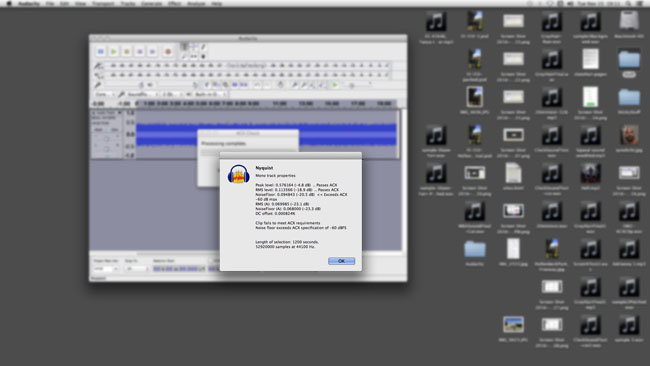
…when all you really needed was the ACX-Check INFO panel in the middle.
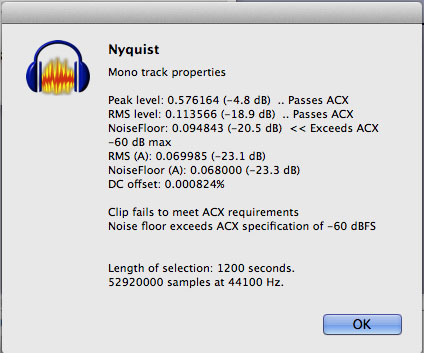
Koz
If you do post that failed chapter, it should be possible for us to give you a generic list of patches (hopefully, short) for all the chapters, assuming nothing additional happens wrong.
You’re on Windows. Did you go through the Windows setups to make sure there were no special effects or filters on your voice? Windows defaults to automatic noise reduction and interference suppression, given that most people are greeting each other from noisy rooms and not recording audiobooks.
Crank down this list just to see what’s there.
http://manual.audacityteam.org/man/faq_recording_troubleshooting.html#enhancements
This is a condition where you adjust your voice perfectly and the next chapter is slightly off “for some reason.” And then you can never quite hit it and can’t figure out why.
Koz
much better luck doing it from Citrus Heights.
For one thing, you’ll be missing the traffic noise on Venice and La Brea. I bet you don’t have Roscoe’s House of Chicken & Waffles a block away.
I guess I need your email address for that.
Maybe not. All you need is an identity and password. Some accounts are open. If you know it’s there, it’s all yours. You can target the delivery and then pull down the work when you’re done.
Do you want a .wav
WAV is good. Export 44100, 16-bit, Mono. That’s about what you should be exporting as a backup for each reading. Export that first file with stops, fluffs, gaffs and all. Do Not cut it or apply effects. That’s the file you go back to when the computer goes into the toilet (metaphorically) and takes your careful, precise edit with it. Not a problem, just open your raw WAV backup and pick up editing again. If you have to start over reading, you are violating good practices.
Koz
Um … my steps are record each chapter in its own file (1, 2, etc.), edit the .aup files, then once I’ve deleted the passing cars and throat-clears and things of that ilk, I save the edited file with a different name(1e, 2e, etc.). But I never export to WAV, I continue to work in .aup files until I’m ready to save a mastered version as Chapter 1, Chapter 2, etc. and turn 'em into upload-ready Mp3 (or whatever it is – I obviously haven’t gotten that far).
I only have 1.5 seconds of room tone at the beginning of Chapter 2, so your tip about adding additional time may do the trick!! On the website, ACX recommends “at least one second” at the beginning of the file and a couple of seconds at the end. I’m going to try making it two seconds, and also make sure I was following your “recipe.” My hopes are high.
There’s been a death in my family, if you are wondering what the gaps in my responses indicate. I’m not losing interest or going off on a bender or anything like that. There is just a sudden series of demands on my time as I help put together a memorial service and pick people up at the airport and things of that nature.
Onward!
Quick comment while I have a second.
edit the .aup files
Those are dangerous words. You are not editing the .AUP file. The .AUP file is the Project Manager for your Project. It’s text-based, semi-English computer programming, not sound.
This is a Project.
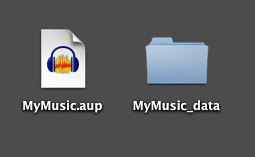
The .AUP file tells Audacity what to do with all that stuff in the _DATA folder. If you ever separate the two or rename them, the Project—and your show—will drop dead. Never change anything inside the _DATA folder even though it seems you should be able to. You can inspect the .AUP file with any text editor, but Do Not Save anything.
Koz
record each chapter in its own file (1, 2, etc.), edit the .aup files
Audacity Projects are “brittle” in the sense of being easy to damage if something goes wrong. The AUP file is created last, so if you close the lid on your laptop at the wrong time or Something Happens at the last second, you may create an orphan Project which may never open again.
Count the forum postings: “My project will not open…”
It’s a common error to edit the file you announced into, continuously ‘stepping on’ one filename until you’re happy with the work. This gives you no access to the original recording, and no good backup.
Closing Audacity erases UNDO, Projects do not save UNDO and we can’t take effects and filters out of a show.
It gets worse. You can’t open the submitted MP3 and make corrections without harming the quality of the work. MP3 creates some sound damage every time you make one and you can’t stop it.
So it’s very highly recommended to export a WAV when you get to the end of a chapter raw reading. Then, the obsessive version of that is copy it over to a thumb drive. Then continue to edit the Project. Your finished chapter should also be exported as a WAV before you make the submitted MP3. Audacity Projects are lovely, but they only open in Audacity, not any sound program as WAV will. Never do production in MP3.
I can’t help asking where are you going to get the raw, pre-edit WAV to send to us if you don’t save the original readings?
[silence]
There is an oblique way to do this without WAV files. Regularly save Projects under different names. If everything hits the fan, you can open the last Project.
Koz
I can hear you asking yourself, “Wait, ACX requires submission in MP3. What’s wrong with this picture?”
ACX requirements are 192 quality (or higher) MP3 and highly recommended in Mono, not Stereo. This quality is far higher than minimum for listening on your Personal Music Player and will tolerate some production and file management without the damage becoming objectionably audible.
It’s a business decision. ACX has to pay for the servers that contain your work. MP3, even at higher quality is much cheaper to store than WAV.
Koz
Open the clip in Audacity.
Effect > Normalize: Remove DC, Normalize to -3.5dB > OK
Effect > Equalization: LF-Rolloff for speech > OK. (this is a special download)Listen to the first two seconds with the volume advanced a bit. Do you hear the little pencil drop at 1/4 second? This hold your breath “silent” thing is harder than it seems. That 2-sec segment is called Room Tone.
Drag-select from 3/4 second to 2-1/4 seconds (avoiding the pencil drop)
Effect > Noise Reduction > Get Profile > OK.
Select the whole clip by clicking just above MUTE
Effect > Noise Reduction: 9, 6, 6 > OK.Analyze > ACX-Check [read it] > OK.
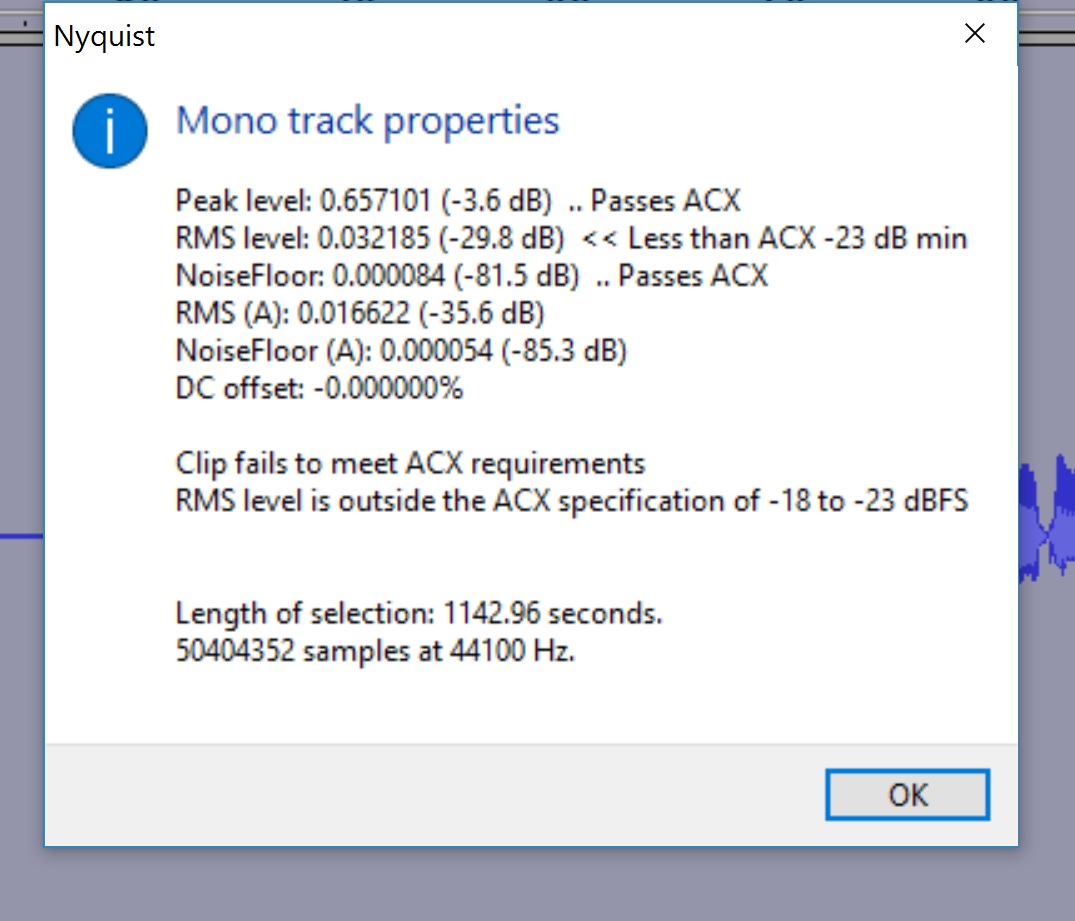
Sorry for the delay … I’ve been busy with family stuff. Memorial service is tomorrow and then I should be free to concentrate again! So here goes. Chapter 1 passed the ACX check. I applied your recipe (above) to my Chapter 2 and here is the result I received. Suggestions? I await your words of wisdom …
Yes … that. That’s what I’ve been doing. I can either give you a WAV of my edited-but-not-mastered read, or my raw read, but I’d be totally embarrassed to send you the one with the giggles and burps. So if there is still some utility to your having it, I would rather send you the former than the latter! I’m still hoping you will hit on some magical way to amplify my recordings without ruining anything else … but if you PM me your email addy, I can invite you to a WAV file in my Dropbox. Or so I am told.
Yes, post an edit or cut performance without any effects or filters. That’s more representative of what you’d be doing in an everyday process.
Your results are perfectly ordinary. Low RMS (loudness), but the other numbers pass or exceed specifications.
The top two numbers run in step unless you add special effects. For example, to make the RMS pass, you would need to add 7dB of volume (-30dB > -23dB). Obviously, If you made the peaks 7dB louder, they would not only fail to pass, but destroy the show with distortion.
This is the exact place we need to investigate the original recording. We can struggle at length with filters and effects, or we can find what performance error caused this in the first place. This is the Gunshot Problem. One brief gunshot in the middle of a perfect 20 minute reading will make mastering a nightmare.
Koz