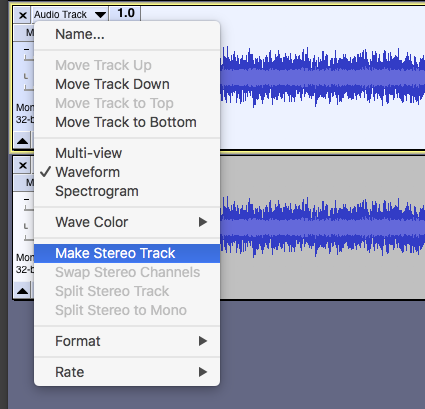
I just updated Audacity, and I am trying to make a mono recording into a stereo track. I am following all the normal steps (select track → edit → duplicate) except there is just one problem. Even though I do have both tracks selected, the ‘Make Stereo Track’ option in the drop down menu (on the top track, which is the original and not the duplicate) is greyed out.
I’m using Windows 10, Audacity 3.0.3.
Thank you for taking the time to read and help me out.
Thank you so much, this actually worked. I believe it is a true mono track, since I used a Zoom recorder with an XLR microphone that only goes into one side, not both. However, I did have to split the track to be able to copy and paste it into the new track. So perhaps it is not?
Could you post a screenshot showing the greyed out menu item and the whole of the Audacity window? We “may” be able to spot the problem if we can see it.
I had this issue today after splitting a stereo track and making edits on one of the tracks.
I was able to resolve it by adding a new mono track below, checking to see if it was no longer greyed out on the second track from the top, and then deleting it afterwards.