Hi All, absolute beginner here and would appreciate your patience and help.
I’m trying to record Bass lines over an existing project while using headphones.
Recording along with the playback is recording correctly (recording latency correct) however the signal from my Bass to the headphones is late making it difficult to concentrate on the job at hand.
Any advice would be gratefully accepted.
Al.
There are audio interfaces (or USB mixers) with direct hardware monitoring, where the monitoring doesn’t go through the computer. IMO, direct monitoring is the best solution. (You can still monitor the backing track from your computer at the same time.)
Pro interfaces and pro DAWs support ASIO which is supposed to be better for low latency, and it’s easier to adjust the buffer size (which directly affects latency) but it can still be a challenge.
Hey Doug, thanks for your prompt reply. I’m using a Scarlett 212. I’m trying to record silently (hence the headphones). I’m using the following setting
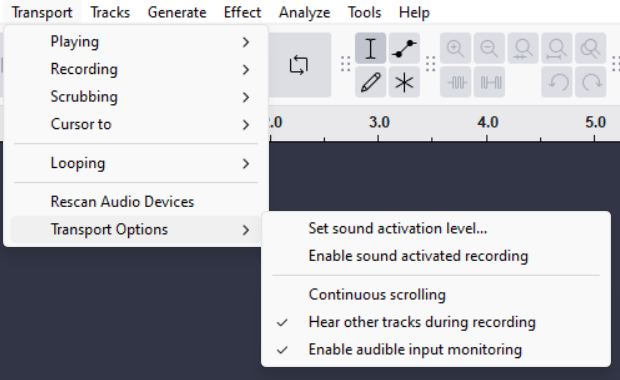
Is this correct?
Cheers,
Allan
Plug your headphones into the Scarlett.
Perfect!
Turn ON direct monitoring on the Scarlett.
In Audacity, turn OFF Enable audible input monitoring.
You might only hear the bass in one ear depending on if you are plugged into input 1 or 2. I don’t know those details about the Scarlett… Or there may be a configuration software for that supplied by Focusrite.
Legend!!!
Thanks so much.
Had to fiddle with the “Direct” button by pushing it a few times till everything lined up the way I wanted it.
Again, many thanks for your prompt and accurate help.
Regards,
Allan
This topic was automatically closed after 30 days. New replies are no longer allowed.