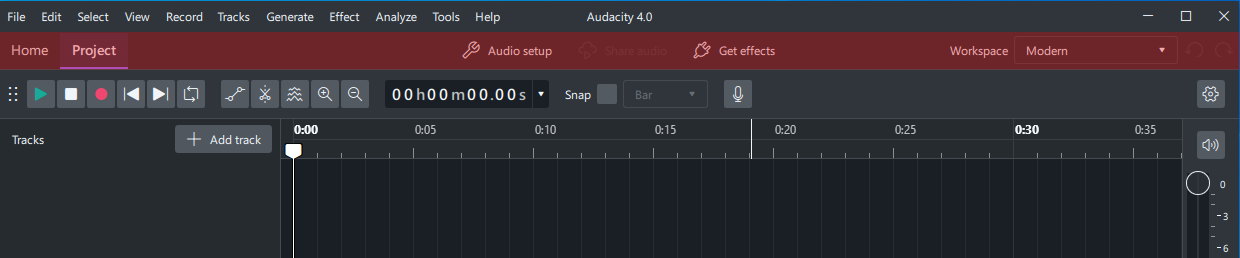
The “home/project”, “Share Audio”, “Get Effects”, and Workplace selector buttons are given a ton of space for buttons that basically never get used (in my case at least).
Is there a way to get rid of that whole line and turn audio setup into a button like it was before?
The “get plugins” thing should be inside plugin manager, why is it on the main screen?
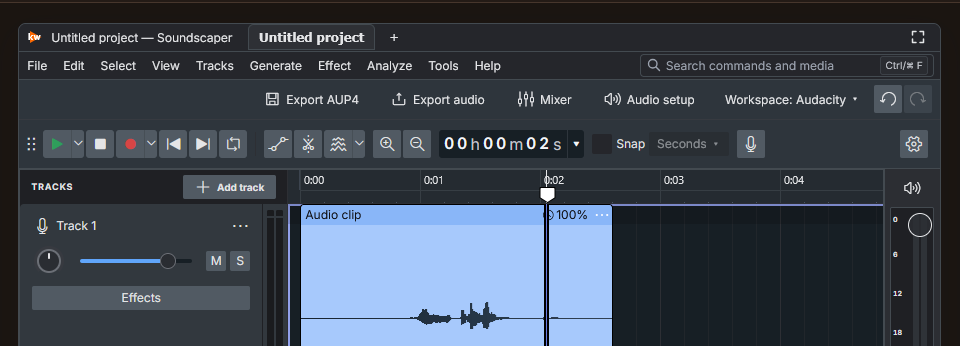
FWIW, this bar is supposed to host toggles for various panels in the future, like mixer, piano roll, that sort of stuff. In Soundscaper, my Audacity 4 port to the web, I have put exporting and the mixer in there instead
Eeh, fair enough. Kind of an eyesore. Still, the Plugin Manager should have the functionality of getting plugins, even if there’s a button for it. A little confusing that they are completely separate.
Having a whole extra line for stuff like this feels weird, I’d rather all of those were same dockable widgets as the other buttons.
If I ever need one of those functions, I can use the standard menus.
I don’t mind if it’s enabled by default and used for ads, as long as there’s an option to disable it somewhere. I think most people never change the defaults, so the ability to hide this toolbar won’t have a big negative impact, but it would make some people happy.