Good morning,
I Know that my post take a lot of your time. Excuse for that. But it’s like that we can go ahead.
I answer to your questions:
Yes when Audacity help is on local, in help it remains on help on the internet.
My browser is Internet Explorer 8, and I am on XP
Here is the URL Where you can get my copy of the directory I have on my computer. You will see the Zip File of Audacity and to get it , click on “telecharger” in french.
On your internet site there is a very good translation in french and I will copy it on my computer because in august I will be in a location without Internet. At home, no problems with the english files if not too technicals.
Have a good day
Your zip works fine for me on WIndows 7 (not tested on XP yet). IE8 opens the locally installed index.html when I click Aide > Manuel in Audacity. Does it make any difference if you rename your “Help” folder to “help”? That is what the folder is called if you install the 1.3.12 exe or download the zipped help from us.
Hello,
I’ve renamed Help for help but no result. What ever I choose in parameters: Local or On internet, in the help on always have “help on internet browser”, but if I put local it’s no reponding. If I put “On Internet”, It’s go the the Internet Browser. It’s a curious thing! And now, what to do? Did you hear somebody else about thaht?
If you have a possibility, test it on XP. I’am going to ask some others on one another forum to test .
good morning,
The alone one who answered to me is on 1.2.6 version. he has help inside the program; he find only a file nammed help and no directory nammed help. the help he get is out connection and of course in english.
1.2.6 is irrelevant - it has a completely different help system.
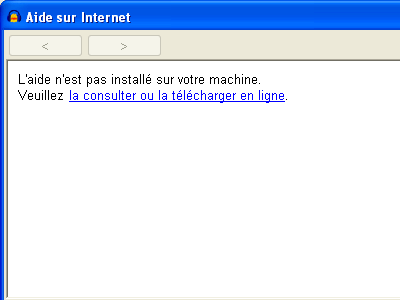
I’m finding it a bit difficult to understand you again. When you set Preferences to “local” and click Aide > Manuel, do you see this dialogue - yes or no?
Thanks
Good evening,
I am so sorry!! No I have nothing coming when clicking on help. The link is out of work for the two helps quick and manual. I’ve never seen the windows you have copied. If it was, there was no difficulty to download it.
I have tried more than 3 times by uninstalling , reinstalling, downloading help. without result. I’ve tried also without firewall, nor antivirus.
I can understand you cannot loose all that time for me. and if necesary, i’ll stay with the internet help
Excuse me for tat plong post.
Have a good night
Well clearly something isn’t correct. So you are saying that when clicking the Manuel or Aide rapide menu items, IE8 goes to the live web page when preferences are set to “Depuis internet”. But when the preferences are set to “local”, nothing happens?
Is this behaviour the same when IE 8 is closed before you click the menus and when it is already open?
If you go to helpmanualindex.html and double-click it, does IE8 respond? If not, you may not have html files associated with IE8 (if you make IE8 your default browser that is one way of achieving that).
Hello,
All is exact. When on local, nothing when clicking on help, even if the Internet connection is closed. On interface with "on the web, all is OK, I’am going to the web help.
When going to the directory audacityhelpmanual and when clicking on any files htlm, the file is opened immediatly. The association is good.
On my opinion, it’s only the link in the help is not operating. Why ?? I cannot have the response. Maybe because when I put in the interface “internet” or “local”, in the help I have always “on internet browser”
My solution is to go by myself to the directory to open the file index.htlm.
It seems so, but no-one else has reported it and I cannot reproduce the problem. Do you have any other web browsers installed? Then you could make them the default browser and see if you have the same problem.
I don’t understand what you mean by that. The text in the menu item is fixed “Manual (in web browser)” or its translated equivalent. The menu text does not change with different preferences settings.
HELLO,
I’m going install Audacity on an another computer with englih language and i’ll see if it is working well.
So, the text in “help” is always the same. I beleaved it change when changing the help location. If it’s impossible or too difficult to repare, I’ll put a link on desktop to open helpmanualindex.html, and it will be right.
If nobody else ask for that, i’ll search in my computer what happened .
Don’t warry anymore, if there is non solution.
Thank’s for your attention.
Hello Andrews,
I’ve received today un notification for a new answer on that post, but no other reply.
For my problem, I’ve stopped to search. I’ve put a link on my keyboard to reach the help manual. Ans so I’ve finded it very fastly. It’s not the best but It’s enough for me; until the next version.
Regards