The cursor in the timeline (playback) view is so small that it is difficult to see. I have already set Windows to use a big white arrow for a cursor, but Audacity ignores it. How an I get a more visible cursor in Audacity?
There may be some information of interest to you here.
Thanks for the tip. I haven’t programmed in 25 years, so I tried to take the easy way out, as described here:
under “Editing the imagecache.png directly“.
I downloaded the imagecache.png shown and edited “Bitmap:IBeamCursor” (at coords="1,363,32,394) to make the I-beam much larger (without changing the containing cell), since an I-beam cursor is what I see in the timeline view.
I placed the edited file in %APPDATA%\audacity\Theme\Custom as described here:
but after restarting Audacity and selecting the “Custom” theme I saw no change.
Just to be sure, I also modified “Bitmap:IBeam” at coords="1,57,27,83 in imagecache.png, but still saw no change.
A copy of the edited file is attached.
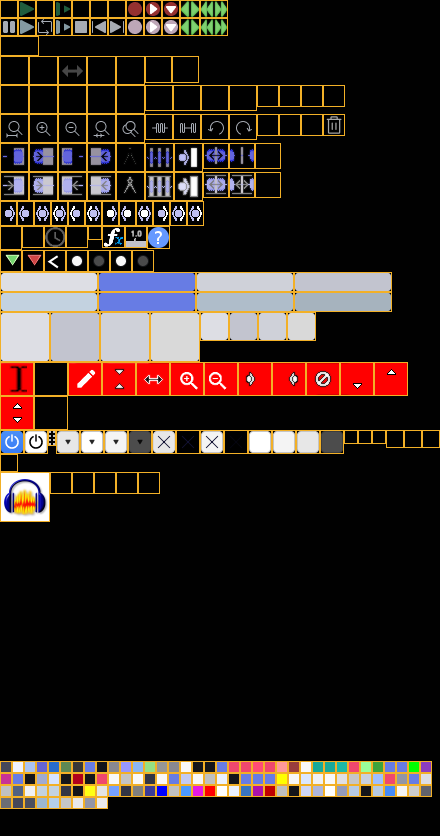

What am I missing?
I am completely out of my depth here. It could be that a cached version of Audacity with the old cursor image is still being loaded into memory. Windows keeps cached versions of memory images for faster subsequent loading. Even restarting Windows may not flush out the memory image. I think that is called Fast Boot. There is a way to override this, but I don’t remember for sure what it is. Maybe something about holding the shift key down when restarting Windows?
And after all that, Audacity may have been compiled differently for the version you have or the code for that subroutine was changed, and nothing you try to do will change anything.
Thanks anyway, but turning off fast boot and (cold-) restarting didn’t change the behaviour.
I am not prepared to recompile Audacity just to access the hidden “Theme” menu described under:
It would be nice if there were a command-line argument to enable it.
The PNG file I downloaded from:
is identified as belonging to v3.6.x. Since I am running 3.7.7 that may explain why editing it doesn’t work for me.
Still, addressing sub-bitmaps by coordinates within one big PNG file sounds like a recipe for disaster.
It would be nice if each graphic element resided in its own file.
Well, I can address that.
Putting all the graphics into one big file is something most programs of any large size does. In fact, the compiler has controls built in to map them for the developer.
It means that all graphics can be loaded from a single source. Loading each one individually would require a file handle and an index in the memory stack for each one and eat up a lot of memory.
Thanks for the explanation!
The struggle with cursor visibility in Audacity on 4K displays is a known scaling issue, as Audacity uses its own internal drawing engine for the timeline “playback line” rather than the standard Windows system cursor. This is why your Windows accessibility settings (like the big white arrow) don’t carry over into the track area.
This topic was automatically closed after 30 days. New replies are no longer allowed.