I’m using Audacity 3.7.7. I can’t find any setting that activates multi-track selection. I’m working on a stereo file, so obviously most edits should be applied to both channels.
Thanks for any insight!
I’m using Audacity 3.7.7. I can’t find any setting that activates multi-track selection. I’m working on a stereo file, so obviously most edits should be applied to both channels.
Thanks for any insight!
Thanks, but I don’t think that addresses my question. When I drag-select a region of a waveform, I want it to be selected on all tracks. For example, if you have a stereo file and you want to cut some silence out; you’d drag-select the silent region and press Delete. Or you want to select a region and adjust its volume on both tracks.
Right now, Audacity only selects material in one of the tracks, regardless of where the cursor is.
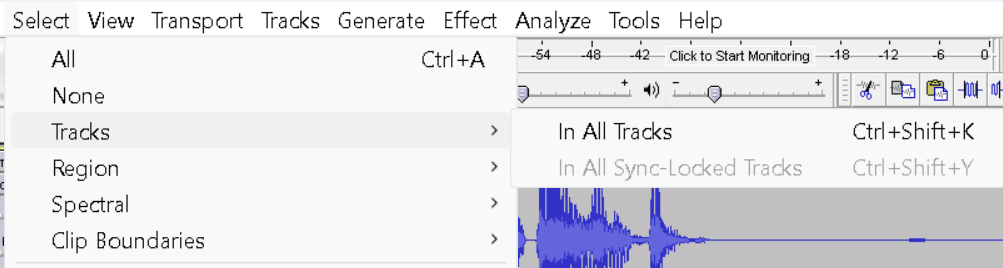
Once the region has been selected in on one track, Ctrl+Shift+K to extend that selection to all tracks
Thanks. But… really? After every selection you have to press a three-fingered hotkey to do what every other waveform editor does by default (for good reason)?
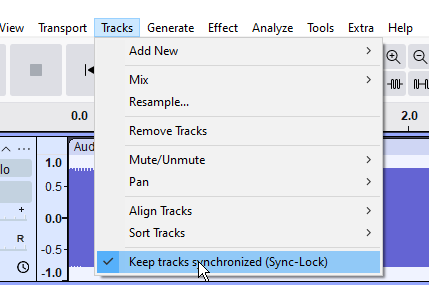
Can sync-lock a group of tracks then the selection will be applied to all of them.
Also can also drag the cursor across different tracks …

Thanks. The “sync tracks” feature (which I can’t find) does not appear to be what I’m looking for anyway (since it would only apply to operations that change the length of the material), but the dragging across multiple tracks seems to work OK and reasonably efficiently.
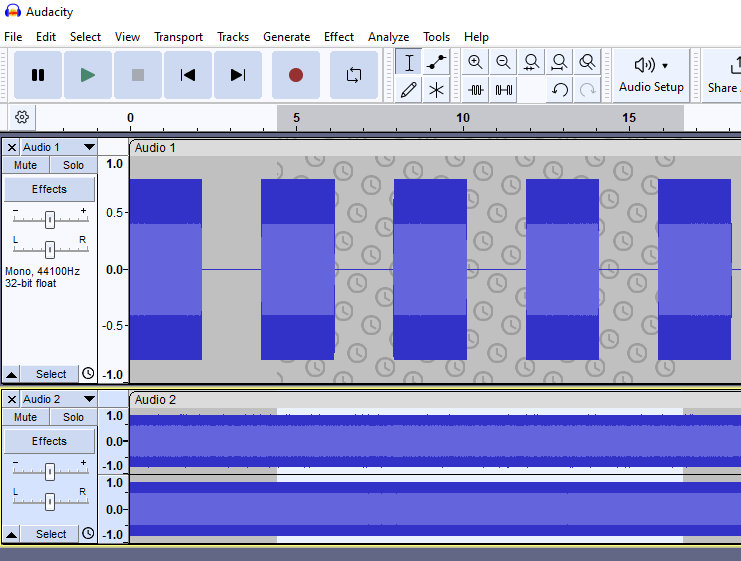
One enabled, you see the little clock symbol (in the bottom left corner of the screenshot) on every track header. Or you select track headers one after another to get all tracks selected.
Thanks! But that actually doesn’t do it. For example, if you make a selection with this mode on and silence it, it will still only affect one track.
Try dragging the mouse up and down as you drag left and right.
Thanks. Trebor did suggest this a while back (above) and it works sufficiently well. Although it might be a pain if all tracks did not fit on the screen vertically.
up to version 3.6 the UI made it clearer which tracks are affected, displaying the wallpaper with clock symbols for the tracks that are kept in sync, but not affected by non-cut/add edits
Later versions don’t make this distinction any longer 
This topic was automatically closed after 30 days. New replies are no longer allowed.