I am using audacity on my computer to record the meeting from Microsoft Teams. I have configured host WASAPI and recording device my head set ( loopback) works great. I have all participants voice EXCEPT my own voice is missing. How do i include my own as well. thank you
Generally, Windows only allows you to record from one thing at a time. But you can play more than one thing and then record everything you’re hearing in your headphones with loopback.
There some utilities that may be able to work-around the limitations:
VB-Audio
Virtual Audio Cable
I don’t have any experience with them. I’ve just heard of 'em…
My “easy workaround” would be to set up a second computer for recording. For this second computer, everyone is “other participants”, even you.
What he said.
Make sure this second machine either doesn’t have a microphone, or has one shut down.
Fair warning that trying to do this trick with software and/or fancy-pants apps is not the most stable idea. This job is such a pain in the neck that Zoom used to, and may still, record all your production voice channels on request and provide sound files.
If you have a quiet, echo-free room, you can play the conversations to computer speakers and set up your Phone to record the room and your voice live. I use iPhone Lossless Voice Memo, or stand-alone sound recorders. If you go the iPhone route, make sure you can transfer the sound files to your editing machine. Also make sure you can record in non-compressed format. MP3 recorders need not apply.
No, I don’t have illustrations. Later.
Koz
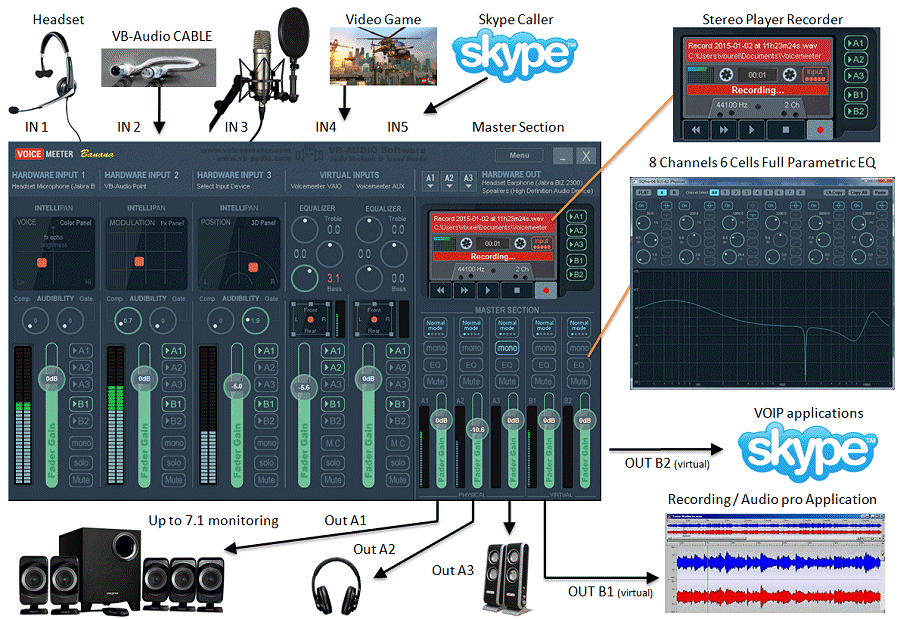
Skype? Really?
The Skype reference shows it’s mature software. 
Apparently it works with Zoom calls … https://youtu.be/nIpt3jF0Nds?&t=12
If you want to record a conversation where the other person is on a phone call, VoiceMeeter is the way to go. You can set it up so the caller only hears you and sound effects (and not themselves), you only hear them, and Audacity hears it all in separate tracks.
There is a tutorial on Pride48.com/training if you want to learn how to set it up.
This topic was automatically closed after 30 days. New replies are no longer allowed.