Help locating folder after saving project and troubleshooting “error saving project” error message

I just downloaded the latest version of audacity currently 3.7.5. I like the new layout, but I believe I’ve run into a problem and want to rectify before I lose any crucial recordings.

I think it all started when audacity defaulted me to saving a project on the desktop rather than the audacity folder. It somehow for some reason happened that way. I did soon after re-save the project to the audacity folder. But now, it seems that when I try to save a project and click “save as” it tells me,

“error saving project. The project was not saved because the file name provided would overwrite another project. Please try again and select an original name.”

So I’m thinking, “this must be some default option I can change in the settings” but I don’t see any settings to change it. Anyway, I catalog my updated recordings by date, but I don’t want to keep doing that because it takes up space on the hard drive. But I’ve noticed something strange every time I save a new recording.

Originally when saving a project, I’ve noticed audacity creates two separate entities in the audacity folder. An audio file with the name I gave the project, and a folder filled with a bunch of important stuff with the name I’ve given the project. Both entities until now have always been saved in the audacity folder. But now, and I don’t know if I did something wrong, and hopefully somebody can help me assess the situation, but I don’t see a folder with all the important stuff being generated along with the audio file. So I only see the “audacity file project”.

all past projects have their two entities still in the folder, it’s only new projects that I sense are going to create problems.

What steps do I need to take to make sure everything is in their right place and nothing is lost? Am I right to assume the error message I received is correlated with the folders not being saved in the audacity folder?

Another variable in this mystery. Currently, I see two audacity project files with the same name “name” and the date in the title as 10-3-25. So that’s two “audacity project files” with the same name, but different file sizes. One was recorded at 1:26am this morning with a file size of 209kb and the other was created after the software update at 10:02 pm this evening with a file size of 671,640kb. I wonder if there was a split due to the new software update? Anyway, there is a correlating folder in the audacity folder but its creation date was this morning at 2:57 am. I can only assume this folder belongs to the recording I created at 1:26am this morning.

Just to recap, folders aren’t being generated in correlation with the corresponding audacity project files, and I think the error message of not being able to “save as” is related to it. Please help :slight_smile:

First, you seem to be using an old version of Audacity. Recent versions only produce one single project file with “.aup3” extension.

Second, it seems that you have disabled the display of file extensions in your Windows settings. This is a very bad idea in my opinion. So you cannot distinguish between project files, exported files, temporary files, etc - because they all share the same name before the file extension.

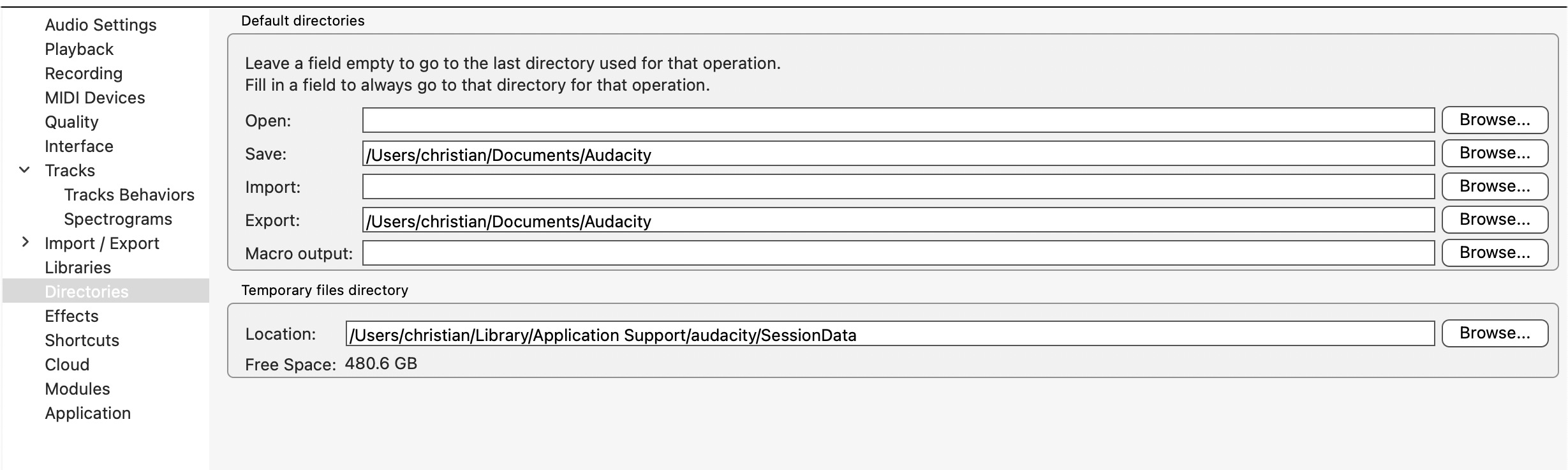
Third, you can - in the settings for Audacity - select where to save project files and where to export your music files.

A project file grows if used. It contains all changes you made to your project, so that they can be undone.

So first, let me go in order- I just downloaded 3.7.5 - is that not the latest version? Before I was working with, like- 2.1.3 or something. The older version did as well only produce one .aup3 file, but it also created a folder with a bunch of other folders filled with AU audio file, VLC in my case. Do newer versions not create these folders anymore?

second- how do I “un” disable?

.aup3 is the format for Audacity 3, it does not need an accompanying folder. Older versions produced .aup files (without the 3!). In .aup3, everything is in the same file.

Your second question is basic Windows knowledge. Or you ask your favourite search engine, for example with these keywords:
windows show file extension
You will probably - among others - find this link.

Okay, I think I understand..

What about the error message? How do I make it so it so I can overwrite an .aup3 file?

I do not know why you can’t overwrite the .aup3 file. But I rather guess that you are trying to overwrite one of Audacity’s temporary files - which will be deleted automatically when your work is finished. You probably cannot disinguish them from other files because you had hidden the file extension.

However, as long as you are editing the same project, you can always issue a “save” command every now and then - and your .aup3 file will then contain all changes until the last save. And Audacity asks you to save when you quit the application.

The .aup3 file is not a sound file. To produce a sound file you need to “export” your finished work - in any format you wish, .mp3, .wav, .aiff, etc.

That’s unfortunate. Let us roll with the guess that I’m trying to overwrite the “temporary file”. The temporary file I’m trying to overwrite, is in fact, the .aup3 file. Should I not be using this method when saving projects?

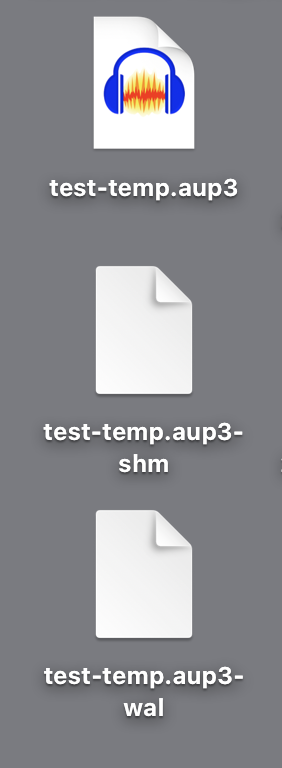
Are you perhaps getting confused with the Audacity temporary production files, the SHM and WAL files?

I forget what they do, but they’re not part of the finished aup3 show. They vanish when you close the production or Audacity.

Just a note, are you doing all this work on the computer’s internal drive? Audacity doesn’t much like running on foreign, external, or network drives. If you must go outside, that’s what the new audio.com drives are supposed to do.

Koz

Romonschun guessed it was temporary files I was trying to overwrite. The file I am attempting to overwrite is an “Audacity file project” which is a .aup3 if I’m not mistaken. Those are the files that are saved by default to the audacity document folder. I would open a recent project, Work on the project, then when I made progress on a project and wanted to save it, I would click “file”, “save”, then “save as” as a habit, and would from there either change the name or or keep the name. I just don’t understand why the program would prevent me from overwriting an existing file under the same name. I’ve never seen that before. Sure they might warn someone that you would overwrite it, and still give you the option to continue or cancel, but never one from overwriting. Is that error message normal? Is it an error in the software itself? What’s the point of it? Lol

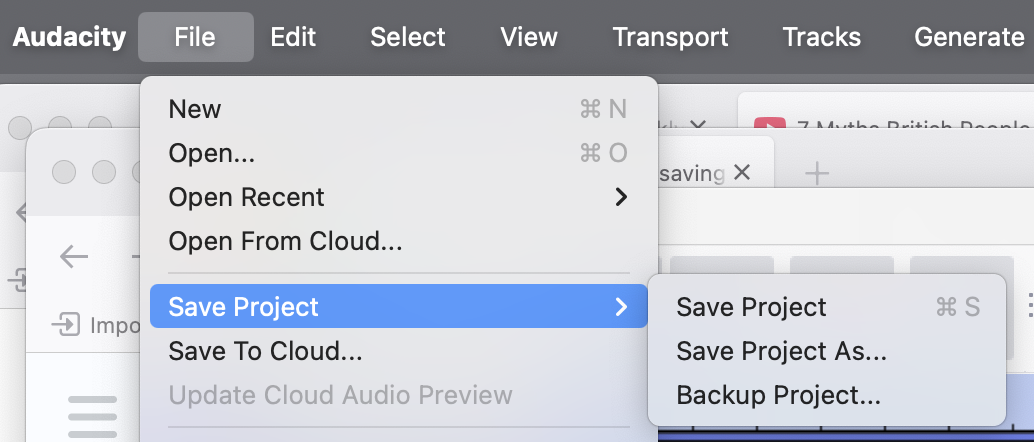
I think I may see the problem. “Save Project” is expecting to apply changes to your existing Project and then stay on that Project. “Save Project As” creates a second Project and then continues editing the second Project. Save Backup creates a new Project but then continues editing the original. So Save Project As the original filename is an editing mistake. Audacity is trying to prevent you from accidentally damaging your show.

Koz

Mmmkay. An editing mistake on my part I assume… so I should just choose “save project”

And just so I understand the situation- Audacity’s old project format used a multiple file system that would catalog parts of the projects in a separate folder, which is no longer used today in 3.0 and beyond- And any previous projects saved using older versions will automatically be updated to the new save format of .aup3 once that file is opened and saved in audacity 3.0 and beyond?

This is from an earlier posting.

=====================

Audacity doesn’t save aup sound files. Audacity saves Projects which have an .AUP Project Manager file and a _DATA folder of the same name with the actual sound in little snippets.

Projects will only open when the .AUP file and the _DATA folder are in the same location or folder.

The newer Audacity versions use the .AUP3 file which is everything in one file. It was very common for people to assume their .AUP file was the whole show and delete or lose the _DATA folder. That is the death of the show.

=======================

I don’t know. I’ve never used Projects for anything. I don’t think they’re very stable, as you’re finding. I Export all my works as perfect quality WAV (Microsoft) files — including backups.

I’ve never lost a paid job.

Koz

You “export”? You convert your project into this “perfect quality wave(Microsoft) file” and continue editing your work in audacity? Or???… Isn’t “exporting” what one does when they have what they think is a complete work? I’m always in the editing phase when it comes to my projects. Is it better to export and continue editing than to save as?

…he said, horrified. I’m going to wear my obsessive engineer hat for a second. Every time I shoot a live production, I immediately export the work as a WAV file.

This was a radio interview with one of our company’s producers. The station recorded the host voice and I recorded the guest. They talked to each other on the electric telephone. The orange microphone and Audacity on the left did the work. I still have that WAV file. The RODE thing on the right is the backup recorder.

We shipped the WAV off to the station who proclaimed it “practically perfect in every way.” We will note that WAV files can be opened by almost anybody, at any time, on any machine.

It is strongly recommended that you export WAV Edit Master files of your audiobook chapters even though the ACX company only accepts MP3 chapter submissions. For some really magic reasons, the MP3s can’t be edited.

What you do in the middle is up to you. You can certainly create a Project and continually update it as you go (Plain Save Project). But know the first time your computer crashes with your Project open, we might tell you that you need to start over with the original WAV files—if you have them.

It could be said that this is a good place for Save Backup.

Koz

Niiiice.

Ok, update. So I worked on my project for a bit, went to file>save project>save project. Thinking I would be in the clear to close the program then and there, which I did. It didn’t give me a warning about not saving, which I thought was a good thing. Then I opened audacity back up, went to file>recent files> clicked on the file I’d just worked on, and this popped up…

“Project Recovered

This project was not saved properly the last time Audacity ran.

It has been recovered to the last snapshot.”

The files’ there. I’ve open and close the program a couple times and the file still seems like the file I attempted to save, but it said I hadn’t saved it properly. The message didnt come up again. So I worked on the project some more. Saved it a couple times after make small changes. No “project recovered” pop up, but then- blast! It happened again. I tried opening the file differently, from file>open, to file>recent projects.

Lol how do I stop this program from telling me I’d improperly saved it when I clearly did save it when I told it to. The timestamp shows when I saved- I was looking at the clock.

I also tried saving by attempting to close the project after making a change and it asking if I wanted to save, which I did. But I don’t like the idea of going with that option. So risky! I’m sure we’ve all had at least one instance of accidentally clicking “no” when asked “Save project before closing?”

Where did you get it from?

Have you ever done a Windows Clean Shutdown? Regular Shutdown and Restart don’t reliably stop and clear everything. They are designed to rapidly work and make you think everything is OK. Clean Shutdown takes longer but reliably closes everything.

Which virus protection do you use? Have you ever done the thorough virus scan that takes all night? I think you should do that.

I think instead of that, I would do File > Open and make it go down the file pathway rather than the shortcut “Recent”. I think you may get a surprise that the files are not where you think they are.

I think Audacity volunteering to save a Project to your desktop is a Red Flag.

How do you connect to the internet? I use hardwired connections for almost everything in the house. I’m typing this in bed which is the only time I use the WiFi. I also close the connections when I stop using them. See if Audacity still works if you open it with your internet connection disconnected or disabled.

And the last note. This is a new machine where I did not install Audacity 3.7.5. I’m using the earlier 3.6.2.

Koz

I’ll try a clean shutdown when I get home.

I’m never connected to the internet. Don’t have WiFi. Unfortunately, I had to use the internet because I wanted to play a GarageBand file from my phone to audacity on my windows pc. I reluctantly had to update audacity using someone else’s wifi to download the plugin or make the extension compatable? Anyway it didn’t work. I don’t know how to convert a .band file into another file that will play in audacity. I don’t see a conversion option on my phone. If anybody know how to do that that would be helpful too

Another Red Flag. There is an odd series of Forum Posts where someone will complain that a Project File Recovery failed. Over many questions and answers it turns out that the poster has been saving damaged projects for centuries and the real question was why this particular one failed.

Most users have zero Project damage and recovery. I’m not a great user, but I’ve never had a Project crash.

Do you know if you have a spinning disk hard drive or Solid State? Have you ever performed a defragmentation?

https://www.techbout.com/optimize-defragment-hard-drive-in-windows-30898/

When you’re using a hard drive, it may seem that the computer just pushes the file onto the drive and that’s that. That may work when the drive is new, but over a long time of putting files on and taking them off, clear spaces on the drive get smaller and smaller. The computer has to wack up files into smaller and smaller pieces to get everything to fit.

My silly illustration is a neighborhood library getting a book that’s too large to fit on their shelves. So they rip it in half and put half here and half over there. When you want that book, the librarian hands you a listing of where the two pieces are.

If you do decide to defragment, leave a lot of time. If you have a crowded drive that’s fragmented, this could take days.

And because I forgot earlier, how much free room do you have on your machine? All of these problems could be traced to running out of drive space.

Koz

And Suzy Sunshine will note that you could have something actually broken.

Koz

It used to be when a hard drive started to fail, you would get error messages telling you that.

These days, the drives are “smart” enough to repair the data, move it to new sectors, and quarantine the bad sectors, all without telling you anything. So the failing drive gets busier and busier, silently fixing everything until it catastrophically fails and you lose everything.