I’m not sure why you are saying it is quiet. I always listen at 100% to be sure it is clean even at full volume and some of these have sounded way too loud even at 50%.
Any suggestions on tweaks to the processing steps instead please?
I would have thought we got past this a while ago.
You can make a successful recording without listening to it.
It’s critical that you make the sound meters, lights, and flashers on your recorder happy while you’re recording. They insure the correct balance between, overload (too high) and noise (too low). The bouncing sound meters in Audacity are the digital version of the older analog meters such as the two rectangular tan ones on my old field sound mixer.
It’s not recommended, but I have made successful sound recordings without hearing a thing, just by using my meters. Apparently, you’re trying to do it upside down. Everything by listening and not use the meters at all. That’s very dangerous and why nine time zones of puzzled looks.
When you announce in the booth, you should be watching the Audacity sound meters out the corner of your eye to make sure you’re in the general ballpark. You can make the meters larger by clicking on the right-hand edge and pulling sideways.
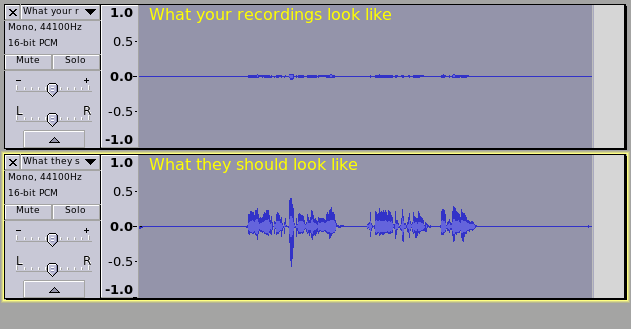
If you can’t see the meters, then it’s a lot harder. You have to make recordings at various volume settings and loudnesses until the meters bounce at about -6 and the peak blue waves just tip up at about 50% (0.5) when you perform. Like in Steve’s pix. You can do 50% either up or down. This level setting is not optional. Many of the following steps depend on getting this one right.
Then, after you get a short performance like that, post it. I can’t stress enough the volume settings and announce performance are adjusted to satisfy the sound meters and blue waves, not your headphones.
thanks. I have mentioned in a few of the recordings where the levels were hitting. They were highest when using my gaming headset microphone but as I said (in the recording) presumably that is due to being so close to my mouth.
Otherwise I can’t seem to get them close to -6 without turning the volume high enough to pick up too much of whatever this new ambient noise is.
Yes, I too thought I was way past this. Did you listen to the produced piece from Audible? How did that sound?
My apologies, Gale, I thought all of the questions had been answered by myself or Koz.
Looking back, I’m assuming you mean the questions regarding the microphone. No, it doesn’t pre-date 2007. It was bought in 2013. I think that is the only one which wasn’t directly answered but yes, I’ve tried the original cable but reverted to the one recommended in this thread which has a choke on it. I haven’t contacted Blue since we’ve seen the same result with my gaming headset microphone which seems to rule out the Blue. And I also posted recordings in all three switch positions. Am I still missing any? I’ve been trying so many things so forgive me if I have.
I’ve also tried a recording with the old Windows sound recorder and the new Windows 8 one. Neither seem to give any options for how the file is saved and Audacity cannot read the Windows format.
The latest sample goes from microphone at 70 all the way up to 100 and the levels will not go past -24. That seems to have been the case all along which (I assume) had some bearing on how Robert et al determined the steps I needed to use in processing (such as the -24 noise reduction perhaps?). They were always very quiet when I first listened back for the editing step before the mastering.
I just did the mastering of that latest sampling here in my home office (not in the booth) and although, as stated, I don’t reach past -24 in the initial recording, after mastering I’m NOT hearing the noise!
Elusive extraneous eradicated?
I’ve added my mastered version.
Please have a listen and let me know what you think.
Wait. Which track are we looking for?
What kind of noise was it? What’s the possibility that it’s only apparent on playback? We had several recent postings from others where none of the elves could find a thing wrong with the work, and it turned out the performer had a playback problem and the files were fine.
You may not need to. I sent the final clip through what measurements I’m sure of and I think it passes very nicely. If there’s a complaint of low volume at any time, just use the boosted volume in the clip, or split the difference.
Peaks are almost exactly -3dB. Just by observation, the noise level bumps along just lower than -60, and the volume is -14 to -18 and I think both of those fit the specification (I need to go and check). There is a discussion about how that last tool works and we may not get exactly the same numbers as ACX, but we’re working on it.
So what kind of noise did you have? Describe it. Do you know what cellphone interference sounds like? I have to make a clip of that…
Our insistence on live recording peaks at -6 come from battle scars of what happens when most people don’t. Low volume and noisy microphones do not get along and pretty much guarantee a failed submission. Except in your case where low volume doesn’t seem to matter.
I don’t think we entirely understand it, either.
I understand from Paul that ACX has provision for a 15 minute test clip, so you don’t get stuck recording a whole novel only to have it crash at the acceptance step.
I actually just submitted an audition as well, just for the hell of it (and I only used noise removal -12 this time as -24 didn’t seem necessary).
Tomorrow I’ll send a sample to ACX to be sure and then I’ll get back to work!
It is entirely baffling. A ghost in the machine? At times I’ve had my mobile 'phone in there (muted) and at other times not and that hasn’t made a difference for this elusive noise.
As for what it sounds like, did you never hear it? It was a VERY low white noise but with a rhythmic ping / pop sort of noise. When I used the compressor it became a hideously audible white noise with the regular pop. I don’t really know how else to describe it. It certainly sounded mechanical but happened whether my freezer was off or on and when no other audible noise was present either in my duplex or below. My downstairs neighbours say they’ve not introduced any new machine into the house.
shrug I don’t know but I really hope it doesn’t return.
Thank you everyone for your help. I’ve been rather frustrated as you can imagine.
OK thanks, Ian. I haven’t seen the recordings at the different switch positions. Was position 1 the loudest?
Audacity can import WMA files if you install FFmpeg from Audacity Manual.
Yes I can hear the noise you are on about if I extreme compress and don’t remove the noise. But the noise sounds to me well within what you would expect for a USB mic and would be of no real concern if you were able to record louder in the first place.
I can’t identify the noise. It sounds like, and it analyses like normal microphone hiss with maybe a little rumble thrown in. Perfectly normal for this type of microphone and not a problem…unless your live performance is too low.
Just a quick update to say that I’m still recording and the noise is still absent.
Interestingly, however, I’m noting that my microphone does NOT pick up noise from the 'fridge, thankfully so it was definitely never that.
It also does not pick up the solid state drive fan noise if it does just its regular, low whirr but certainly DOES pick it up if it does its turbo, airplane lifting off hurricane. For those moments, I definitely have to wait for it to finish. For others with such drives, I’ve found that if I stop just about everything else running whilst recording, it rarely needs the cooling of the hurricane.


 I’ve been trying so many things so forgive me if I have.
