I don’t hear any damage to the second one.
Koz
I don’t hear any damage to the second one.
Koz
Thanks, I appreciate it.
I just can’t bring myself to post these louder videos to my training course. Those peaks over 0 dB just bother me too much. So I am thinking of using the quieter versions with peaks about -4.5 dB. (Remember, I can’t normalize these to ACX compliant -3 dB because Camtasia will just reduce it again, and I will be chasing my tail.)
So my question then is, is this quieter audio too quiet? I know listeners can just increase the volume setting on their computers, but I don’t want it to sound too quiet, because subjectively, as we know, this can come across as low quality.
Here is a sample. What do you think of this audio, on a scale from far too quiet to fully acceptable?
You can do it the way you did it last, except reduce the volume of the two tracks slightly before you combine them.
I think it sounds like you. All we can do is check for sound damage or distractions.
We can’t judge volume variations or theatrical matching without reference to the rest of the show.
I think you should wear your Producer’s Hat and either find an editor program that doesn’t fight you, or hire someone who knows Camtasia settings and get them to make it stop fighting you.
Koz
Unfortunately, for this purpose I’m locked in. It’s complicated. I’ll try to explain.
The course I’m working with is 8.5 hours, with literally thousands of images and edits developed over many years. Moving it to another editor would be years of work, and likely impossible.
And it is overlaid on a music track that was custom made years ago with a very early AI generator that no longer exists. For about a year, the generator was available publicly, and could make really nice ethereal, uplifting artificial music that I found was better than anything else I’ve found before or since. You might be able to hear it in the background, supporting the narration, but not distracting, as so much other narration music back tracks are. There aren’t even instruments, it’s just “pleasant”, with the perfect volume to back the narration track. When I tried doubling the audio track, I simply doubled the music track too.
Now if I double the audio track, but reduce the volume slightly, I will have to reduce the volume of the audio track as well to end up with the same combined “near perfect” quiet supporting music in the background. The Camtasia audio controls are just too crude to do this kind of fine tuning.
And to try and pre-process both the narration and music tracks with Audacity, reducing both slightly to end up with the same relative compatibility they have now, runs into all sorts of combined effects once Camtasia renders the result. The trial and error could take forever, with no guarantee of success.
I’m not sure all this makes sense. I’ve tried. Anyway, as a result I’m left with having to choose between the version with peaks above 0 dB, which just bothers me so much, and the version I just posted with peaks at about -4.5 db.
I understand the question might be hard to answer in isolation. Maybe another way to put it would be: in the professional audiobook and video world, would a work with an ACX check of -4.5 dB be considered too quiet? Above -3.0 dB is not ACX compliant, but is there a level that is “generally” considered too low, and is -4.5 dB at or near that too low level? If you received an audiobook or narrated video with peak of -4.5 dB, would you consider it ok, or outside an acceptable professional range?
There is no quiet limit for peaks. We assume if you really screw this up, it might sound funny or muffled and trigger the No Distractions rule.
Past obvious problems such as mouth noises, distortion, competing noises or other theatrical damage, there are only three numbers.
Mastering starts by getting rid of wind, thunder, and earthquakes with a rumble filter. This is from Movie and Radio recording.
Then it changes the overall volume until the RMS (Loudness) is between -18dB (too loud) and -23dB (too quiet). This isn’t fancy-pants compression. It just turns the volume up or down.
Then it goes through again and gently trims the tips and peaks so none of them are louder than -3.5dB. The specification is no louder than -3dB.
Background noise when you stop talking (FFFFFF) has to come in roughly a thousand times quieter than that at -60dB. I use -65dB (quieter) to make sure.
That’s it. If you start with a plain, ordinary recording in a quiet, echo-free room, you will get a standard ACX chapter that will probably match all the other ACX chapters out there. I did a reasonable and passing ACX sound test by announcing into an iPhone on the desk in my quiet office. It’s not rocket surgery.
You may still get theatrical variations such as a gritty or harsh voice. There have been forum posters whose natural voice sounds like harmonic or peak sound distortion. Without actually saying so, some people should not give up the day job.
Koz
I can see where what you’re doing competes with Mastering.
The Limiter step gently trims tall tips and peaks. It doesn’t affect anything else. If you have an ordinary voice, there are only occasional peaks that go over. Just Those Peaks are “rounded off” without affecting overall volume.
Every time you describe changing the peaks, the overall volume goes up and down. That’s not how Mastering’s peak correction works.
Koz
I think I understand. So here is the ACX check for the current audio track for a typical video in the course, after rendering:
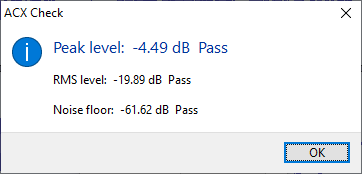
If I’ve digested everything you’ve said, that looks fairly ok. And the RMS is not too quiet, which is really what I’ve been worrying about the most. Do I have that right?
Right. The tips and peaks thing was designed to get you past ACX-Check. You should not be able to hear it working and it should make almost no difference to the RMS (loudness).
Koz
But wait, it gets worse.
Audiobook Mastering Macro adjusts the RMS (loudness) of the work to -20dB. That’s not half-way between -18dB and -23dB. It was designed very slightly loud so when peak limiting got done, the reduced work should settle in at -20.5dB which is half-way between -18dB and -23dB.
One of the many reasons it’s not a good idea to stick extra steps into the Mastering dance or leave any out.
Koz
Thanks @kozikowski . Fwiw, the spoken audio had previously been cleaned up thanks to a lot of help from you, so I think it is pretty good. Equalization with 100Hz rumble, then a custom equalization you called “de-boomy”, then TB-Siblance to get rid of some harsh s’ing, and then I threw in Ozone imager because I really like the spaciousness of that, and then normalized, and then limited. Sounds better than me, in my opinion.
This topic was automatically closed after 30 days. New replies are no longer allowed.