Hello, Audacity Team.
I eagerly await the arrival of our beloved Audacity, which will be able to read and save in Opus HD 24-bit/96kHz. This is a dream for me.
Currently, there is no program that does this, neither Opus Tools nor FFmpeg.
Hello, Audacity Team.
I eagerly await the arrival of our beloved Audacity, which will be able to read and save in Opus HD 24-bit/96kHz. This is a dream for me.
Currently, there is no program that does this, neither Opus Tools nor FFmpeg.
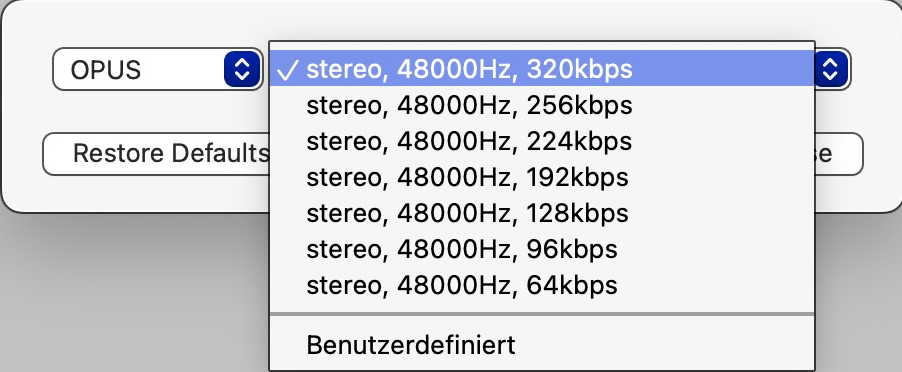
MediaHuman Audio Converter can do conversion to OPUS formats, with these settings:
So until Audacity can export to OPUS directly, you could export from Audacity into a non-lossy format such as .aiff or .wav and then convert. No idea whther 96 kHz is possible as “user defined”.
Edit: no,obviously 48 kHz is the limit…
I’m sorry, but you’re misinformed. The screenshot you posted is from the current Opus version 1.5.
Version 1.6 (which Audacity doesn’t use yet) supports 24-bit/96 kHz audio.
Please visit Opus 1.6 Released
Out of interest, what do you need it for?
Steve,
Well, wasn’t what I wrote clear enough? “I eagerly await the arrival of our beloved Audacity, which will be able to read and save in Opus HD 24-bit/96kHz. This is a dream for me.”
I want Opus 1.6 in Audacity specifically to export to 24-bit, 96 kHz Opus. Simple as that!
I meant, why do you need the “Scalable Quality Extension” for the Opus Codec?
Steve,
The goal is to maintain the highest possible quality when converting a 24-bit/96kHz source into a lossy codec. Since Opus 1.6.1 allows me to do this, why not use it?
Currently, I can export 24-bit/96kHz with the lossy codec “Windows Media Audio Pro 10” in Vegas Pro. But WMA is a proprietary format, and it’s very difficult to run it on other operating systems and devices.
That’s why I want Audacity to use “all the power” that the new Opus HD 1.6.1 allows.
When “highest possible quality” matters, you can avoid losses entirely by using a suitable lossless format.
Yes, Steve. I know. But the highest quality “Maximum” in the original Opus 1.5 reduces the audio to 16 bits/48 kHz, and the file becomes larger than the one exported in FLAC 24-bit/96kHz.
So, Opus at the “Maximum” level doesn’t solve my problem at all!
The only thing left for me is: Either I use FLAC 24/96 or I wait for Audacity to use Opus HD 24/96.
This topic was automatically closed after 30 days. New replies are no longer allowed.