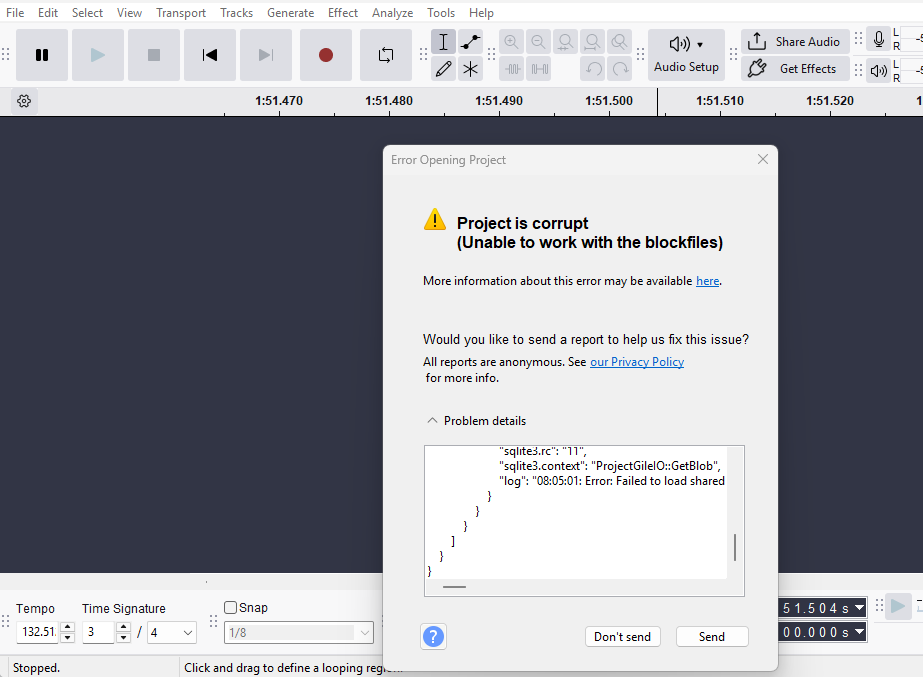
Switched PCs and downloaded a newer version of Audacity. Tried to transfer .aup files from the old PC and process them, but getting the same fatal error after working for a while and unable to use the file further.
This morning, I recorded a NEW file on the new PC, thinking it might be a version-transfer problem of some kind. But after a little work I have the same problem. The error message is shown below and I cannot find it in the links directed. Ack!
I’m really just a voice actor, I don’t speak tech. Is there a fix I can comprehend here?
This is wild speculation based on the few debug lines I can see in the screenshot.
When SqlLite loads a blob object, it is raw binary data. In this case probably audio data. Perhaps it is trying to load data from a path that does not exist on the new computer.
Thank you Wrecks0 I think this is likely the problem. In plain English- which Gemini is giving me, forgive me warming planet, is that my new PC is “helpfully” syncing to OneDrive all the time now. I am unlinking my PC and will backup occasionally as I’ve always done, and hopefully I can use Audacity to recover the damaged files by Importing Audio.
AUP3 is the new all-in-one which has to be on an internal NTFS or exFAT drive. It can be temporarily saved to a FAT32 thumb drive or a cloud drive but when Audacity is open you should be working from an internal drive (it’s a restriction of the underlying database format). So if you have an AUP3 file on OneDrive, moving it to your hard drive should work. (And you MIGHT have to temporarily disable One Drive.)
The old AUP format was a folder with multiple files and it all has to remain together in ta folder with the same name, etc. Newer versions can open AUP files but it can’t save them.
P.S.
I always recommend exporting as WAV (or FLAC) as a “back up” immediately after recording whether you make a project or not (and maybe at other times) because regular audio files are “simpler” and more robust than AUP or AUP3 files.
Thanks DVDdoug, I’m starting now to follow the immediate export advice. These are of course the new aup3 files, but the problem was that OneDrive is constantly syncing and I hadn’t even tried to shut that off. Hopefully now I’ve only lost some of my work and can catch up.