I’ve been using Audacity on and off over a number of years and I’m now trying to use macros.
I record birdsong and some times (almost always) there is noise I want to remove, me coughing, cars passing, aircraft etc. I want to keep the bird song as continuous as possible so I would like to fade out just before the noise, cut the noise and then fade back in so the listener knows there was a cut without there being a sudden change in the background noise or the birds song.
So my proposed method is to copy the good sections and add them to a new track so I end up with a track of sections (clips), select the sections one by one and run a macro to fade in and fade out. Then join them into one track.
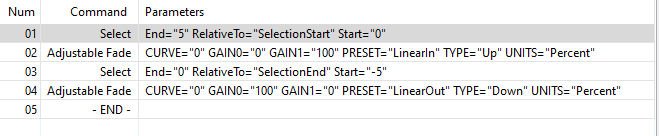
The problem I’m having is with selection. My current macro looks like this:
(I’m using 5 secs for visibility. Once I get the functionality working I can tune it to my preferences)
If I manually select a section and run it, the fade in works but the fade out is added to the end of the fade in. I’m guessing this is because the original user selection is lost by the first select and then the second select is from the end of the first.
I’ve looked through as much documentation as I could find but I didn’t find commands that helped. I’ve also noticed the macro only works on the first track i.e. if I have three tracks and I select a section in the bottom track, it operates on the top track. Not an issue because I simply drag the destination track to the top
So can somebody help me with this. How can I fade a section (clip) in and out with a macro.
I’m guessing this is mainly related to my ignorance, but if there is no appropriate feature then I’ll have to go back to doing it manually.
Thanks for the help. As it stands the code works in reverse, it fades out at the beginning of the selection and fades in at the end. This would create silence within the original track.
What I’m after is fade in and fade out of the good parts that will have been copied from the original to a new track.
(pwlv l1 t2 l2 t3 l3 ... tn ln) [LISP]
Creates a piece-wise linear envelope with breakpoints at (0, l1), (t2, l2), etc., ending with (tn, ln). Otherwise, the behavior is like that of pwl.
The arguments l1 to ln represent amplitude, and t1 to tn being the time.
For it to scale correctly to the selection length, tn = 1.
Note that t1 is implicit (not passed as an argument), and is always 0.