Long time user. Long time no post. Audacity 2.4.2, because still Mac 10.14.6. When I try to export an audio file I just now am unable to define a new target directory, but must choose one from the drop-down menu. Which, of course, I created. What might I have done to trigger this?
First, there is no reason to use such an old version of Audacity. I am using Audacity 3.5.1 with macOS 10.13.6 without problems.
Second, I do not remember having used something like a dropdown menu in version 2.x. If you do not have any special settings saved for Audacity, you could throw away Audacity’s settings by deleting (or moving it elsewhere) the folder
~/Library/Application Settings/audacity
But I rather think it is not a dropdown menu you created, but a list of previously used targets which the operating system proposes to you…
Thanks. I apparently went off the rails in thinking that Audacity 3.0 required a macOS update! But 2.4.2 has been quite sufficient for my purposes in the meantime.
The export directory business just came up recently, and is more of a puzzle than anything major. The ‘dropdown’ I referred to does consist, more or less, of my previous export destinations. But now I can’t seem to append a new directory to it or otherwise redirect my exports. Of course, I can move them afterwards.
I attach an export dialog of Audacity 3.6.4 (a different computer, running macOS Sonoma 14.8.8). Here you can
- select the “Browse” button to find the right destination directory
- manually edit the path in the tialog to something else if you know the exact hierarchy and folder names

You could also define a standard export directory in Audacity’s preferences and then navigate from that directory to the right destination before clicking the “Export” button:
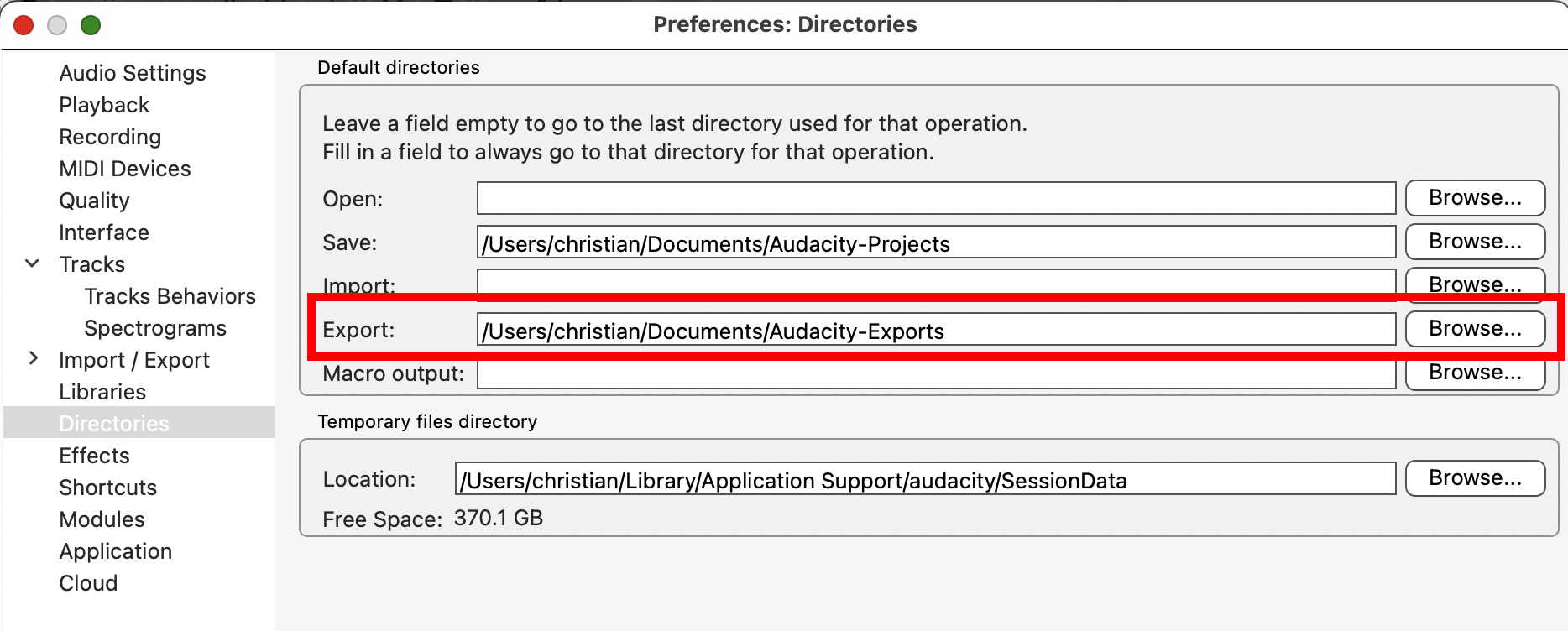
But as said before, I do not remember how these things looked in Audacity 2.4.2.
This topic was automatically closed after 30 days. New replies are no longer allowed.