Am a beginner with Audacity - currently trying to record vinyl LPs before copying to CD. If I select Export Audio and Entire Project I get a single .wav file with all the complete tracks in it that I can play. If I select Multiple Files and split on labels, I get several files named after the label on each track, but they are all about 2 seconds long and contain none of the track itself. What am I missing??
That’s a new one on me. Would you be willing to share the project file so I can try too and see what happens?
Sure - how do I do that?
If you have a Google account you could upload a project file to your public folder and post the link to it on here. How does that sound to you?
Never done that before - any help appreciated
I’ll send you a private message. In the meantime, this might help: Use Audacity to title and export songs from an audio file using labels and multiple export.
The problem is with your labels. You need ONE label at the start of each track. You have two so Audacity is exporting the tiny bit of noise between the two labels and no song - see screenshot!
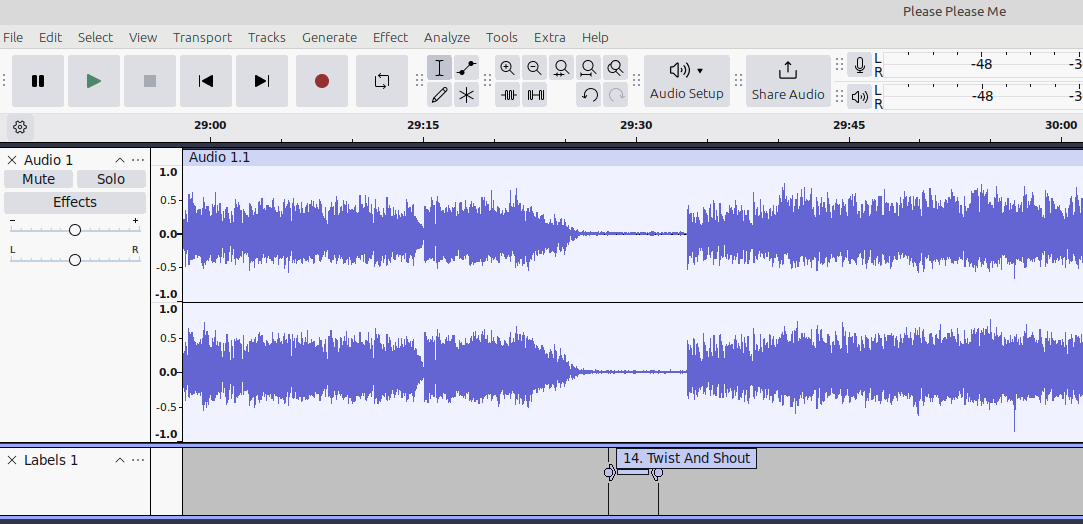
Delete your label track and start again. There is a lot of noise too - be sure to clean your LPs really well and apply noise reduction in Audacity.
Thanks Mark - thought I had read somewhere that I needed to create a label by highlighting a wideish section of the recording prior to the start of the track.
1 Like
You can also select-highlight one song at a time and then go to the export dialog, select Export Range = Current Selection, and export one song at a time.
This topic was automatically closed after 30 days. New replies are no longer allowed.