I didn’t add stereo so it must be in the mic. I have a good mic a friend gave me but I don’t know it’s intricate settings. I also have a hearing problem (seriously) so maybe I am completely missing the reverb.
Should I use the Effects “Amplify” to boost the volume? I was already planning to use Loudness Normalization and set it at RMS -20 dB. Is that what you think is needed?
The reverb is only on the side-channel,
IMO that means it’s an effect, rather than actual room reverb.
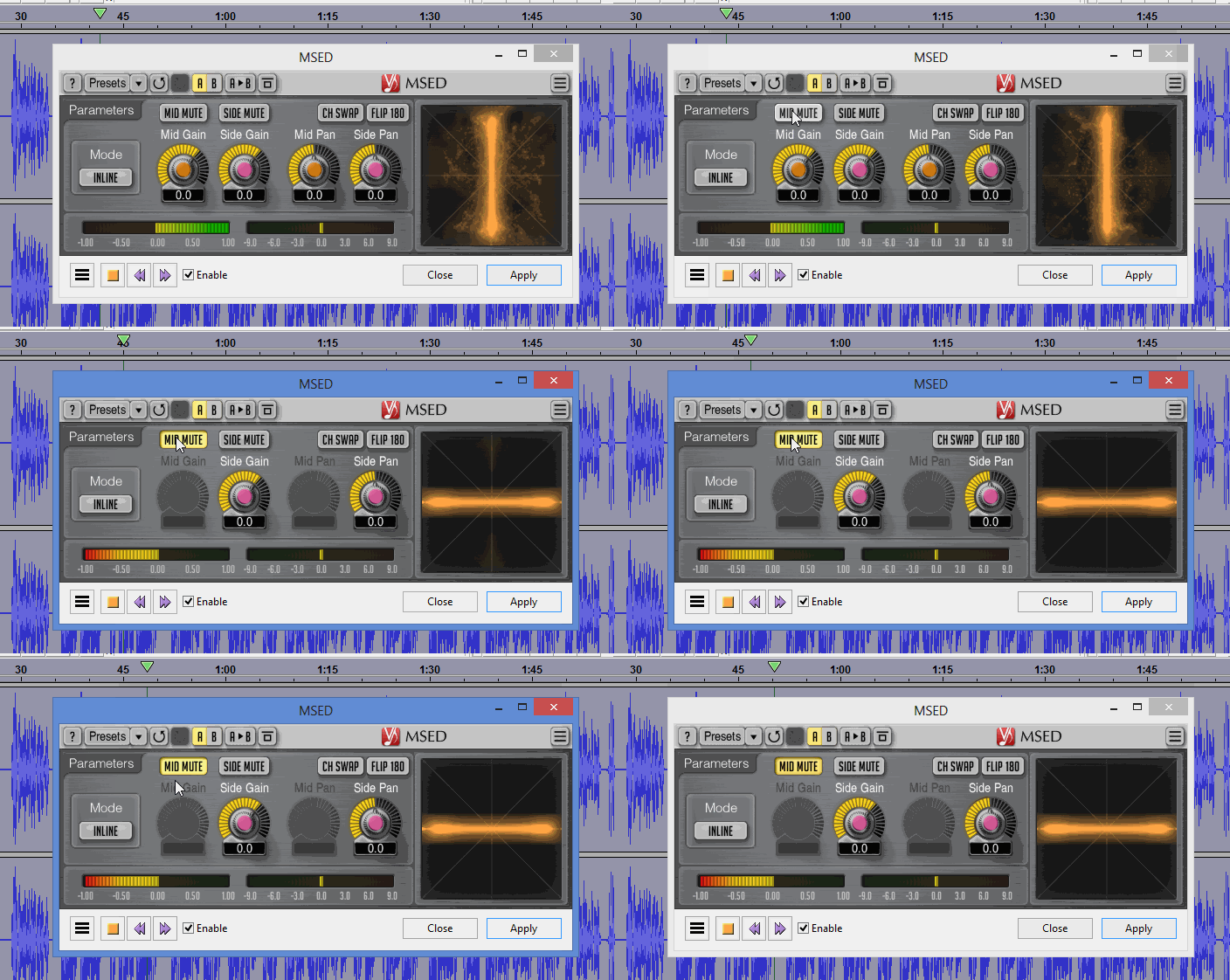
Mid-Side Encoder-Decoder Plugin [VST, AU, AAX] - MSED - Voxengo (free)
Some audio mixers* have a reverb effect built in.
( * the device the mic is plugged into ).
Stereo, two blue waves on the timeline isn’t recommended for a bunch of reasons, but it’s not forbidden. You are warned that if you start the book stereo, you have to finish that way. Again as above, all the chapters have to match.
Audacity has a couple of super handy tools for audiobooks.
I believe Analyze > ACX-Check is built into the current Audacity. Someone will correct me.
That checks the three major audiobook specifications. Peak (tips of the blue waves) RMS (loudness), and Noise.
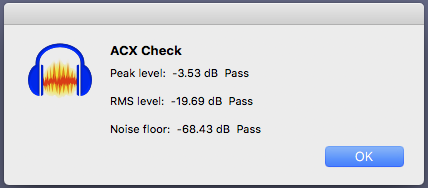
Getting your chapter to that point is done with Audiobook Mastering Macro. If you start with a stable, corrected, well behaved chapter with no errors and no major volume disturbances, applying Mastering will guarantee Peak and RMS. If you recorded in a quiet room with a good microphone, the noise will pass and you can go make coffee.
This is an overall writeup on these tools.
Actually, what you do after you master a chapter is File > Export an Edit Master WAV Sound File. After you do that, you can create whatever sound file the client wants. In the case of ACX, they want 192 Constant-Quality MP3.
You can’t change an MP3 file. Once you make one, that’s the end. If you need to change anything, change a copy of the Edit Master WAV and burn a new MP3.
Are you frightened yet?
Another note that once you create an ACX quality chapter, you can submit to almost anywhere else.
Koz
Adobe Enhance are now offering a “premium” ($$$) option of where users can control the amount of the enhancements applied.
[ Their free version has no user controls ].
You guys are awesome!
I originally recorded with GarageBand. Then exported to an AIFF file. When I open that file in Audacity there are two identical tracks present. Right now I’m re-cutting every chapter but not applying any effects, I’m only saving as a project. The sample was an MP3 of a raw cut without any effects. The stereo might be coming because of the dual tracks in Audacity. I’m researching now how to change my files from stereo to mono in Audacity. If that’s possible then it should be easy to do as my first step just before applying any effects.
I’m in Berlin so the time difference has me responding much later. THANKS THANKS THANKS
I just found Mix Stereo to Mono. That should fix that problem.
Yes. Mono has a lot going for it. It’s crazy easier to edit. Juggling two blue waves is not fun when you have to correct a reading mistake. Mono takes half the time to apply effects and filters. It takes up almost exactly half storage space. It transmits to the client in half the time, and it’s the preferred ACX audiobook format.
It could be said it pays handsomely to record in mono right at the beginning. No conversions needed. As you found, sometimes computers don’t like that very much and even my “mono” microphone interfaces will record stereo if I’m not paying attention.
Many of the senior elves are in England, the software owner is in Russia and the legal team is in war-torn Cypress. My old company had production offices in India, so dealing with time shifts is built in. I can’t always get the number of hours right, but we have a “feel” for the time difference.
Koz
Projects can be brittle and easily damaged. Search the forum for “My Project will not open. What should I do?”
When you get done reading a chapter, errors and all, File > Export as a perfect quality WAV sound file. You can save a project, too if you want, but you will be happy you had the WAV the first time a Chapter Project fails to open.
There’s a trick to reading mistakes. Do Not go back later to correct the reading. Correct it right then. When you make a fluff (easier to detect when you’re wearing headphones and hear yourself in real time), pause briefly, look back to the last even sentence and read it all again—do not stop the recording—this time making the correction and keep going. In final editing, all you have to do is delete all the bad words. Since your correction happened in, or close to real time, the pitch, rhythm, emphasis, and theater should automatically match.
Some readers ring a bell or clap or something to make it easier to find the fluff later. It doesn’t matter if the indicator sound overloads the sound channel. You’re going to delete it anyway and the overload makes it easy to find.
Koz
Correcting my mistakes immediately is my practice. But I have found a few I didn’t realize were there. I will start exporting my raw recordings into WAV. Thanks
Here is a raw sample. @kozikowski Can you tell me what Effects you recommend and in which order they should be applied. THANKS!!!
IMO too much bass on that Timisoara reading …
Timisoara before-after
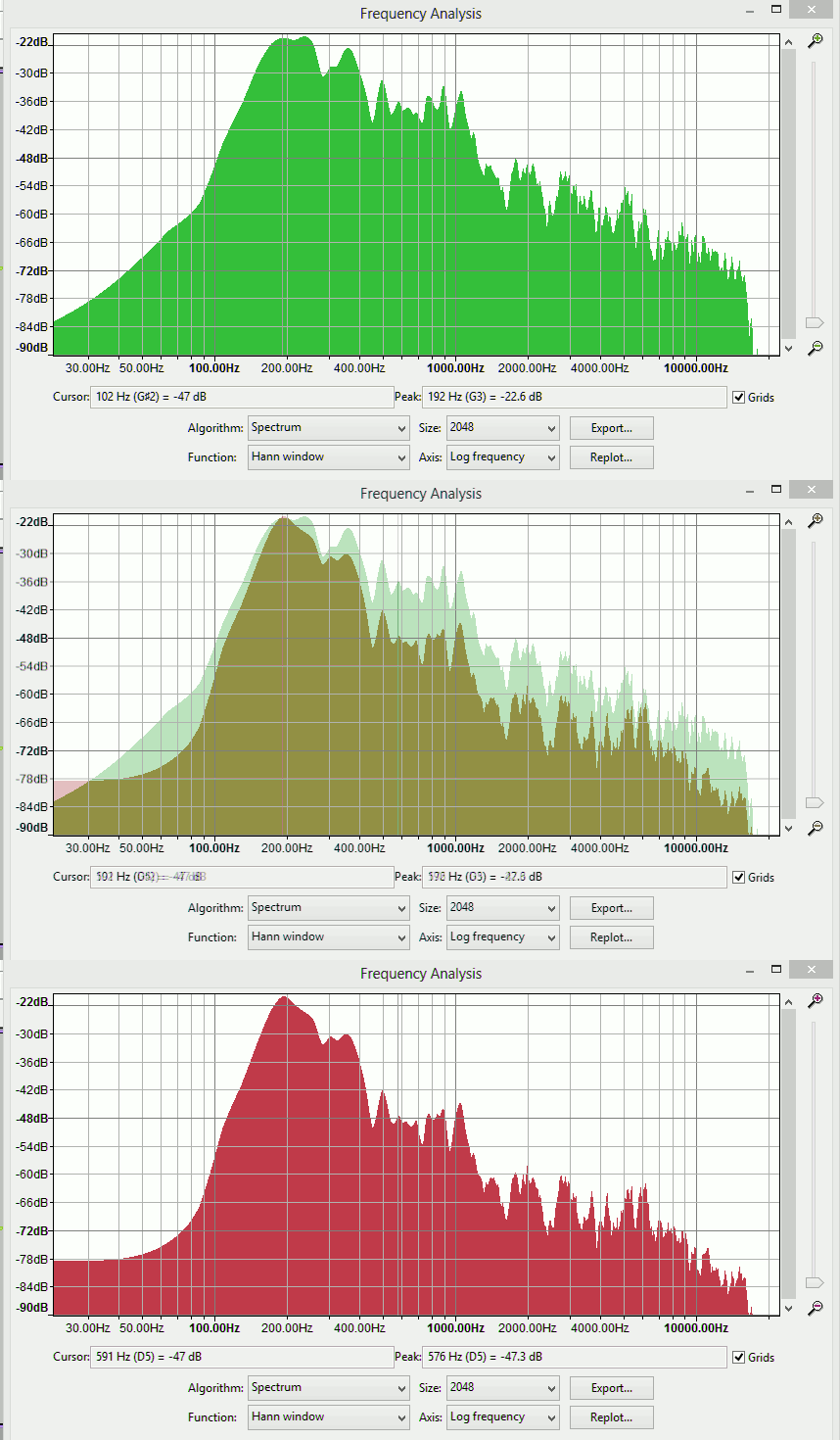 green is good.
Spectrum’s are more reliable than playing by ear …
https://manual.audacityteam.org/man/plot_spectrum.html
OK, so that’s the second complaint about bare-wall, polished wooden floor Room Boom. Look at the numbers along the bottom of his animation. They “haystack” right around 200.
This is a graphic capture of the equalization correction I applied earlier when I noticed this problem.
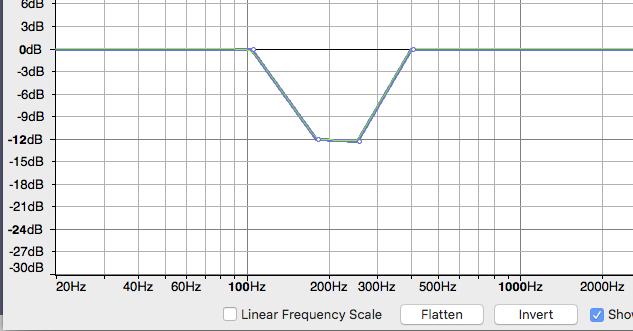
Note the bottom of the dip is 200.
It will be super beneficial if you can get rid of that tonal boost during the recording.
Do you have enough room to create a Kitchen Table Studio?
That won’t be perfect, but it will go a long way to keeping your walls, ceiling and floor out of the show.
Do you have a car? One of the people in the shop used to arrive in the morning with terrific short voice sound tracks and clips. I know his house has two dogs, three kids, and a nearby highway. I asked him how he did it. He said, “My Toyota.”
Given the low traffic in the evening, I was able to record a workable sound track in my messy, peaked-roof garage.
There are ways out of this. I want to avoid this correction because most production mastering is going to apply it twice, and that’s not good.
Koz
Here is a sample with all of my effects applied in the following order:
- Mix Tracks to Mono
- Noise Reduction 12/6/3
- Low-Pass Filter 4000/6
- Compression -12/-50/2.2:1/1.25/1.2
- Loudness Normalization – RMS -20
- Limiter 0/0/-2.75/10
- Click Removal 184/24
- De-Esser -20/10/2500/7642/10/5
- Tempo Speed +8%
Also here is a pic of my studio. I knew about the Kitchen Table studio but couldn’t find PVC pipe so I used wood slats. So I’m not sure where the bass is coming from in the recording.
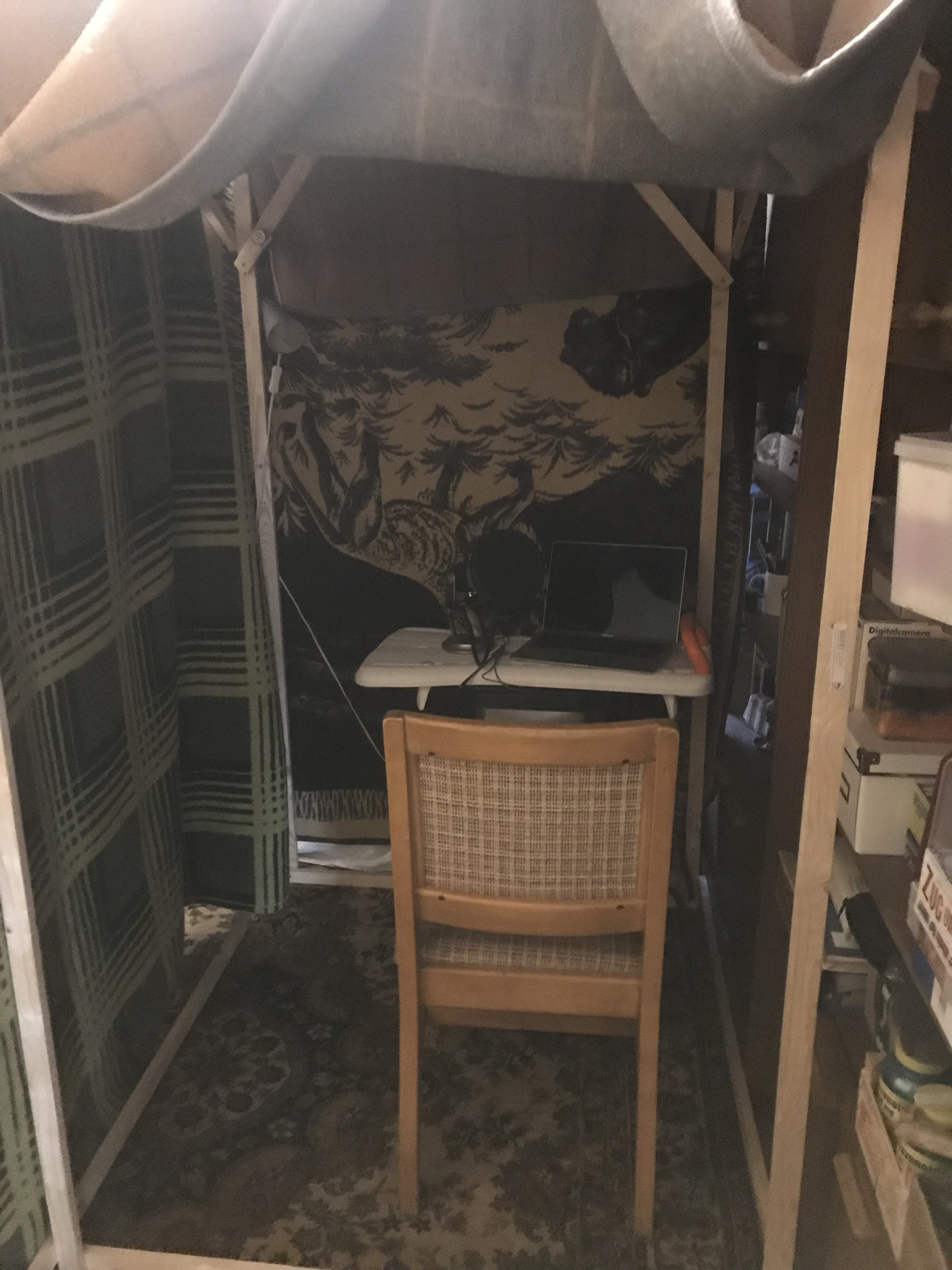
The charts are great but I don’t know what to do with that info. Do I use an EQ curve filter and if so what settings? I don’t think I can improve my studio any further.
You could be speaking into the wrong end of the mic: that would make it sound bassy & roomy.
Yeti is a side-address microphone: the sensitive part is just above the logo. You don’t speak into the tip/end. The Yeti mic body should be vertical or tilted backwards away from you, not pointing at you.

[If the mic is repositioned the previous EQ advice will not be valid].
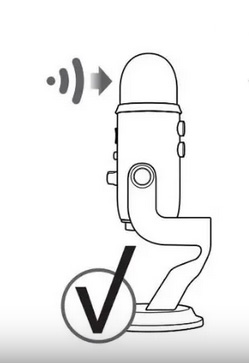
I bet that makes a difference in both sound quality and volume. Depending on your pattern setting, you’ve been recording the ceiling or your desk. Not you.
Koz
That’s exactly what I am doing wrong. I was pointing the Mic at me. Wow. But now I don’t have time to re-record the book. Since I don’t have time, is it possible to fix the bass problem through applying the EQ with the settings shown on the chart that KOZ posted?