I don’t see (in Audacity 2.0.5) the same edit menu items as in Edgar’s screen capture. What contex is required to get those choices in the Edit menu?
(Edgar’s Edit menu image below)
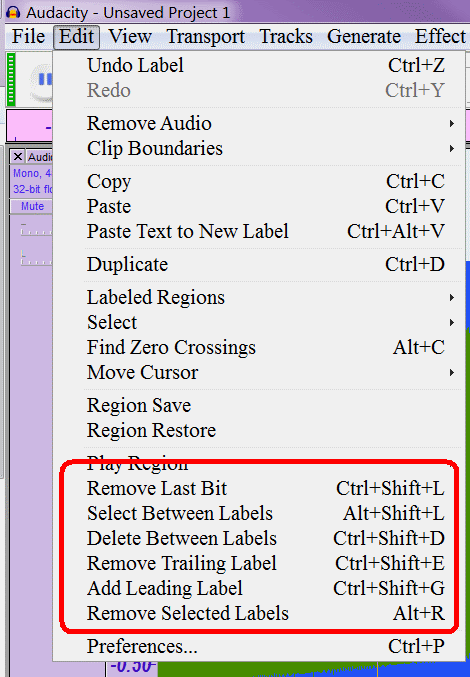
Sorry, I suppose I was teasing you. People hire me (or I do it for free) to customize Audacity. What you see there is my personalized highly custom version of Audacity. All of the code to accomplish all of that has been posted here on this board by me and is in the public domain. If you have a burning desire to try it out let me know and I will post a link here to the most current development version I have.
“Burning desire” yes. But I’d just be blowing smoke if I claimed to know what to do with the code if I had it. 
Of course a “right click menu” is not accessible. If you don’t use a pointing device with a right click then you can’t right click, but that is no reason to not have right click menus. The “commands” ARE accessible. I quoted shortcut sequences for the commands. The same functions are also available through the Labels Editor. The Label Editor may not be as convenient and accessible as it could be, but the intention is for that to provide accessibility for non-mouse users and that is something that can be improved over time.
There are a lot of programs that require the usage of a mouse to reach certain GUI elements.
I can navigate to an object if it is correctly embedded and has some mean to be identified by the screen reader.
I only wonder how labels are actually handled internally. It is possible that not much is missing. Even if all is created graphically, there’s at least a chance that hotspot regions can take an alternative text (such that labels can be read when navigating over them).
The command sequence is not practical in Track View mode because neither the underlying text nor the characters you delete are announced.
However, the deletion of single labels is easy with the Edit Labels dialog box and a right click menu for sighted users is appropriate.
I am sure that Edit Labels will become a rightful alternative for VI users.
The bad thing is that in Track view the label tracks can’t be “freezed” such that no unwanted label edits occur. A way could be a item (toggle or check box) in the drop down menu for label tracks “disable Edit in Track View”.
However, this goes better into another topic “Accessible labels - Wishlist” and I won’t bother you anymore with unrelated issues in this one.
http://www.hometownband.org/members/efm5/Audacity_AudioPlus2alpha10.zip
This is a complete, compiled executable. The zip includes: the executable (my customized Audacity); documentation in Microsoft Word format; the wxWidgets libraries – you will need to use these, not the ones shipped with Audacity; a folder “Portable Settings”. It does not include any plug-ins; you will need to find the plug-ins folder from your Audacity installation (it is in the same folder with the Audacity executable) and make a copy in the folder with the customized Audacity; nor does it include a Languages folder, if you want to run in any language other than English you’ll also need to copy the Languages folder in just as with plug-ins.
This is a version which has been customized for a television show production studio so there are a couple of specialized features (customized export in the File menu) which you may ignore.
This looks like fun. I’ll download right away. I’ll keep both version of A. in separate folders. Love that about portables.
Have fun! If you look at this part of the manual:
http://manual.audacityteam.org/o/man/preferences.html#stored
you can read the details about the Portable Settings and its folder.
I’m using v2.2.2 on Windows 10 and it seems that there is still no “easy” way to delete extra labels, even five YEARS after it seemed like there were good and accepted suggestions.
Well, I have another suggestion, just in case any of the developers care…
We can already use the mouse to click and drag labels right and left along the track. In fact, I could drag all of the unwanted labels beyond the end of the track, then select and delete them. But I cannot delete just one at a time and my tracks are LONG (9+ hour audio books that I’m trying to break into chapters using the Silence Finder to guess where the breaks are) so dragging past the end is quite time consuming and frankly, annoying for something that should be trivially simple.
Why is it not possible to just drag a label out of the top or bottom of the label window to delete it? I tried that when the most obvious method – a context menu – was not available, but it didn’t work. Is there any chance that a future version of Audacity (preferably sooner than 2023, by the way) would support this?
Thanks!
Right click on Label > Delete Label (Label Tracks - Audacity Manual)
Alternatively you could use the Labels Editor: Label Editor - Audacity Manual
Alternatively you could select the labels and “Edit menu > Cut”, or “Edit menu > Remove Special > Split cut”, or use the shortcuts for those commands.
(Edit Menu - Audacity Manual and Edit Menu: Remove Special - Audacity Manual)