Hi all,
I’d like to share a Nyquist plugin pair I’ve built for detecting and reducing breath sounds in voiceover, podcast, and audiobook recordings. It uses adjustable spectral analysis. It’s free, GPL v2, and works in Audacity 3.2+.
Detecting, Raw and Reduced:
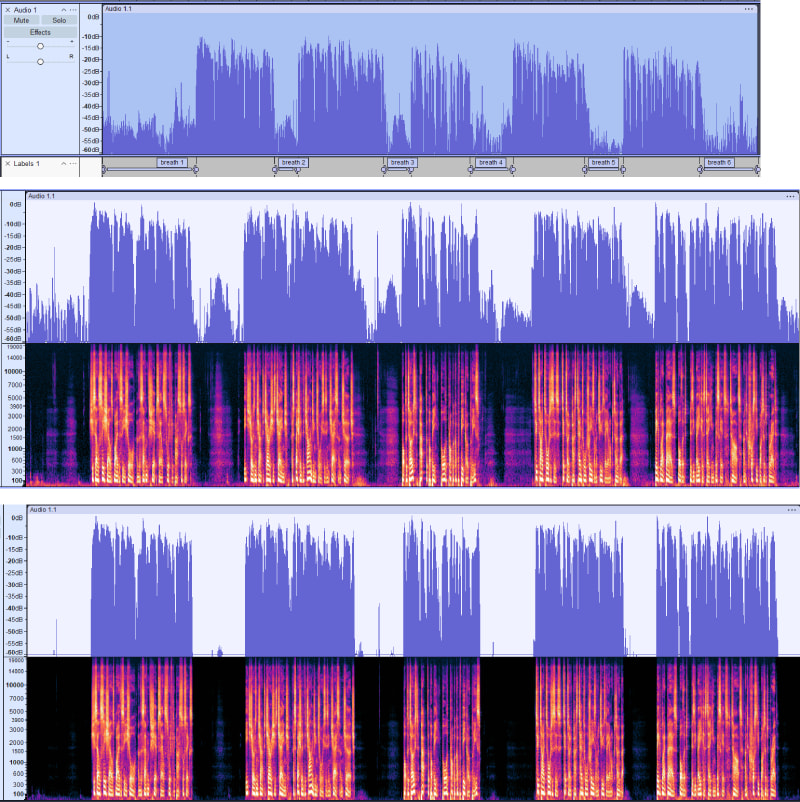
**
Why I built it**
Editing breaths between phrases is one of the most tedious parts of spoken-word post-production. Existing tools either:
- Use amplitude gating (which chops word edges or misses loud breaths), or
- Silence breaths destructively (making the result sound robotic)
How it works
Spectral detection rather than amplitude. I noticed my breath has a specific signature:
- No energy in the 3–8 kHz band (no consonants/sibilants)
- No energy in the 80–400 Hz band (no voiced fundamentals)
- Sustained for at least 500 ms
Most speech has energy in one or both of those bands. Word decay tails still have low-band fundamentals. Quiet consonants still have upper-band hash. Only true breaths and pauses pass both tests for long enough to count.
Both spectral bands are configurable, so you can tune them for your voice. The defaults work well for typical adult voices on dynamic mics, but a higher voice might benefit from raising the lower band, and a deeper voice might benefit from lowering it. The upper band is also adjustable for mics that capture more or less air above 8 kHz.
Two plugins, shared algorithm
The package ships as two complementary plugins:
- De-Breather Detect — outputs labels marking each detected breath. Non-destructive. Use this to preview, tune your settings, and verify what the algorithm is finding before committing.
- De-Breather Reduce — applies gain reduction directly to detected breaths. Destructive (Undo to revert). Use this once Detect’s labels look right.
The recommended workflow is: run Detect first, look at the labels, adjust settings if needed, then run Reduce with the same settings to apply.
Default reduction is -20 dB with linear edge fades to avoid clicks — leaves room tone audible and preserves the natural rhythm of speech rather than making it sound clinical.
Get it
GitHub: https://github.com/MeanTemperature/DeBreather-for-Audacity
Install via Tools → Nyquist Plugin Installer (you can install both .ny files in one go), then find them in Effect → Noise Removal and Repair → De-Breather Detect… and De-Breather Reduce…
The README includes before/after spectrograms, a sample WAV to test on, and a tuning guide for different mics and recording setups.
A few notes
- Tested on dynamic mics (Rode PodMic, Klark Teknik CM2 via Scarlett Solo) and built-in laptop mics
- Best on dynamic mics close to the speaker; condenser mics at distance may need stricter Max level settings
- Voice condition affects the spectral signature — colds and tiredness can change breath characteristics, sometimes requiring per-recording tuning
- Word-final glottal stops can be spectrally indistinguishable from short breaths; the README documents how to handle this
Feedback welcome — particularly on:
- How it works on different voices and recording setups
- Edge cases where it over- or under-detects
- Suggested settings that work for your voice/mic combination
Cheers,
MeanTemperature