Creating ping pong loop using 'reverse' effect

Hello,

I am trying to create a seamless loop for a vocal sample I will use in a soundfont. The sample does not loop nicely so I am trying to create a manual ping pong loop.

To do this I have extracted the segment of the sample I want to loop, duplicated it, and then reversed the duplicated segment to supposedly create a seamless ping pong loop effect. However there is a clicking sound between the two clips which ruins the effect.

Any advice on why this is occurring and how I can eliminate it?

Notes:

  • I have made sure to spilt the original clip on “zero points” (where the wave form crosses the centre line)
  • I have tried re-joining the separate clips
  • I have also tried combing the reverse effect with the invert effect which changes the clicking sound but does not get rid of it.

Hornet_Shaw_loop.aup3 (556 KB)

select zero crossing, then reverse and invert the duplicate.

Thanks for your comment Trebor, though as I stated in my post I have already tried this approach to no avail.

You did not mention invert, only reverse. If you don’t invert there will be a click at the join …

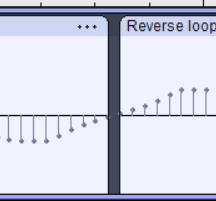
I did mention the invert effect in my notes at the end of the my post, but I should’ve been more explicit. This is the wave form for the reversed and inverted clip where it joins the original. It looks smooth but there is still artifacts which I don’t know enough about audio production to eliminate. (its the same with the clips joined together)

crossfade clips at the joins helps …

before -after

oh that sounds much better, thank you!

This topic was automatically closed after 30 days. New replies are no longer allowed.