FYI, I have never been successful using the project recovery tools on “usaved” files.
1 Like
Hello, thank you for all this work. At step 9 the command prompt says “audacity-project-tools -drop_autosave broken.aup3 file is not a database”. I read that other people had the same problem but I didn’t quite understand if there is a solution. Can you help me?
See: Corrupt or Otherwise Broken Audacity Project Recovery - #53 by jademan
Sometimes it can be helpful to post a screenshot.
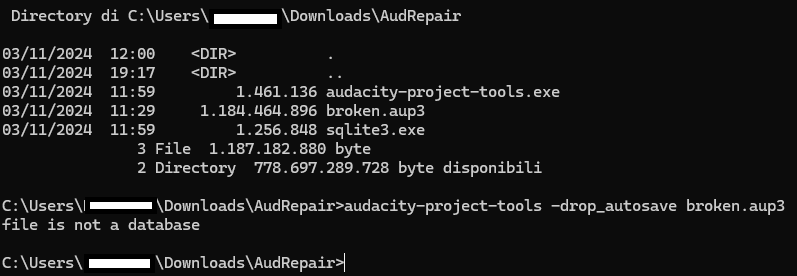
This screenshot is very helpful. It seems you are doing everything correctly. You just ran out of luck. Sorry. I have nothing to offer here other than your project is truly trashed.
Oh okay, thanks anyway. In these days I found out that I did actually esportate two WAV files from the project, but they are also corrupted and Audacity can’t read them. Do you know whether there’s a guide about repairing a corrupted wav file?
Yes. There is no guide. 
Okay, no problem. Thanks for the help anyway!
Hi, I’m another one to have a problem with Audacity not being able to open a file. Today I’ve recorded an interview using Audacity and after saving the project I was able to open it again and check if everything works fine. But the next time I was trying to open the aup3 file I got:
“value”: “Audacity failed to read from a file in /.”,
“mechanism”: {
“type”: “runtime_error”,
“handled”: false,
“data”: {
“sqlite3.rc”: “101”,
“sqlite3.context”: “SqliteSampleBlock::Load::step”
I know there is a recovery tool available, but first of all I’m using Mac and second of all from what I can see I lack some knowledge and skills to use it.
Is there any one who could try to fix the file?
You could also ask at: Audacity
Thankfully I was able to use the tool and recover the file.
Great! Thanks for the report. 
Hello !
I know you said you stoped fixing people’s projects, but I tried your fix and I didn’t succeed, it’s a project I have to finish for Wednesday, so it’s quite an emergency and I’ll be very grateful if you could have a look at it. We initially had a broken file with a 101 error code (this file: Sexual Violence as a Tool of Opression.aup3 - Google Drive ) We ran audacity-project-tools with -recover_project but now it says “A track has a corrupted sample sequence.” ( Sexual Violence as a Tool of Opression invalid track.aup3 - Google Drive ) Would you know how to fix that ?
Thanks a lot !
Kind regards
No. I have no second level recovery tools. If the primary tools fail, you are out of options.
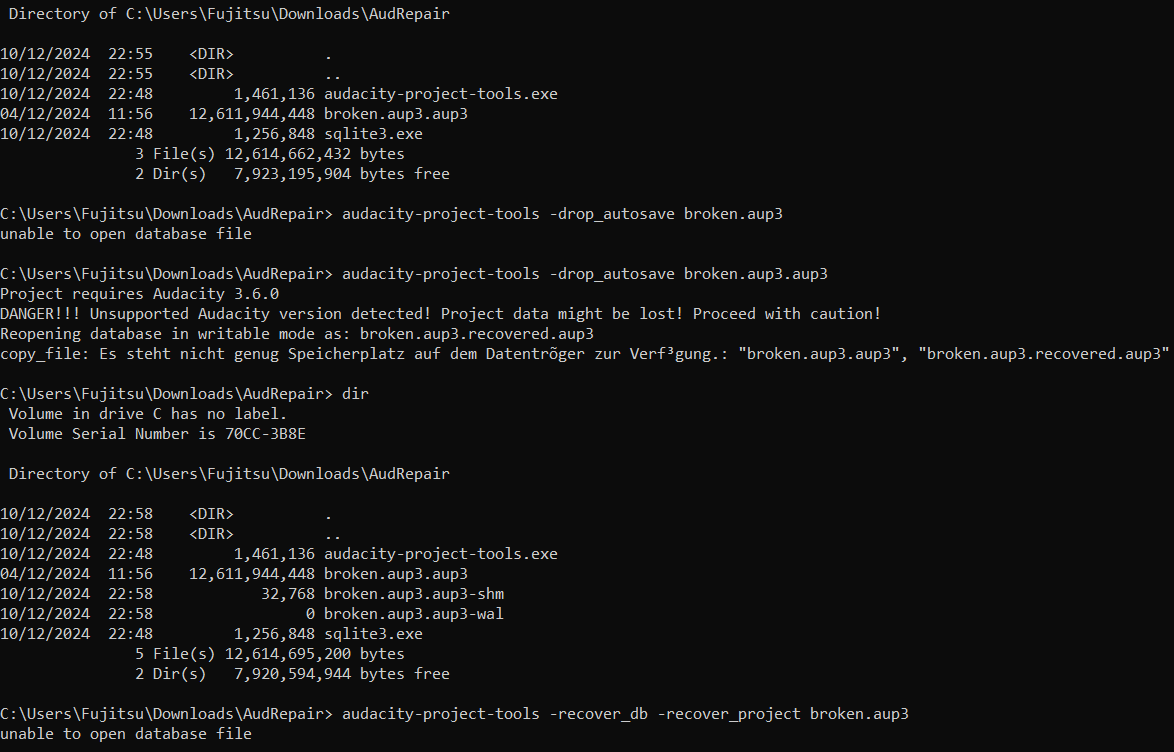
Hi there. I got as far as step #9 however despite me literally copying your next command - “audacity-project-tools -drop_autosave broken.aup3”, the “unable to open database file” keeps appearing. I then tried adding an extra extension to the corrupted file extension like so “audacity-project-tools -drop_autosave broken.aup3.aup3” as that’s how it appeared under my cmd when completing step #8. However when I completed step #9 using this way, I was greeted with this -
“Project requires Audacity 3.6.0
DANGER!!! Unsupported Audacity version detected!
Project data might be lost! Proceed with caution!
Reopening database in writable mode as: broken.aup3.recovered.aup3”
Now my AudRepair dir reads as so: audacity-project-tools.exe, broken.aup3.aup3, broken.aup3.aup3-shm, broken.aup3.aup3-wal and sqlite3.exe
Any further tips? Many thanks in advance.
Possibly you are using Audacity 3.6 features and project recovery tools need to be updated? @LWinterberg ?
I’m up for anything. How do I update the recovery tools please?
I think you are going to need @LWinterberg 's help. I don’t know how to reach him other than by flagging him here as we have already done. I suppose you could try to reach him on discord - Audacity.
Looks like I missed it but suddenly this morning in the folder was the recovered version. It’s back! Many many thanks @jademan! You saved my podcast! Much appreciation to you. Will give a shout out to you on our YT description if you wish?