Any update?
Not as yet.
According this forum thread, I’ve learned a lot and written a plugin which convert label text to SRT subtitle or mp3 LRC format.following is the plugin script code.
$nyquist plug-in
$version 4
$type tool analyze
$name (_ "Subtitle Generator")
$manpage "Subtitle_Generator"
$debugbutton disabled
$author (_ "Cheng Huaiyu")
$release 1.0.0
$copyright (_ "Released under terms of the GNU General Public License version 2")
;; http://www.gnu.org/licenses/old-licenses/gpl-2.0.html
;;
;; For information about writing and modifying Nyquist plug-ins:
;; https://wiki.audacityteam.org/wiki/Nyquist_Plug-ins_Reference

$control filename (_ "Export Label Track to File:") file (_ "Select a file") "*default*/subtitles" "SRT file|*.srt;*.SRT|LRC files|*.lrc;*.LRC" "save,overwrite"

;; Reurn number as string with at least 2 digits
(defun pad (num)
  (format nil "~a~a" (if (< num 10) "0" "") num)
)

;; Reurn number as string with at least 3 digits
(defun pad3 (num)
  (format nil "~a~a" (if (< num 10) "00" (if (< num 100) "0" "")) num)
)

;; Format time (seconds) as hh:mm:ss,xxx
(defun srt-time-format (sec)
  (let* ((seconds (truncate sec))
        (hh (truncate (/ seconds 3600)))
        (mm (truncate (/ (rem seconds 3600) 60)))
        (ss (rem seconds 60))
        (xxx (round (* (- sec seconds) 1000))))
    (format nil "~a:~a:~a,~a" (pad hh) (pad mm) (pad ss) (pad3 xxx))
  )
)

;; Format time (seconds) as mm:ss.xx
(defun lrc-time-format (sec)
  (let* ((seconds (truncate sec))
         (mm (truncate (/ seconds 60)))
         (ss (rem seconds 60))
         (xx (round (* (- sec seconds) 100))))
    (format nil "~a:~a.~a" (pad mm) (pad ss) (pad xx)))
)

; generate srt format subtitle
;;;;;; srt sample text:
;; 1
;; 00:00:00,260 --> 00:00:00,990
;; subtitle 1
;;
;; 2
;; 00:00:02,220 --> 00:00:06,410
;; subtitle 2
(defun label-to-srt (labels)
  ;; subtitle index
  (let ((srt "")
        (ind 0))
    (dolist (label labels)
      (setq ind (1+ ind))
      (setf timeS (srt-time-format (first label)))
      (setf timeE (srt-time-format (second label)))
      (string-append srt (format nil "~a~%~a --> ~a~%~a~%~%" ind timeS timeE (third label)))
    )
    (format nil srt)
  )
)


;; generate mp3 lyric
;;;;;; srt sample text:
;; [00:00.26] subtitle 1
;; [00:02.22] subtitle 2
(defun label-to-lrc (labels)
  (setf lrc "")
  (string-append lrc "[ar:Lyrics artist]\n"
                      "[al:Album where the song is from]\n"
                      "[ti:Lyrics (song) title]\n"
                      "[au:Creator of the Songtext]\n"
                      "[length:How long the song is]\n"
                      "[by:Creator of the LRC file]\n"
                      "[offset:+/- Overall timestamp adjustment in milliseconds, + shifts time up, - shifts down]\n"
                      "[re:The player or editor that created the LRC file]\n"
                      "[ve:version of program]\n\n"
  )

  (dolist (label labels)
    (setf timeS (lrc-time-format (first label)))
    ; (setf timeE (lrc-time-format (second label)))
    (string-append lrc (format nil "[~a] ~s~%" timeS (third label)))
  )
  (format nil lrc)
)

;; Return file extension or empty string
(defun get-file-extension (fname)
  (let ((n (1- (length fname)))
        (ext ""))
    (do ((i n (1- i)))
        ((= i 0) ext)
      (when (char= (char fname i) #\.)
        (setf ext (subseq fname i))
        (return ext)
      )
    )
  )
)

;; Get labels from first label track
(setf labels (second (first (aud-get-info "labels"))))


;;(setf txt (case file-ext (0 (string-append filename ".SRT") (label-to-srt labels))
;;                         (1 (string-append filename ".LRC") (label-to-lrc labels))
;;          )
;;)

(setf file-ext (string-upcase (get-file-extension filename)))

;; detect file extension to determine which format to export
(setf txt (if (string= ".LRC" file-ext)
            (label-to-lrc labels)
            (label-to-srt labels)
          )
)

(setf fp (open filename :direction :output))
(format fp "~a" txt)
(close fp)

(format nil "~a" txt)
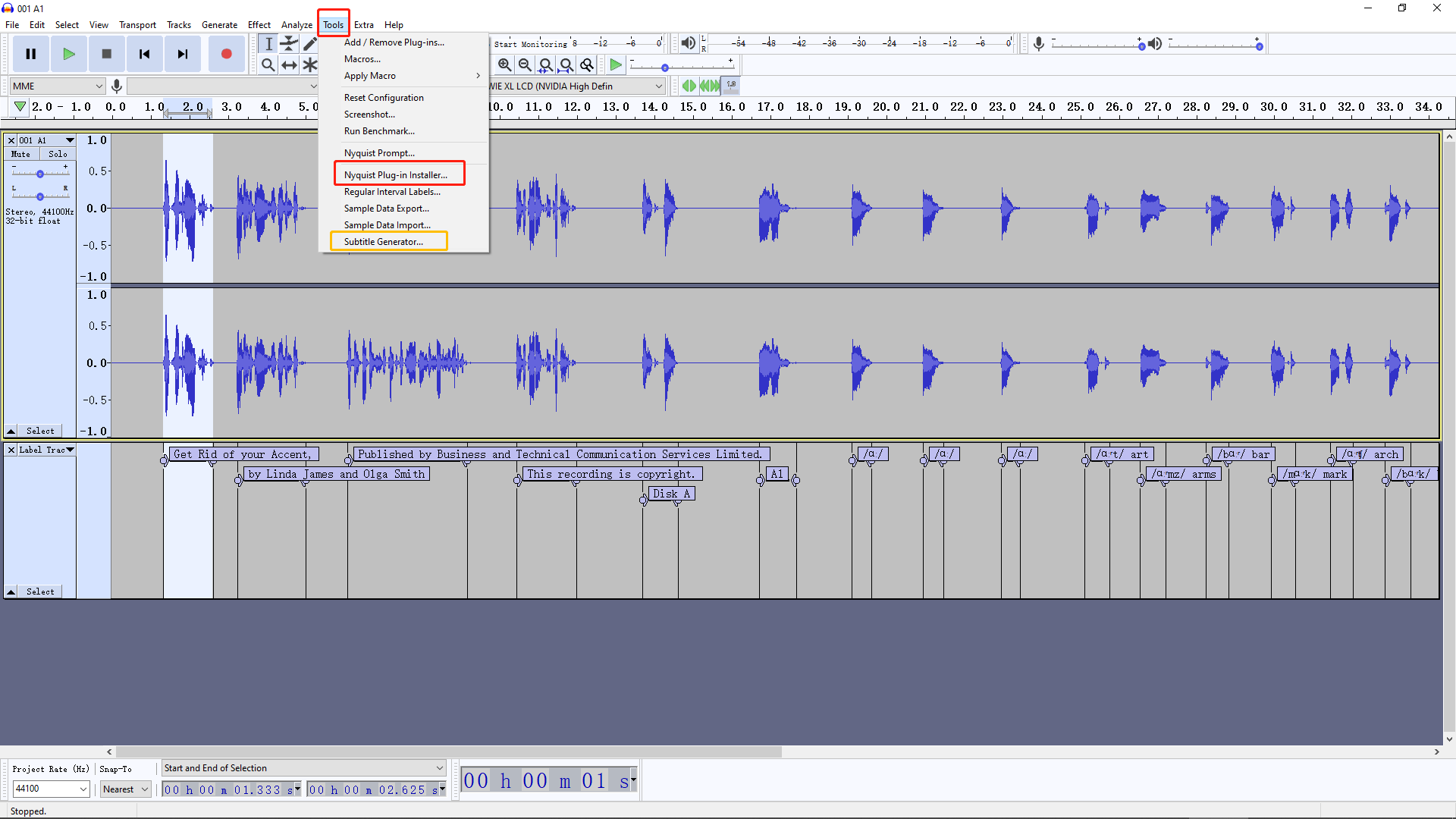
Given a filename, for example “SubtitleGenerator.ny”, you can save the “.ny” file to the “Plug-Ins” subdirectory in your audacity location, or install it by “Tools” menu → “Nyquist Plug-in Installer…” of the software,
Congratulations. That seems to work as intended.
Perhaps I could make a few suggestions. None of these affect the functioning of your script, but are more a matter of convention.
\
- Headers
$nyquist plug-in
$version 4
$type tool analyze
$name (_ "Subtitle Generator")
$manpage "Subtitle_Generator"
$debugbutton disabled
$author (_ "Cheng Huaiyu")
$release 1.0.0
$copyright (_ "Released under terms of the GNU General Public License version 2")
Normally, headers begin with a semi-colon rather than a dollar sign.
(This may not be in the documentation yet)
Headers are treated by Nyquist as comments - they are ignored, but Audacity reads these special comments to convert the Nyquist code into a plug-in.
Comments normally begin with a semi-colon. However, the plug-ins that are shipped with Audacity use a modified form of these comments, with “$” instead of “;” so that shipped plug-ins can be translated into other languages. This translation mechanism does not work for third party plug-ins because the translations have to be compiled into the Audacity app.
The translatable strings are also enclosed in: (_ “translatable string”)
For third party plug-ins, the the “(_ …)” is ignored.
So the recommended way to write the above headers would be:
;nyquist plug-in
;version 4
;type tool analyze
;name "Subtitle Generator"
;manpage "Subtitle_Generator"
;debugbutton disabled
;author "Cheng Huaiyu"
;release 1.0.0
;copyright "Released under terms of the GNU General Public License version 2"
In future versions of Audacity it “may” be possible to make third party plug-in headers translatable, but there’s no guarantee that the syntax will be the same, so best to use the standard semicolon comment syntax.
2. Debug button
Until a plug-in has been available “In the wild” for a while, it’s generally a good idea to leave the Debug button enabled. This is extremely helpful if anyone finds a bug. The debug button is enabled by default if you omit the header “;debugbutton disabled”.
3. Manual page
The “;manpage” header creates a “?” help link in the interface IF there is a page in the manual with that name.
Example:
;manpage ""Low-Pass Filter""
will take you to this page in the manual: Low-Pass Filter - Audacity Manual
For third party plug-ins (which are not documented in the manual), there is an alternative (and optional) way to include a help page. See: Missing features - Audacity Support
4. Trailing parentheses
The Nyquist language is a form of LISP. As with other forms of Lisp, it is conventional to avoid trailing parentheses. Thus:
;; Good
(setf txt (if (string= ".LRC" file-ext)
            (label-to-lrc labels)
            (label-to-srt labels)))

;; Bad
(setf txt (if (string= ".LRC" file-ext)
            (label-to-lrc labels)
            (label-to-srt labels)
          )
)
I hope you will find this useful for writing many more beautiful Nyquist plug-ins 
Thanks a lot for your detail explanation.
@chenghuaiyu
I’d like to suggest that you create a new topic for your Label to LRC plug-in so that it doesn’t get lost in this long topic topic.
I’m a little concerned about the final line:
(format nil "~a" txt)
If there’s a lot of labels, this may create a window that is too tall, and Nyquist message text windows do not scroll.
How important do you think it is for the plug-in to display the contents of the file, rather than just a confirmation message that the file has been written? (There’s several options of what could be done, but as I don’t use LRC files I’m uncertain of what is important).
I’d like to see feedback from people that do use LRC files so that the plug-in may be tweaked if necessary prior to “publication”. It isn’t my decision for which plug-ins are shipped with Audacity, but if users of LRC files are happy with this plug-in, then I can upload it to Audacity’s “official” plug-ins on the Audacity wiki (http://wiki.audacityteam.org/wiki/Download_Nyquist_Plug-ins).
Steve, have you got any update?
I’m glad you reminded me In the release candidate for Audacity 3.0.0 (See: https://forum.audacityteam.org/t/audacity-3-0-0-release-candidate-available-for-testing/60573/1)
Nyquist still does not support Unicode (and probably never will).
Python scripting now correctly handles multi-byte characters returned from Audacity. (fixed)
Super! Just can’t wait to test that (continue my work at where I stopped). Oh that was even pre-pendamic.
The other day, I was thinking… I had started something with audacity and given up, but what was the reason?
Luckily, I bookmarked the thread. So I could read through my own thread again 
If you feel comfortable doing so, there’s a “release candidate” for Audacity 3.0.0 available for testing. See: https://forum.audacityteam.org/t/audacity-3-0-0-release-candidate-available-for-testing/60573/1
I got RC6 portable. I haven’t done that for such long that I’m not sure whether I’ve missed any step
I enabled mod-script-pipe, restarted and double checked enabled. When I ran my script I got nothing returned:
PS E:\work\python\Audacity> python .\pipe_utf-8.py
pipe-test.py, running on windows
Write to  "\\.\pipe\ToSrvPipe"
Read from "\\.\pipe\FromSrvPipe"
-- Both pipes exist.  Good.
-- File to write to has been opened
-- File to read from has now been opened too

Send: >>>
GetInfo: Type=Labels Format=JSON"
 I read line:[
]
Rcvd: <<<
When I ran the same script on v2.3.3 I got:
PS E:\work\python\Audacity> python .\pipe_utf-8.py
pipe-test.py, running on windows
Write to  "\\.\pipe\ToSrvPipe"
Read from "\\.\pipe\FromSrvPipe"
-- Both pipes exist.  Good.
-- File to write to has been opened
-- File to read from has now been opened too

Send: >>>
GetInfo: Type=Labels Format=JSON"
 I read line:[[
]
 I read line:[  [ 0,
]
 I read line:[    [
]
 I read line:[      [ 0, 0, "Hello" ] ] ] ]
]
 I read line:[BatchCommand finished: OK
]
 I read line:[
]
Rcvd: <<<
[
  [ 0,
    [
      [ 0, 0, "Hello" ] ] ] ]
BatchCommand finished: OK
Another strange thing also happened. When I restart v3 mod-script-pipe is reset to New (after v3 has been launched).
The script:
#!/usr/bin/env python
# -*- coding: utf-8 -*-

import io
import os
import sys


if sys.platform == 'win32':
    print("pipe-test.py, running on windows")
    TONAME = '\\\\.\\pipe\\ToSrvPipe'
    FROMNAME = '\\\\.\\pipe\\FromSrvPipe'
    EOL = '\r\n\0'
else:
    print("pipe-test.py, running on linux or mac")
    TONAME = '/tmp/audacity_script_pipe.to.' + str(os.getuid())
    FROMNAME = '/tmp/audacity_script_pipe.from.' + str(os.getuid())
    EOL = '\n'

print("Write to  \"" + TONAME +"\"")
if not os.path.exists(TONAME):
    print(" ..does not exist.  Ensure Audacity is running with mod-script-pipe.")
    sys.exit()

print("Read from \"" + FROMNAME +"\"")
if not os.path.exists(FROMNAME):
    print(" ..does not exist.  Ensure Audacity is running with mod-script-pipe.")
    sys.exit()

print("-- Both pipes exist.  Good.")

TOFILE = open(TONAME, 'w')
print("-- File to write to has been opened")
#FROMFILE = open(FROMNAME, 'rt')
FROMFILE = io.open( FROMNAME,'r', encoding='utf8', newline='\n')
print("-- File to read from has now been opened too\r\n")


def send_command(command):
    """Send a single command."""
    print("Send: >>> \n"+command)
    TOFILE.write(command + EOL)
    TOFILE.flush()

def get_response():
    """Return the command response."""
    result = ''
    line = ''
    while line != '\n':
        result += line
        line = FROMFILE.readline()
        print(" I read line:["+line+"]")
    return result

def do_command(command):
    """Send one command, and return the response."""
    send_command(command)
    response = get_response()
    print("Rcvd: <<< \n" + response)
    return response

def quick_test():
    """Example list of commands."""
#    do_command('Help: Command=Help')
#    do_command('Help: Command="GetInfo"')
    do_command('GetInfo: Type=Labels Format=JSON"')
    #do_command('SetPreference: Name=GUI/Theme Value=classic Reload=1')

quick_test()
Testing with Audacity 3.0.0 (release version) on Linux, when I send the command (from Python “pipeclient.py”):
GetInfo: Type=Labels Format=JSON"
I get:
Sending command: GetInfo: Type=Labels Format=JSON"
[
  [ 1,
    [
      [ 0.435929, 0.435929, "hello" ],
      [ 2.13066, 3.33559, "world" ] ] ] ]
BatchCommand finished: OK
Now that Audacity 3.0.0 has been released, it’s probably best to resume your Python work with the release version. See: Audacity ® | Download for Windows
Got the same result on v3 release. Do I have to do something under Extra menu which I’ve done on my v2?
PS E:\work\python\Audacity> python.exe .\pipe_utf-8.py
pipe-test.py, running on windows
Write to  "\\.\pipe\ToSrvPipe"
Read from "\\.\pipe\FromSrvPipe"
-- Both pipes exist.  Good.
-- File to write to has been opened
-- File to read from has now been opened too

Send: >>>
GetInfo: Type=Labels Format=JSON"
 I read line:[
]
Rcvd: <<<
Just ensure that “mod-script-pipe” is enabled in “Preferences > Modules”.
(Note that Audacity has to be restarted after changing that setting)
Can you get any commands to work from Python? (for example, try sending “Play:”)
“Play:” works, confirmed.
Just tried:
do_command(‘SetLabel: Text=Hello LabelIndex=1 Start=2 End=3’)
that works.
Does
GetInfo: Type=Labels Format=JSON"
work for you with “pipeclient.py” (command line interface)?
Where can I find pipeclient.py?
The same place as pipe_test.py. Here: https://github.com/audacity/audacity/tree/master/scripts/piped-work
Documentation is in the file (See the Docstrings).
Great! pipeclient works and the unicode issue has been resolved.
Now I have to update my old script for v3. Thank you so much for your very patient help.
Enter command or 'Q' to quit: GetInfo: Type=Labels Format=JSON
Sending command: GetInfo: Type=Labels Format=JSON
[
  [ 1,
    [
      [ 0, 0, "Hello" ],
      [ 1.31483, 1.31483, "小苹果" ] ] ] ]