Convert Label text to LRC file

Thank you for your time.
This is my current results:
A) ASCII only (all good!)

C:\tmp>python pipe_test.py
pipe-test.py, running on windows
Write to  "\\.\pipe\ToSrvPipe"
Read from "\\.\pipe\FromSrvPipe"
-- Both pipes exist.  Good.
-- File to write to has been opened
-- File to read from has now been opened too

Send: >>>
GetInfo: Type=Labels Format=JSON
Rcvd: <<<
[
  [ 0,
    [
      [ 1.52091, 2.31039, "hello" ],
      [ 3.47138, 3.47138, "world" ] ] ] ]
BatchCommand finished: OK

B) Unicode
Exported labels:

1.520907	2.310385	hello
3.471383	3.471383	小苹果

Piped:

GetInfo: Type=Labels Format=JSON
Rcvd: <<<
[
  [ 0,
    [
      [ 1.52091, 2.31039, "hello" ],
    c:\wxwidgets-3.1.1\include\wx\strvarBatchCommand finished: OK

I know that my Windows/DOS shell doesn’t display unicode characters. But it should at least show me some unreadable characters :unamused: :question:

The scripts provided by Audacity assume that data is plain ASCII, and will not work with multi-byte Unicode characters. With Python3 you will probably see errors like:

"UnicodeDecodeError: 'utf-8' codec can't decode bytes in position x-y: invalid continuation byte


I should have said that “I think it should be possible to get …”
The “GetInfo: Type=Labels” can definitely handle multi-byte Unicode characters
(try it from Audacity’s “Extra menu > Scriptables II > Get Info”).
I “assume” that Python3 is capable of accessing that data, but you would need to write your own Unicode compatible functions to read and write Unicode data to/from Audacity.

It took a while until I found where to activate the Extra-menu :slight_smile:
Yes, that works. I can write a Python script to read the JSON output. But how do I pipe that output to my script?

If you can get Python to read the Unicode labels, then you should be able to the whole thing with Python.

With my limited Python skill and Google’s help :laughing: , I tested the UTF-8 read/write:

import io

encoding = 'utf8'

with io.open('utf-8.txt', 'r', encoding=encoding, newline='\n') as fin:
    text= fin.read()
    print( text)
    
with io.open('utf-8_out.txt', 'w', encoding=encoding, newline='\n') as fout:
    fout.write(text)

then I modified the pipe_test.py:

FROMFILE = io.open( FROMNAME,'r', encoding='utf8', newline='\n')
*snip*
    while line != '\n':
        result += line
        line = FROMFILE.readline()
        print(" I read line:["+line+"]")
    return result

I guess I can leave TOFILE as it is.
This is my output:

GetInfo: Type=Labels Format=JSON"
 I read line:[[
]
 I read line:[  [ 0,
]
 I read line:[    [
]
 I read line:[      [ 0, 0, "Hello" ],
]
 I read line:[    c:\wxwidgets-3.1.1\include\wx\strvararg.BatchCommand finished: OK
]
 I read line:[
]
Rcvd: <<<
[
  [ 0,
    [
      [ 0, 0, "Hello" ],
    c:\wxwidgets-3.1.1\include\wx\strvararg.BatchCommand finished: OK

Is Audacity writing an UTF-8 pipe?
mod-script-pipe is a DLL. I couldn’t look into it.

Does it work for you with just a single label:

3.471383	3.471383	小苹果

No, it shows one path. Basically it shows a path whenever it’s unicode. For instance:

0.359909	0.359909	Hello
2.159456	2.159456	回頭我也
4.040272	4.040272	world
6.315828	6.315828	不要你


 I read line:[      [ 0.359909, 0.359909, "Hello" ],
]
 I read line:[    c:\wxwidgets-3.1.1\include\wx\st      [ 4.04027, 4.04027, "world" ],
]
 I read line:[    c:\wxwidgets-3.1.1\include\wx\strvarBatchCommand finished: OK
]

My UTF-8 routine failed totally when I tried with German:

1.253878	1.253878	Lüneburg


GetInfo: Type=Labels Format=JSON"
 I read line:[[
]
Traceback (most recent call last):
  File "pipe_utf-8.py", line 82, in <module>
    quick_test()
  File "pipe_utf-8.py", line 79, in quick_test
    do_command('GetInfo: Type=Labels Format=JSON"')
  File "pipe_utf-8.py", line 71, in do_command
    response = get_response()
  File "pipe_utf-8.py", line 64, in get_response
    line = FROMFILE.readline()
  File "C:\Users\home\AppData\Local\Programs\Python\Python37\lib\codecs.py", line 322, in decode
    (result, consumed) = self._buffer_decode(data, self.errors, final)
UnicodeDecodeError: 'utf-8' codec can't decode byte 0xfc in position 42: invalid start byte

Which version of Python are you using?

On Linux, with Python 3, this will read the return message and print as hex values. You may notice that with two labels containing “小苹果”, the printed data is a mix of UTF-8 and non-UTF-8 (UTF-8 and “latin 1” characters perhaps?).

import os
import sys

PIPE_BASE = '/tmp/audacity_script_pipe.'
WRITE_NAME = PIPE_BASE + 'to.' + str(os.getuid())
READ_NAME = PIPE_BASE + 'from.' + str(os.getuid())
EOL = '\n'

write_pipe = open(WRITE_NAME, 'w')
read_pipe = open(READ_NAME, 'rb')

def send_command(command):
    """Send a single command."""
    print("Send: >>> \n"+command)
    write_pipe.write(command + EOL)
    write_pipe.flush()

def get_response():
    """Return the command response."""
    result = ''
    line = ''
    last = ''
    while (last != b'\n' or line != b'\n'):
        #result += line
        last = line
        line = read_pipe.read(1)
        print(line.hex(), end=' ')


send_command("GetInfo: Type=Labels")
get_response()

Python 3.7.5 on Windows 10
Audacity 2.3.3

I modified the code and write the output to a binary file:

 write_json = open('labels.json', 'wb')
*snip*

   while (last != b'\n' or line != b'\n'):
        last = line
        line = read_pipe.read(1)
        print(line.hex(), end=' ')
        write_json.write( line)

It still shows me the wxwidgets path:

0.452789	0.452789	hello
1.044898	1.044898	小苹果

This will return the byte values (This version is for Linux and will need adapting for Windows)

import os
import sys
PIPE_BASE = '/tmp/audacity_script_pipe.'
WRITE_NAME = PIPE_BASE + 'to.' + str(os.getuid())
READ_NAME = PIPE_BASE + 'from.' + str(os.getuid())
EOL = '\n'
write_pipe = open(WRITE_NAME, 'w')
read_pipe = open(READ_NAME, 'rb')

def send_command(command):
    """Send a single command."""
    print("Send: >>> \n"+command)
    write_pipe.write(command + EOL)
    write_pipe.flush()

def get_response():
    """Return the command response."""
    eolCount = 0
    bytes = bytearray([])
    while eolCount < 2:
        byte = read_pipe.read(1)
        bytes += byte
        if byte == b'\n' :
            eolCount +=1
        else:
            eolCount = 0
    print(bytes.hex())

send_command("GetInfo: Type=Labels")
get_response()

The problem though is that the returned bytes may not all be valid UTF-8, so I don’t know how you would decoded it.

Following pipe_test.py code adapted:

WRITE_NAME = '\\\\.\\pipe\\ToSrvPipe'
READ_NAME = '\\\\.\\pipe\\FromSrvPipe'
EOL = '\r\n\0'

This is my output. You still can see 4 zero bytes followed by the path “633a5c777877696467…”, just like the last time I tried.

C:\tmp>python get-labels.py
Send: >>>
GetInfo: Type=Labels
5b200a20205b20312c0a202020205b200a2020202020205b20302e3837303734382c20302e383730
3734382c202268656c6c6f22205d2c0a00000000633a5c7778776964676574732d332e312e315c69
6e636c7564655c77785c7374727661724261746368436f6d6d616e642066696e69736865643a204f
4b0a0a

What output do you get from two labels, each containing: 不要你
What output do you get from the “GetInfo” menu command with those labels?

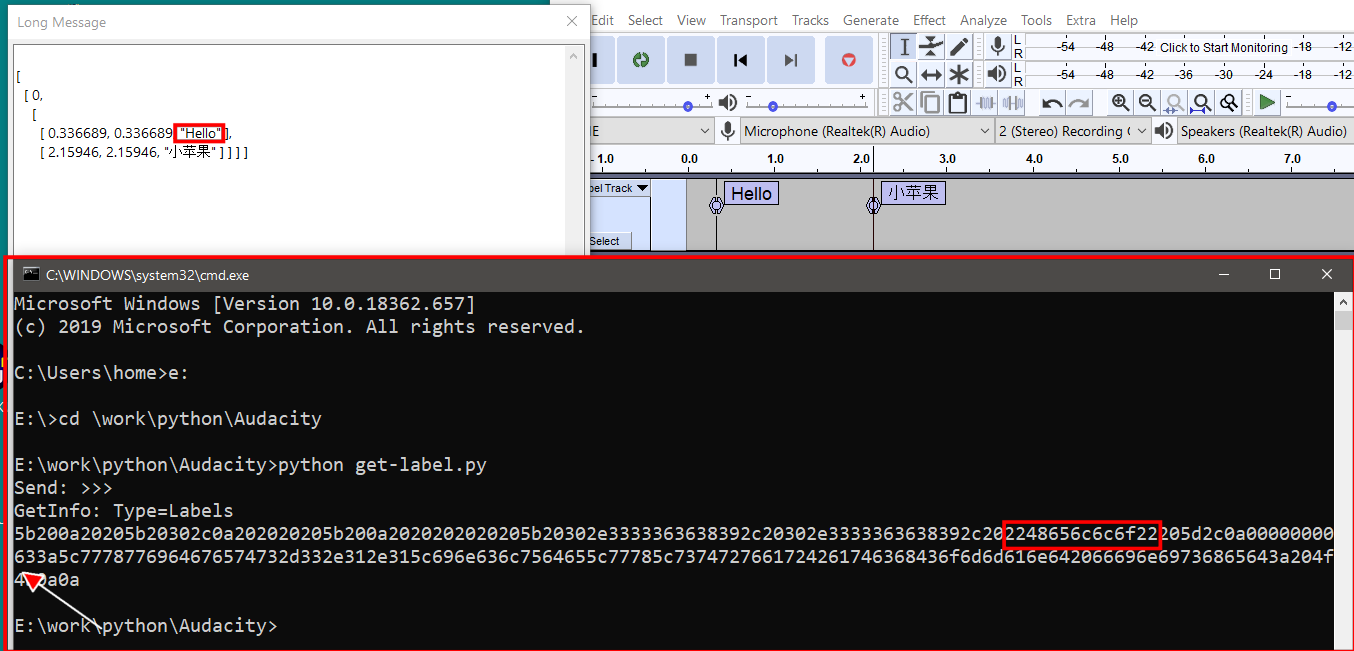
The arrow is pointing at the path.

I’m trying to work out where the encoding / decoding is going wrong.
I can’t copy and paste digits from a screenshot.

5b200a20205b20302c0a202020205b200a2020202020205b20302e3333363638392c20302e3333363638392c202248656c6c6f22205d2c0a00000000633a5c7778776964676574732d332e312e315c696e636c7564655c77785c7374727661724261746368436f6d6d616e642066696e69736865643a204f4b0a0a


[ 
  [ 0,
    [ 
      [ 0.336689, 0.336689, "Hello" ],
      [ 2.15946, 2.15946, "小苹果" ] ] ] ]

Just like my old post (above), there are 4x zero bytes then followed by a path.

You’re getting less on Windows than I do on Linux. Your version appears to be completely choking on the Unicode characters.

For the current version of Audacity, it appears that the script pipe module does not support Unicode at all on Windows. I’ve written to the developers about this, but I’m not hopeful of Unicode support being added any time soon, unless the problem was just an oversight that can be easily fixed.

I’ll write back if I get more information. Sorry I couldn’t be more help.

Thank you for your time :+1: