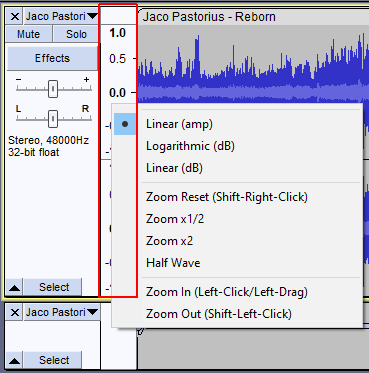
As the subject line implies, are there ways to use the keyboard with Vertical Zoom (apart from the rather clunky Windows builtin Mouse Keys solution)?
If not, where is the correct place and what are the procedures to request for this feature?
Edit: Ahh, the source code is on github and there’s the Adding Features category . Great
My request would be a solution that matches the CTRL+1 and CTRL+3 etc. for normal zoom, when the vertical zoom area has focus, (I don’t think you can set focus or navigate to that area with the keyboard in the current implementation, though.)
My version is Audacity 3.4.2 on Windows 10 64 bit, but I assume this question is relevant for all platforms.
Well,- I checked the Edit->Preferences->Shortcuts->Name(radio button)
scrolling through but only found the toggle shortcut for “Advanced Vertical Zoom”.
Also tried, as you suggested, various combinations of Page Up/Down, Up/Down with modifier keys, in the hope some hidden shortcuts would appear, but with no luck.
Anyway,- think I’ll clone the github sources and dig into that. Seems that they’ve started to use Conan as a package/dependency manager, which should make the whole compilation of the sources way way easier on “poor” windows coders/targets. (In the vague hope I can come up with a pull request for this problem). If When I eventually give up I can always make a feature request.
Yeah, that is what I use now, but as mention in my post, I find the builtin Windows Mouse Keys rather clunky.
Edit: Actually that is not true, I use the mouse mostly, but if I need precision I switch to Mouse Keys.
Edit2: Oh, after reread, emulating the Scroll-wheel! Nice idea. I could use autohotkey to do that! Thanks for the idea
Edit3: Sadly the mouse wheel only works in normal zoom mode not in Vertical Zoom hmm, does work when holding ctrl.
Edit4: Anyway, the heart of the problem is that the Vertical Zoom is dependent on the mouse cursor is hovering over the small dB area just left of the wave forms, which really complicates a autohotkey hack emulating a ctrl wheeldown and wheelup for vertical zoom when the cursor is not in that area.
One problem with having key bindings for vertical zoom is determining which part of the track you want to zoom in on. In this image, the top track is zoomed in on the top part of the track, the middle track is zoomed in on the middle of the track, and the third track is zoomed in on the bottom of the track:
Choosing the “Zoom in on middle” as default and then add some “Move Vertical Center up/down” keybindings/commands would solve that. Exposing the functionalities of the various popup menu items in the “dB area” (framed in red)
as keybindings/commands would ease the usage.
(Well, if we at least could navigate to the “dB area” we would have access to this extra functionality without the mouse.)
Honestly, I think these functions should be exposed as keybindings/commands as I have just argued for in an Enhancement Request on github.
And please note,- I’m not arguing for adding a lots of new keyboards shortcuts, just expose these “menu actions”? seemingly already present in the ui, as possible keybindings/commands, selectable in the preferences for people who prefer not to/cannot use the mouse.
The macros and the SetTrackVisuals command are new to me. Sounds promising. Have to dig further into that to see if this could solve my problem.
Ps! Just realized that the keybindings in Preferences->Shortcut seems to mirror the commands in the Tools->Macro Manager. Thanks for the macro tip. (Was that already available in ver. 2x ?)
There are a couple of plug-ins available HERE for zooming in/out on the track that has focus. When installed and enabled you will be able to create keyboard shortcuts of your choice (I’m using the “+” and “-” keys on the numpad).
There are compound widgets in many UIs, I do not know here though. If sub elements are not focusable in this part of Audacity then yes I agree will need key combination to identify area. Was just a suggestion.
How I love this forum! Just spent days of editing with miles of mouse-wheeling for vertical zooming back and forth and now I run across this post, where you even present a great solution with your Vzoom macros (here), @steve!
My main painpoint in vertical zooming by mouse was, that quite often I first hit the wrong key (SHIFT instead of CTRL) with the pointer in the vertical axis area, which unintentionally shifted the center of the waveform. And then when zooming in further, my waveform completely disappeared to the top or bottom …
Now I can zoom with keyboard and be sure to NOT mess with the vertical position.
THANK YOU!
Just while I’m at it: is there a single command to reset vertical zoom to “default” (-/+1) ? This would make it even easier to jump back to normal view after a deep drill-down.
EDIT: Just found the “Zoom Reset” in the context menu, but I didn’t find this command in the keyboard preferences to associate a key-binding to it (Aud. v3.3.3). Did I miss something?