Hey guys, so I’m doing an audiobook and I believe I’m going through all the steps in the right order, RMS normalize, De-clicker, legacy limiter….
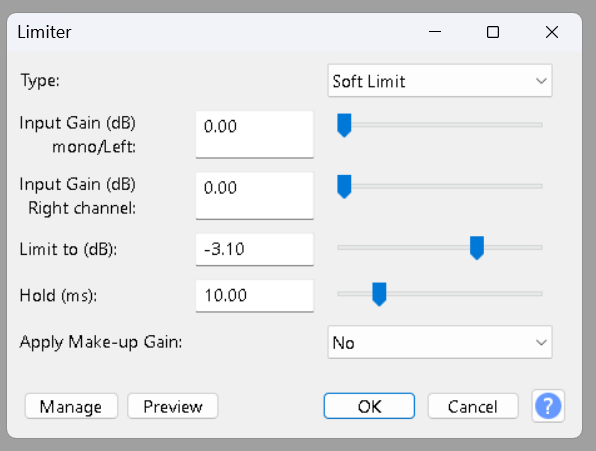
But I’ve been worried that it’s too loud afterward. I’m on chapter 12 and each time my final wav still sounds too loud. It actually hurts my ears with the headphones on. I’ve got the RMS normalizer sent to -20 db, legacy limiter is set to -3.1 (should that be -3.5?) and…. Now today it actually still has a section that is distorted. Just one peak that actually has distortion. Painful to listen to. I’ve gotta be doing something wrong! It does pass all the ACX check markers though!
Clipping normally happens when recording if you “try” to go over 0dB. Or, regular WAV files will clip if you “try” to go over 0dB. (Or if you try to get 110 watts out of a 100W amplifier, etc.) Internally, Audacity used floating point so Audacity itself won’t clip.
The legacy limiter doesn’t normally clip unless you’ve set it to one of the clipping modes. Normally it uses look-ahead so can reduce the level of the loudest parts without changing the wave shape.
You MAY have distortion for some reason but if it’s passing ACX check the loudness is OK (about -20dB RMS) and about the same as other audiobooks.
The loudness in YOUR headphones depends on your headphone output/amplifier, your volume control setting and the sensitivity of your headphones.
-3.1dB peaks MAY be OK. The spec is -3dB or less so it should be fine. BUT MP3 compression can slightly change the peak levels so the MP3 may measure differently and -3.5dB gives you a bit more safety margin.
Will it be different once I convert to MP3?
The “sound” should be the same. MP3 is lossy compression but at higher bitrates it often sounds exactly like the uncompressed original (in blind listening tests) and voice is easier to compress than music.
MP3 chapter submission for ACX is 192 Constant—or better—which is crazy good quality. There should be no difference between that and your final chapter edit.
Do you listen to yourself while performing (Highly Recommended)? It’s possible you are announcing very reserved or reduced volume, and that’s where your headphone comfortable loudness is set. Listening to the chapter after ACX Processing could give a very serious loudness boost.
What do your timeline blue waves look like? Is there a big difference between the live performance and the ACX Processing?
My headphone volume is set with keyboard buttons. If your chapter passes ACX-Check, just turn the headphones down.
If you are using ACX, they have on-line ACX Audiolab where you can check your work. I think it’s still true they don’t check noise.
Another note. None of these tests check for voice quality. An ACX live human checks your work before they accept your production. That could be the first time you find that the quality of your voice is so bad they won’t accept it.
You can read a test and publish it on the forum.
It doesn’t say so (yet) but you should produce the test at the best, most pleasant sound quality you can manage.
Thank you both so very, very much for your responses, and so fast!!
(And I’m terribly sorry but my dear friend’s mom died so that’s why I didn’t and that is why I didn’t respond in an equally fast and appropriately gracious timeline. So sorry.)
So- OK Doug, you say that the legacy limiter normally doesn’t clip unless you set it to a clipping mode. Maybe I’ve done that??
Because you say that the legacy limiter normally doesn’t clip unless you set it to a clipping mode. Maybe I’ve done that??
Because I’ve done 12 chapters using legacy limiter and it clips it every time, flat across the top, all the peaks cut off flat.
this “look ahead option“ that you mentioned sounds great! How do I make that happen? How do I set that?
(I’m using version 3.7.5 because when I upgraded to 3.7.6 it had that glitch that I wrote in about, where the selection tool would make the tracks slide or would randomly highlight sections. I understand I should go ahead and try version 3.7.7 but now I’m afraid too! I just wanna finish this book.)
I understand the loudness in my headphones point, and I do turn it down when I play it back after mastering. My “naked voice” is much softer yes. The peaks are much lower. I swear it just seems as if RMS normalizer is cranking it up way too high… But yeah it’s passing the ACX check. But there is truly distortion. I played it for my friend who heard it clearly.
Continuing on, again, thank you so very much for your quick response and I apologize for being tardy in reply. This is a very urgent issue for me so I’m really grateful.
OK so yes, Koz, you guessed it —my waveform looks very different after my recording, and then after mastering with RMS normalizer.
But I can’t stress enough how the waves are clipped off flat at the top and Doug wrote back that that should not happen. So have I pushed some button or changed some setting??
I will send you a sample clip later tonight if I can, otherwise first thing in the morning.i’ll also send a picture of the different waveforms. But it truly does have distortion and I was just gonna let it go, the flat topped waves, until I had this distortion zapping in my ear.
I have been just hoping against Hope that indeed the sound level once it’s on audible will be fine. But I’m really questioning it now from what you both say: that clipping off flat shouldn’t happen.
Could it be that my recording is too soft so that when it’s jacked up by RMS normalizer it overcompensate or something??
I’m also wondering if it’s my mic… I have a Sennheiser. But I really wish I’d gotten a used Neuman instead. The 416 picks up every little thing, every bit of mouth noise every click and maybe it’s too sensitive or maybe that’s the problem with a clipping?
OK, I will send you that clip later. And thank you both so very much for your advice.
Did you export a WAV sound file each time you finished announcing a chapter? That’s a good idea because if you make a bad choice in post production, you could have a chapter that’s permanently damaged.
Clipping throws away part of your performance — forever. There is no recovery.
We offer 36Audiobook-Mastering-Macro.txt. Its job is to automatically set the first two ACX submission standards, Peak and RMS (Loudness). So all those individual steps you’ve been executing go away. I need to check it before I post because the last time I used it, it seemed to act funny. This is the second version of Mastering. Audacity changed the tools around and the first one stopped working.
I can make it worse. I’m doing all this on Audacity 3.6.2. I don’t trust the versions much beyond this. The developers seem to have adopted the New Version Every Week model and the forum lit up with bugs and unstable behavior. Audacity is not your normal software package. It runs on many different machines and operating systems. That means the developers have to check all of them before they issue an update. They are not always “upgrades.”
Are you depressed enough yet? It’s possible your voice is naturally uneven. I’m not sure I know how to deal with that.
Looking for your sound test. Quick note: if you work in mono (one blue wave), you can announce out to 22 seconds. Pick a segment from one of your chapters rather than using Catskill Cows.
Which Audacity features this limiter? Is it Effect > Volume and Compression > Limiter?
Regard “36Mastering.” The reason it got updated (pre-36) was Audacity changed the Limiter and the Macro stopped working. I mentioned briefly in a recent post that the 36 Macro seemed to act a little odd.
You may have timed yourself into a conundrum. There are ways to manage microphone positioning to avoid most mouth ticks and clicks, but the performances may not match everything you’ve done so far.
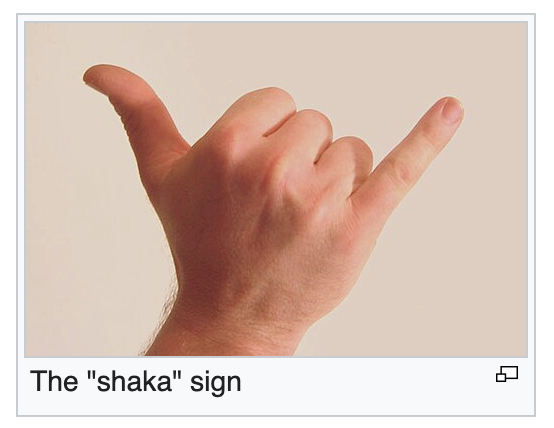
The fuzzy rule for spacing is to have about 8 inches between you and the mic. That works out to be a Hawaiian Shaka.
So no, you don’t have to go searching for a ruler.
You don’t have to be directly in front of the microphone (A), either. That’s where most of your mouth noises go. Try Position B.
Position B is handy if you have a microphone with low sensitivity. You can get a lot closer and louder without picking up lip smacks, tongue ticks, glottal stops, or breath rumbles. It also allows you to put the script in front.
There is a marketing rule here. Everybody Knows if you produce a microphone with normal sensitivity and a beginner gets it, they could easily overload their system with immediate harsh distortion. Then the performer sends the microphone back. However, if they produce a low volume microphone, the New User will get a low volume performance that sounds OK. So they think they are doing something wrong—and keep the microphone.
No contest, right?
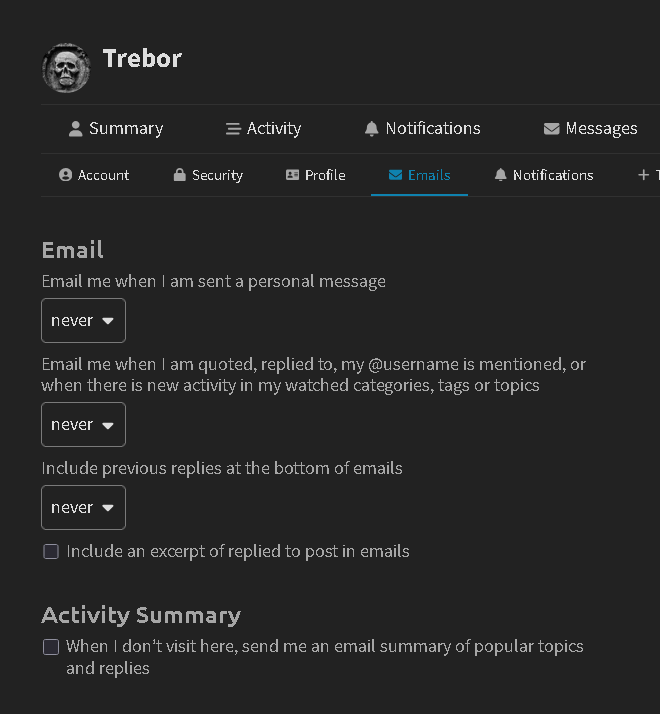
They may be alerted by email that there is a private message for them, but it depends on their email preferences for this forum. When they next visit the forum there will be an indicator (top right) to show they have a private message.
e.g. My email preferences for this forum are “never” …
Wow, I got really sick. Kind of lost two weeks. Just now getting my voice back. Okay, I’m going to try and go through all of this, all your Very kind thoughts and ideas, etc.
By the way, I have a 416 because that was industry standard about a decade ago, even five years ago when I bought it. William Morris (my voiceover agency for 19 years until they dropped the dept. during Covid) switched over in about 2009 or 10. But I knew I should’ve gone with a Neuman (used). Anyway, I’ll start trying to save up. But meanwhile I have all of this book already recorded. I just need to finisih editing and mastering it. So– back to dealing with the distortion. Sounds like changing the limit in Legacy Limiter from Hard to Soft may be key.
Meanwhile, I need to figure out how to send samples on here….