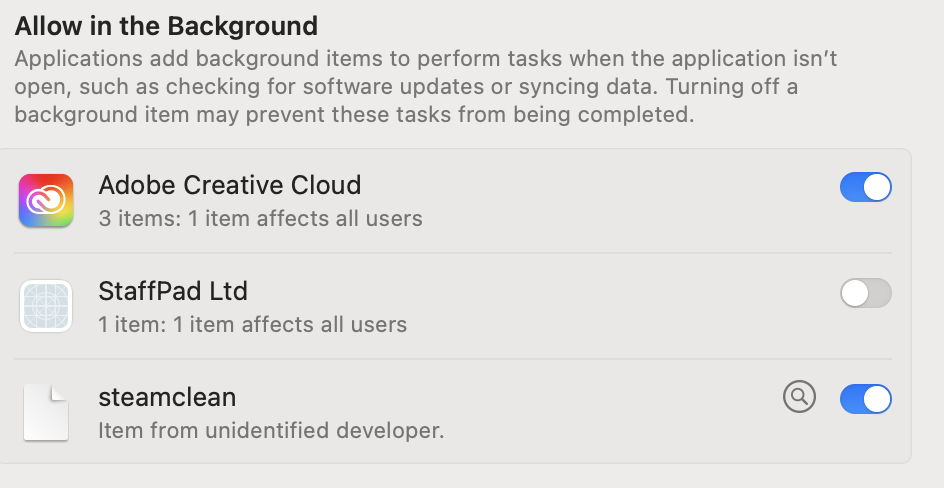
I accidentally installed Audacity on Mac OS using the “Download Audacity 3.7.5” link instead of the “Download without Muse Hub” link. During installation, I received a system notification that something was added to my “Login Items & Extensions”, so I opened that window and am having a hard time determining what has changed on my system.
How can I perform a full and clean uninstall of all items that were installed and configuration settings that were changed with the “Audacity_Installer_via_MuseHub.pkg” installer? I understand I can delete the Musehub and Audacity apps from my Applications folder, but the system notification regarding other items being added to “Login Items & Extensions” suggests to me that there is more to clean up after uninstall.
You’ll want to throw away the “audacity” folder which is in ~/Library/Application Support/
You’ll probably want to find - using your system settings - the login items. Look for something called “Audacity” there, then try to find this login item using “Find any File” from Thomas Tempelmann.
I don’t think that any “configuration settings” were changed by the installer.
Anyway, even if you continue to use your current installation “with MUSE”, you can deactivate it in your system settings, and you don’t need to use it at all. Audacity works with it or without it. Just never - I repeat: never - enter any credit card details anywhere.
Thanks for the details. It seems there were more changes made to my system by the Muse Hub installer, though. I found at least one of the items that was added to “Login Items & Extensions”: the “StaffPad Ltd” item:
You probably need to perform a search for files installed/created at the time when you installed Audacity. And then (try to) decide whether it belongs to Muse Hub or not. Or you revert to the previous state by restoring your backup.
The macOS installation system does not have an option to uninstall or remove files and apps that were installed with an installation package. You can get a list of files that were installed from the package payload or the receipt. This will be a good starting point, but an app or tool might also create daemons, agents, preferences, configuration files, and other resources in various places across the file system. All these files weren’t part of the package payload and wouldn’t be tracked in the receipt. You will have to inspect all of these and judge whether you need to remove them, as well. Daemon and agents will need to be properly unloaded and quit before deleting their files.
Once you have built a script that performs the un-installation to your satisfaction, you should also run pkgutil --forget and remove the record of the package being installed to ensure a future re-installation will run smoothly.