Trebor,
I’d like to make sense of the principles and rationale behind the steps you took.
The EQ graph you used looks like it removes extreme bass, and adds some treble (to bring back cymbals and reduce “muffle”)
Compression/limiter makes sure there is no clipping? Tries to smooth out the extremes in high and low decibels?
I didn’t understand the stero/mono step. You’re just “double tracking” the song with additional copies of mono? What end result does this accomplish?
I did notice that when I combined the original raw and Koz’s final, it sounded better with both of them. I think the original provided some extra bottom end that was lacking in Koz’s final. Is that the idea?
Chorus to add some echo and fill in some dry spots? I get chorus, just didn’t know it can be applied to an entire track. I guess it helps “bring out” the entire track (or whatever word phrase use)
Compression again. Same logic as #2?
Envelope to modify final volume. Is this similar to the Amplify effect? It makes sense to do this step last.
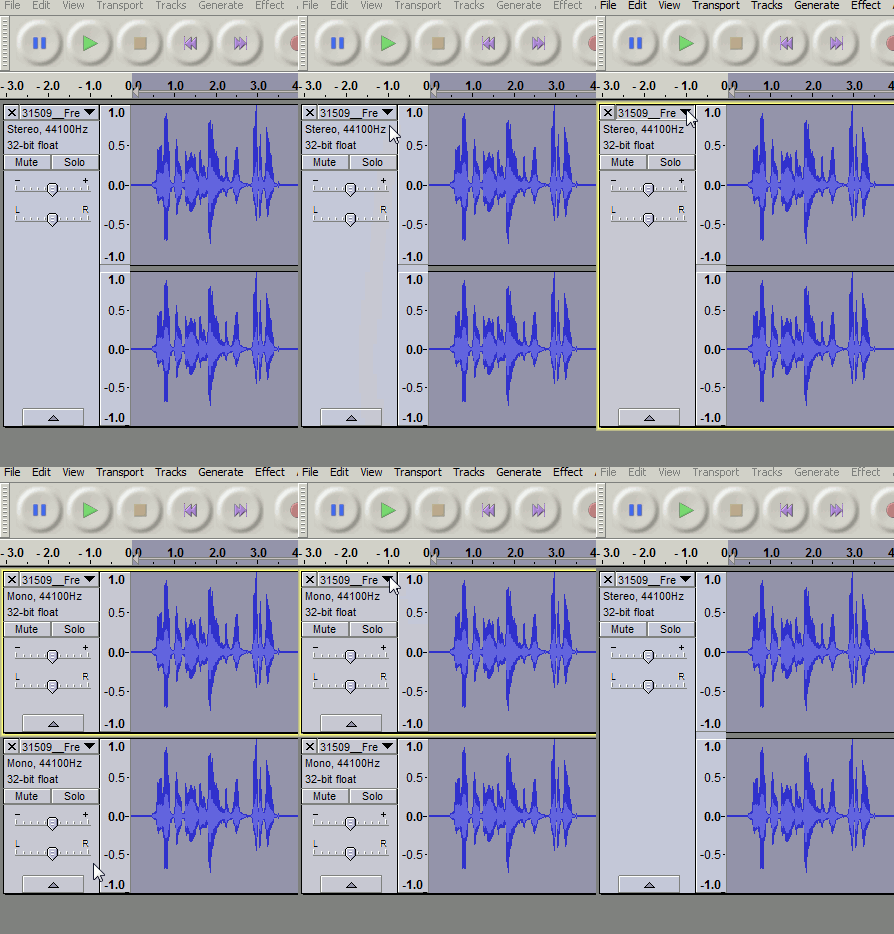
I don’t know how to do Step #3 (stereo/mono copying)
How do you set the decibels? You said stereo is set at -6db. How do I do this?
I can add a blank track, but how to I copy one of the stereo tracks? I can only use the mouse to select both stereo channels.
Also, how do I set the new mono track to -12db?
Modify volume of start and finish to taste with Audacity’s envelope tool.
I also don’t know what you did with the envelope tool.
This is to control the volume of the start and finish of the song?
I don’t understand this, as the song is not intended to “fade in”.
I only applies the “fade out” affect to the audience clapping at the end of the song.
What am I missing about the use of envelope?
A1) Yes. Removing the extreme low frequencies (below 30Hz) seems pointless as they aren’t audible but removing them makes the waveform easier to manage. I may have overdone the treble boost a bit (you can cut it back with the equalizer).
A2) Steve’s Limiter (a fast-acting compressor) cuts back the loud peaks in the envelope (the vocalist) so the volume level does not go through such extreme variations.
A3) The stereo/mono step changes the stereo image, (i.e. where the sound appears to be in the stereo field). IMO the original raw recording needed to be made more mono : with the band more in the front-centre. The (mono) copies are perfectly in sync with the original stereo from which they came so it’s not “double tracking” where the tracks are slightly different. If you try the set-up I show in step 3 then intermittently “solo” the stereo track whilst playing the mix you’ll hear the effect.
A4) I used the chorus with a short 10ms (milliseconds) delay, (and without LFO, “rate=0”) to create a wider “fatter” stereo sound, (that was your brief). I only applied it to the stereo track, not to the mono duplicates. This Chorus (delay) step isn’t vital, you could omit it.
A5) Steve’s Limiter deals with the extreme rapid variations in volume, Chris’s compressor could not respond quickly enough to do that but does provide a final polish: gently smoothing out variations in volume.
A6) Chris’s compressor made the start of the track (first 5 seconds) too loud, so I used Audacity’s envelope tool to reduce the volume of the start, (and to increase the volume of the applause at the end).
The -/+ dB values are those of the level slider on each track …
Select the stereo track, hold down the “Ctrl” key and press “D”, a duplicate of the stereo track will appear below it,
You will have to then split this duplicate stereo track into two mono tracks, “split stereo to mono”
With the envelope tool you are not limited to gentle fade-in fade-out, you can apply abrupt changes to the envelope if you zoom in to the waveform.
And as in many messages back, these settings are going to change when you change the club or room and position and distance of the microphone. Knowing what each setting does is a big deal, yes.
And I wonder how well we could do if the show wasn’t in MP3. Each export bumps the quality down another notch, so I figure we’re around 70 or 80 by now.
In defence of my mono-stereo control method as described above, it has an advantage over plug-in channel mixers in Audacity in that you can adjust the levels while the mix is playing. If Audacity allowed real time adjustmet of effects a mono-stereo mixer plugin would be simpler solution to adjusting the stereo image.
Thank you for the clarifications, Trebor. I really appreciate all this.
I can now apply all your edits in a matter of seconds, in the right order.
I really feel empowered to improve crappy live recordings in a big way.
To practice a little, I will apply each of your edits one at a time, and make sure I can hear their impact.
Koz, I reapplied every EQ step onto the orignal raw. So, there are 2 generations, not 80.
A friend just sent me a live recording, and most are similar in terms of being muffled, etc.
Even just blindly applying your series of edits made a huge difference on his track.
It’s not a custom EQ based on the track, but until I learn how, this is a very handy series of steps to apply to any typically muffled/bassy live band recording.
I still can’t tell why your original clip now sounds different here than it did earlier. Same clip. No changes. I hate it when it does this. All this stuff is based on high quality, stable equipment running in a predictable manner.
I may grab your original clip [1] from DropBox again, just to be sure.
The bass suppression thing is a no brainer and either of our curves should work. Bass music works in the audience by feel as much as hearing. If you can’t feel your shirt move, they’re not interested. Of course, that drives microphones nuts.
“OK, Today we’re going to mic an earthquake.”
Good luck with that.
I’m still surprised that your original recordings work as well as they do. Please note that one elf in the procession did claim clipping – too loud music here and there. I heard it, too, but I was so happy that everything else seems to have survived that I didn’t worry about it. But we can’t cure that. Once the blue waves go all the way up that’s the end of that musical note. It will start sounding harsh and crackly. Steve’s Clip-Fix can do a best-guess estimate of what the note may have once been, but he can’t do it repeatedly over many notes and you never get the original musical note back. Those errors are usually fatal.
After listening to Steve’s remix maybe my remix is a bit too mono. If you vary the ratio from -6dB stereo / -12dB mono to say -4/-14 the result will be less-mono more-stereo. As I mentioned in my previous post you can adjust these levels while the mix is playing : you immediately hear the consequences of altering the levels in the stereo image.
Koz may have been referring to the kbps rate of the mp3. An 128Kbps original remixed then exported as 128Kbps will have compression damage (compression artefacts) similar to an ~80Kbps original.
I usually use 256kbps, but as Koz says mp3, (even at 256kbps), is going to add more compression damage because mp3 is lossy compression format.
FLAC format is a loss[u]less[/u] compression format, but the compression ratio is only 1:2 whereas mp3 can be 1:10
i.e. a FLAC file is half the size of the original WAV , an mp3 can be 1/10th the size of the original WAV.
Not all audio software & devices can read flac files.
I think Audacity as shipped can read/write FLAC format without having to add ffmpeg libraries.
Audacity also supports “Ogg Vorbis” which is a “lossy” format with similar compression capability to MP3, but without some of the design limitations and is free (MP3 is restricted by licence)
I’m revisiting this topic a year later with a new clip.
Can someone please remind me how to do Step #3 from Trebor in terms of splitting stereo tracks?
I have no recollection of what and where I am supposed to click!
Trebor, I’m hoping I can use your expertise again.
I just applied your same tweaks from last year, but I bet you can do better?
B/c this recording is much different than last year.
I think the guitars are way down, for example.