Seriously, I installed it exactly as instructed! I’m running macOS 12.6.7, and as far as I understand, Audacity 4 is compatible with it. I’ve already tried quite a few different ways to fix the problem myself before coming here for help!
As long as you don’t tell what the problem is - nobody would be able to help…
Okay, let me rephrase that. I downloaded the new version, and the installation seemed to go smoothly. But Audacity 4 simply won’t open at all!
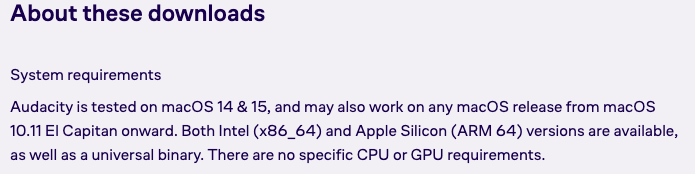
One thing I still don’t fully understand: does Audacity 4 require macOS 13 or later, or does it support older versions as well?
I’ve already tried quite a few different ways to get the program to launch, but nothing has worked!
Did you make a restart before you tried again?
Does Audacity 3.x run while you try to open Audacity 4?
Does Audacity 4 appear in the list of open applications after the dock icon stopped to jump? Either if you shift-tab thtough them or if you select «Command - Option - Escape»?
In the «Change log» of the Audacity website I did not see any mention of what the minimum macOS version for Audacity 4 is…
In the «Change log» of the Audacity website I did not see any mention of what the minimum macOS version for Audacity 4 is…
Did you make a restart before you tried again? - I already tried restarting my Mac!
Does Audacity 3.x run while you try to open Audacity 4? - The older version of Audacity wasn’t running when I tried to launch Audacity 4 either.
In the «Change log» of the Audacity website I did not see any mention of what the minimum macOS version for Audacity 4 is… - But this is what it says on the download page! At the same time, both MuseHub and the Terminal are telling me that macOS 13 is the minimum required version.
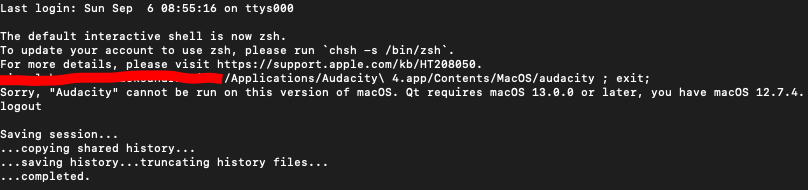
Same here, does not open on monterey
Does not open on Mac OS Big Sur 11.7.11
macOS 13 is obviously required for Audacity 4.