I am using Audacity 4.0.0-beta.2.261621301 on Windows 11 and it is not recognizing REAPER ReaPlugs x64 VST plugins. REAPER ReaPlugs are the only VST plugins I have installed so I do not know if it is a VST problem or just related to REAPER ReaPlugs.
I found a second problem when I was trying to work around this problem. I tried opening an Audacity project that was made in Audacity 3. Not only did this not work for the relevant REAPER plugin, but every other realtime effect used was shown as missing. I will describe this problem after the REAPER problem.
I tried reinstalling REAPER ReaPlugs but installing the plugins in “C:\Program Files\Common Files\VST2” or “C:\Program Files\Steinberg\VSTPlugins” did not help. I did not install them in “C:\Program Files\Common Files\VST3” since they are VST plugins. Right now the plugins are installed in “C:\Program Files\Steinberg\VSTPlugins\ReaPlugs\VSTPlugins” as that is where they installed were before (I do not remember why). The plugins seem to still work fine in Audacity 3.
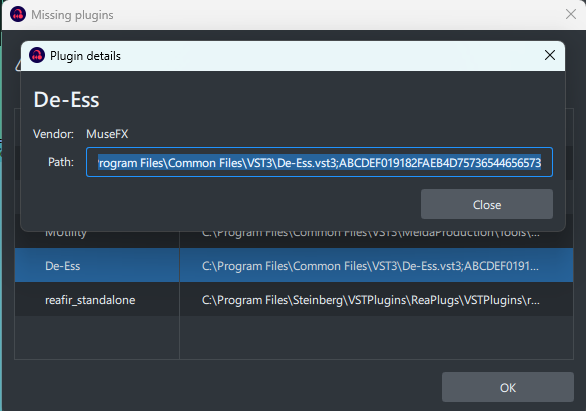
This is where I tested opening a project with realtime effects. I found that all the plugins I regularly used did were listed as missing. In addition to the REAPER plugin, I use a few MuseFX plugins and some from MeldaProduction. All of these plugins were listed as not found. I created a new project in Audacity 3 and used Audacity’s built in compressor and found that it imported properly. I then tested the plugins that were listed and missing inside Audacity 4. This seemed to work if they were added as a new effect instead trying to import an Audacity 3 project. I attached a screenshot of one of the plugins that was listed as missing. (I was prevented from including more).
One interesting thing I noticed about the plugins that were listed as missing when trying to import them is the end of the path. I noticed after the name and extension of the plugin, there is a ; followed by more text.
There can be problems like this if you’ve previously used the alpha version of 4.
The following should fix it. Go to the roaming folder of your appdata folder ( a quick way is to open file explorer and then type %appdata% in the address bar, and press Enter. In the Audacity folder in the roaming folder, there’s an Audacity4Development folder - delete this folder.
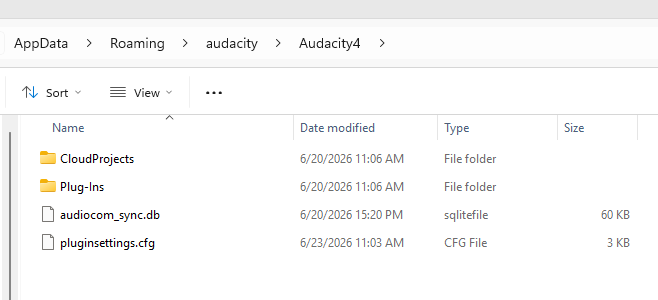
I did not find a folder called Audacity4Development. I don’t think I ever installed the alpha version of Audacity 4. Within the Audacity folder, there is a sub folder for Audacity4. There is not much in it though. The two folders are empty so that just leaves the two files show in the screenshot.
I tried deleting the Audacity4 folder and it did seem to change anything. Then I realized the Audacity4 was being recreated when Audacity 4 was opened.
Thanks for the info. Try this instead - in appdata/Local, delete the Audacity folder.
I tried that and that did not seem to work. Audacity 4 seems to create its sub folder in Local\Audacity folder.
Sorry, I’ve been chasing the wrong problem. As far as I can Audacity 4 can only make use of VST3 plugins, not the older VST/VST2 plugins. Unfortunately the ReaPlugs are VST. I can’t find any sign that Audacity 4 will support VST plugins in the near future, but someone on this forum might know.
Ok, thanks for trying. If it makes a difference, the MuseFX plugins and MeldaProduction plugin are VST3 plugins.
Vst2s are not supported at the moment, and likely won’t be at launch of Audacity4. Reason being that Audacity’s plugin infrastructure is incredibly awkward to work with and eat up lots of time for not necessarily a lot of benefit. This also is why LADSPA and Vamp support is being dropped.
If anyone wants to contribute support, I’m sure the team will be thankful. It’s not gonna be easy though (especially since the majority of plugins don’t actually follow the plugin standards and need specific fixes to make work!).
This might be a real bug. The string after the semicolon is the plugin ID (which is just the base64 encode of name, publisher and path iirc), and something about that may be broken. Maybe @dozzzzer @mugen2x know more