You will never get a lot of bass if your loudspeakers are too small to produce a lot of bass. As a general rule, to get low bass with power you need to have big speakers. All speakers have a “cut-off” frequency, which is the lowest frequency that they can effectively reproduce. For very large speakers this may be as low as about 40 Hz, but for small speakers it will typically be much higher, perhaps around 100 to 150 Hz.
What this means in practice is that unless you have big bass speakers in your car, then boosting the bass below 100 Hz will not increase the bass that you hear, but will only make the music quieter. The reason that it will be quieter is that in order to accommodate the bass waveform, the rest of the audio spectrum must be relatively lower, and if the speakers don’t reproduce the low bass but only the other frequencies then the overall effect is less volume.
When you boost the bass, there are likely to be a few peaks that are significantly higher than the rest of the audio - in order to retain a good level of loudness you will probably want to apply a “limiter” to control these peaks and allow the volume to be raised a little - I’d recommend the “brick wall limiter” which you can get here: https://forum.audacityteam.org/t/peak-limiter/20300/1
Instructions for installing this plug-in: http://wiki.audacityteam.org/wiki/Download_Nyquist_Plug-ins#Installing_Plug-ins
For best results in your car the bass needs to be boosted taking into account the capabilities of your speakers.
If you have medium size speakers, try something like this (Ensure that your track is set to “32 bit float” format before you start):
-
Use the Amplify effect with default settings - this will bring the peak amplitude up to 0dB.
-
Apply the Equalization effect with settings similar to this:
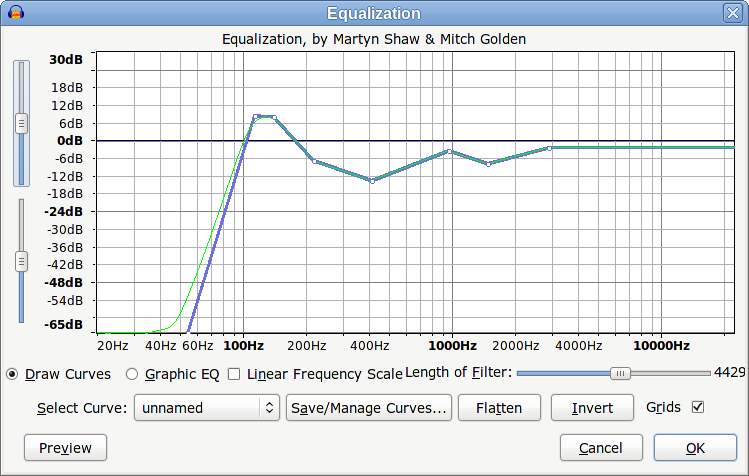
-
Apply the Amplify effect again with default settings - this will adjust the peak level back to 0 dB.
-
Apply the brick wall limiter with the default settings.
If you intend to export in WAV format (recommended), then that’s all. If you need MP3 format, then use the Amplify effect again and reduce the level to about -2 dB or the MP3 encoding will probably cause a bit of clipping (which is one of the reasons why many downloaded tracks are clipped).
Note that the settings suggested here will probably not sound the best on a good hifi system with big speakers, but are suggested for standard in-car speakers.