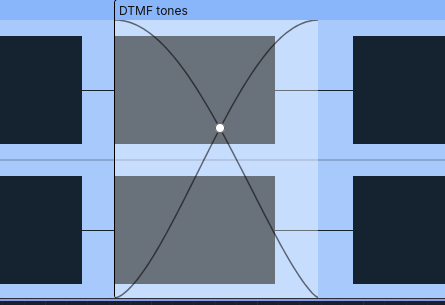
Auto-crossfade when overlapping clips on the same track

Hi,

It would be great if dragging clip B over clip A on the same track automatically created a crossfade on the overlapping part:

  • both waveforms shown with transparency in the overlap,
  • crossfade length adjusted by moving clip B,
  • curve type (linear, S-curve, equal power…) adjustable directly on the track,
  • non-destructive, so it can be changed anytime.

Today this requires two tracks plus manual fades. This would make transitions much faster, as in most DAWs.

Regards,

Hugo

1 Like

Yes, that would be awesome.

There’s an enhancement request on Github: Non-destructive crossfade · Issue #11843 · audacity/audacity · GitHub

and it seems to have been picked up by one of the developers.

1 Like

I believe this is planned for Audacity 4.1, the design is already finished, given the amount of bugs the team still has to fix in 4.0, I’d expect that release no sooner than January. In the meantime, I have already added crossfading and fade handles to Soundscaper (my own Audacity fork)