I had downloaded Audacity 3,7 but is impossible to open with Mac OS 15.10. Which version I should have to run with my Mac OS 15.10.8 Catalina?
Ahem - any error message?
Did you download the version vor the Apple M-Processor and own a Mac with Intel processor? What is the name of your downloaded file?
There are downloads for “Universal”, “Intel” and “M-Processor”. If you download from the Audacityteam website you probably get the right version for your computer (for a Mac, I guess it is “universal”).
You may also download a n explicit version if you click on the “Downloads” link at the very top of the page and then select “Older versions of Audacity”. Then, you go to your preferred version and click “Assets”. You are presented with all downloads for that version.
arm64: version for Apple’s “M”-processors
x86-64: version for Macs with Intel processors
universal: version which works for both platforms (much bigger, as you can see!)

Currently, Audacity’s “latest” version is 3.7.8. Audacity 4.x is “beta software” and should not be used for real work.
la versione Ahem - any error message?
Did you download the version vor the Apple M-Processor and own a Mac with Intel processor? What is the name of your downloaded file?
There are downloads for “Universal”, “Intel” and “M-Processor”. If you download from the Audacityteam website you probably get the right version for your computer (for a Mac, I guess it is “universal”).
You may also download a n explicit version if you click on the “Downloads” link at the very top of the page and then select “Older versions of Audacity”. Then, you go to your preferred version and click “Assets”. You are presented with all downloads for that version.
arm64: version for Apple’s “M”-processors
x86-64: version for Macs with Intel processors
No error message. Only message received trying to open vers. 3,7 is "Your Mac OS15.10 is not…Requested Mac " The Processor is 2,9 GHz Intel Core i5 quad-core
SORRY… I’m not friendly with this functions  The message trying to open ver. 3.7.7 is …"You need vers. Mac OS 11. "
The file name is Audacity.app
I have chois in Audacity download for Mac. Sorry but I’m unable to answer to Your following questions:
"There are downloads for “Universal”, “Intel” and “M-Processor”. If you download from the Audacityteam website you probably get the right version for your computer (for a Mac, I guess it is “universal”).
WITH ref. to Your following question…:
“You may also download a n explicit version if you click on the “Downloads” link at the very top of the page and then select “Older versions of Audacity”. Then, you go to your preferred version and click “Assets”. You are presented with all downloads for that version.”
I WOULD LIKE ANYWAY TO THANK YOU VERY MUCH FOR YOUR ANSWER AND FOR YOUR HELP!
Sorry for my english is not so good as needed
PLEASE NOTE THAT for me IS NOT POSSIBLE TO UNDERSTAND WHICH KIND OF VERSION I HAVE TO download because is not clearly specifyed the ref to Mac OS 15.10… → ADACITY versione
THIS IS THE MAIN QUESTION: To understand and download-connect the Mac Os version to the AUDACITY version.! 
That message implies that you downloaded the “arm” version. Try the universal version from here:
This is why I asked for the filename of the download. The filename is for sure NOT “Audacity.app”, but probably “audacity-macOS-3.7.0-arm64.dmg” or something similar.
On one of my computers, I have Audacity 3.5.1 working on macOS 10.13 “High Sierra”. I don’t see any mention about macOS 11 being required (other than macOS 11 being the first OS for Apple’s M-processors). So if you have an Intel Mac, any download for the Intel-processor or the universal version should work - but not the ARM version.
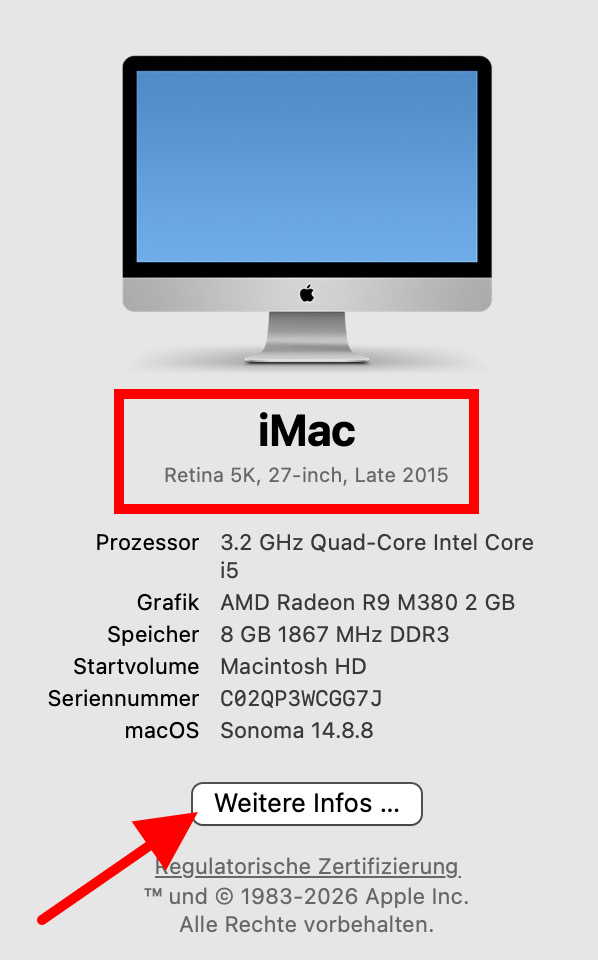
I would still recommend however, that you consider an upgrade to a newer macOS (if possible). Since we still do not know the type/model of your Mac, we can’t say whether this would be possible. Please look at the Apple menu → About this Mac and tell us what it says there (not the processor, but the Mac type).
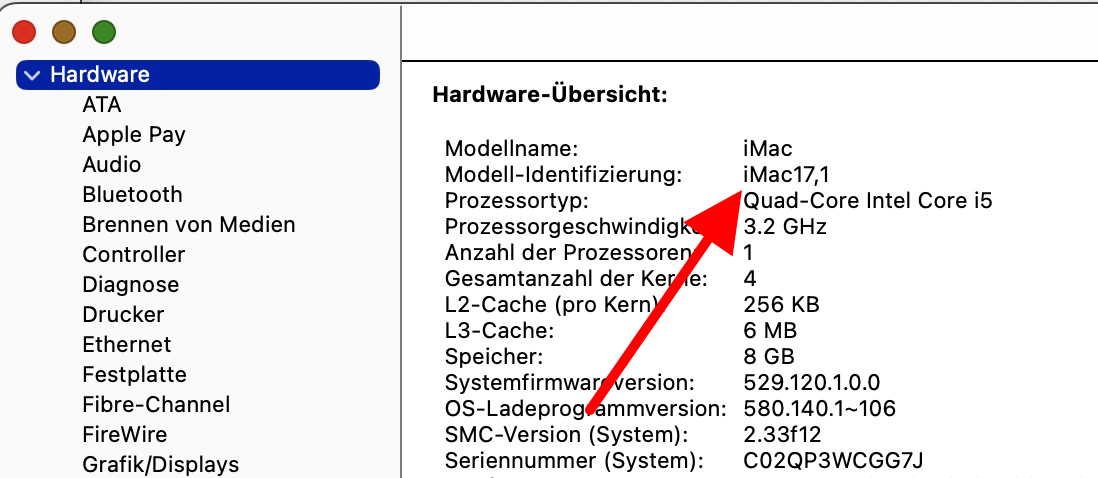
And after that either click on “More Info…” or something like “System report” or similar ( I don’t have a mac running an english OS) and tell us the Mac’s identifier (which, in my case, is iMac17,1).
This topic was automatically closed after 30 days. New replies are no longer allowed.