I have Audacity 3.7.7.
I recently noticed that my PC failed to go to sleep when Audacity was open with a project but nothing was running.
when I did ‘powercfg requests’, I saw the following
:\WINDOWS\system32>POWERCFG REQUESTS
DISPLAY:[PROCESS] \Device\HarddiskVolume2\Program Files\Audacity\Audacity.exe
SYSTEM:[DRIVER] Realtek High Definition Audio (HDAUDIO\FUNC_01&VEN_10EC&DEV_0892&SUBSYS_18496893&REV_1003\4&1a1ebc7b&0&0001)
An audio stream is currently in use.
AWAYMODE:None.
EXECUTION:None.
PERFBOOST:None.
ACTIVELOCKSCREEN:None.
does anyone know why this would be the case?
Thanks
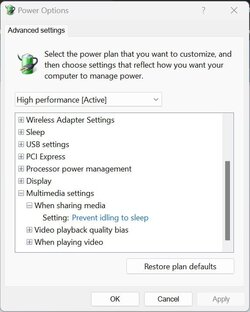
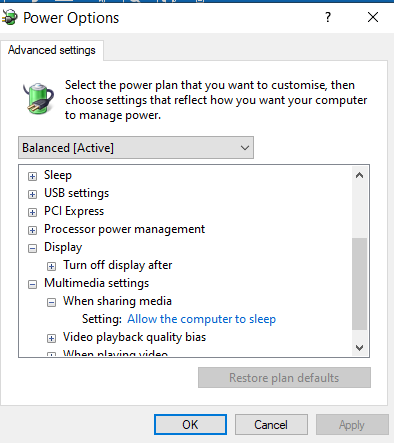
It is a Windows setting. It’s purpose is to prevent the screen saver from activating while watching a program that is handling multimedia. It prevents interrupting when you are watching a DVD or Blue Ray and not pressing any keys or clicking the mouse.
Unfortunately not the case in my situation i.e.
When i open Audacity with NO project displayed, the PC goes to sleep. However if I insert a project file and start playing BUT then pause it in order to do something else, this prevents the PC from going to sleep. It would appear that in pause setting the audio player is still in use and therefore stops sleep EVEN if I set the ‘allow the PC to sleep’ in power settings.
is this normal?
Thanks
I would be curious to know if this still happens if you play some media and then close the project, but leave Audacity running.
in this specific situation, the pc goes to sleep